> ## Documentation Index
> Fetch the complete documentation index at: https://docs.valar.space/llms.txt
> Use this file to discover all available pages before exploring further.
# AOI Timeline
> See every Area of Interest's spacecraft overflight opportunities on one shared timeline, grouped by AOI
> For the complete documentation index, see [llms.txt](/llms.txt).
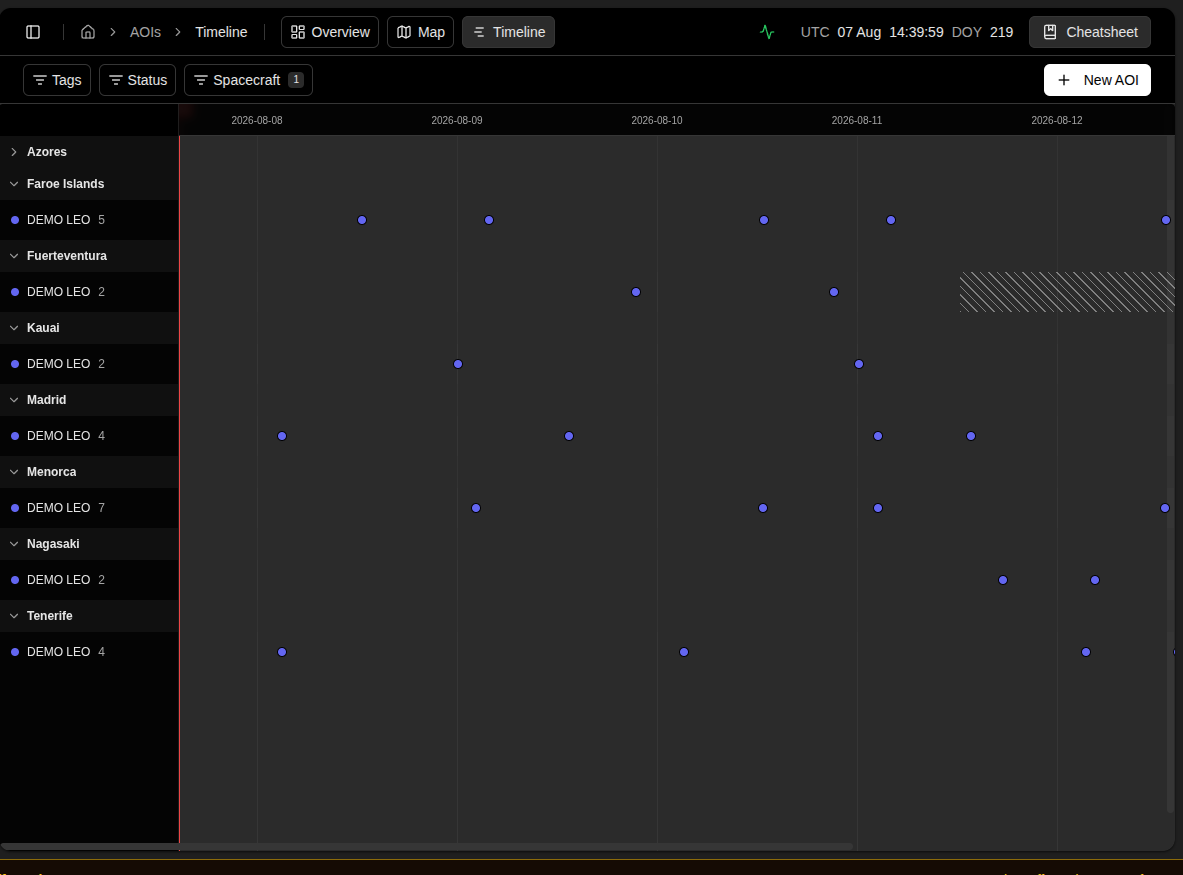
The Timeline page shows every Area of Interest's spacecraft overflight opportunities at once, grouped by AOI, on a single shared 7-day horizon. Where the [Overview](/features/areas-of-interest/overview) page reads one AOI in depth, the Timeline page is the wide view — scan every AOI's activity side by side without switching between them.
**Route:** `/aoi/timeline`
Open it from the **Timeline** tab beside **Overview** and **Map**.
## Page Layout
The page is a full-height, full-width canvas: a sticky sidebar column on the left listing each AOI and spacecraft, and a horizontally-scrollable track on the right drawing every opportunity in time against a daily-tick axis. A **Now** marker crosses the track at the current instant, re-checking its position every 60 seconds.
 ## Every AOI at Once
Each AOI renders as a collapsible group: a header row naming the AOI, followed by one row per spacecraft in the workspace. Click an AOI's header row to collapse or expand it — collapsing hides its spacecraft rows but keeps the header itself visible, so you can scan every AOI's name even with most of them collapsed. AOIs are listed alphabetically by name.
An AOI outside its validity window still gets a header row, suffixed **— validity window expired**, with no spacecraft rows beneath it — it stays visible rather than disappearing, so you know it exists and why nothing is drawn for it.
A spacecraft with no imaging payload configured is left out of every AOI's roster entirely — it can never produce an opportunity for any AOI, so it carries no row anywhere on this page.
## Reading a Spacecraft's Row
Each spacecraft row shows the spacecraft's colour and name on the left. Click the name to open a small popover with:
| Field | Description |
| --------- | ------------------------------------------------------------------------ |
| **Basis** | The orbit source the row's opportunities were computed from. |
| **Reach** | How far this spacecraft-AOI pair's forecast currently extends. |
| **Count** | The spacecraft's opportunity count for this AOI, over the drawn horizon. |
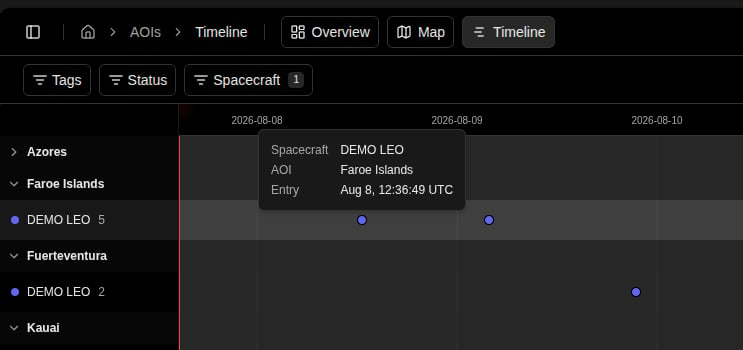
To the right, the spacecraft's opportunities are drawn as small marks positioned in time. Click a mark to open a popover with:
| Field | Description |
| -------------- | ------------------------------------------------ |
| **Spacecraft** | The spacecraft's name. |
| **AOI** | The name of the AOI this opportunity belongs to. |
| **Entry** | The instant the opportunity enters (UTC). |
## Every AOI at Once
Each AOI renders as a collapsible group: a header row naming the AOI, followed by one row per spacecraft in the workspace. Click an AOI's header row to collapse or expand it — collapsing hides its spacecraft rows but keeps the header itself visible, so you can scan every AOI's name even with most of them collapsed. AOIs are listed alphabetically by name.
An AOI outside its validity window still gets a header row, suffixed **— validity window expired**, with no spacecraft rows beneath it — it stays visible rather than disappearing, so you know it exists and why nothing is drawn for it.
A spacecraft with no imaging payload configured is left out of every AOI's roster entirely — it can never produce an opportunity for any AOI, so it carries no row anywhere on this page.
## Reading a Spacecraft's Row
Each spacecraft row shows the spacecraft's colour and name on the left. Click the name to open a small popover with:
| Field | Description |
| --------- | ------------------------------------------------------------------------ |
| **Basis** | The orbit source the row's opportunities were computed from. |
| **Reach** | How far this spacecraft-AOI pair's forecast currently extends. |
| **Count** | The spacecraft's opportunity count for this AOI, over the drawn horizon. |
To the right, the spacecraft's opportunities are drawn as small marks positioned in time. Click a mark to open a popover with:
| Field | Description |
| -------------- | ------------------------------------------------ |
| **Spacecraft** | The spacecraft's name. |
| **AOI** | The name of the AOI this opportunity belongs to. |
| **Entry** | The instant the opportunity enters (UTC). |
 A row that cannot show opportunities says exactly why, instead of just showing nothing:
| Row State | What You See | What To Do |
| ---------------------------------------- | -------------------------------------------------------------- | --------------------------------------------------------------------------------------------------------------------------------------------- |
| **Computed, with opportunities** | Live track with marks; count shown beside the spacecraft name | Nothing to do — this spacecraft contributes. Select a mark to inspect it. |
| **Computed, no opportunities (drought)** | Live, un-struck track labelled `No opportunities in this span` | Nothing is wrong — this spacecraft genuinely flies nothing over the area in this stretch. Not an error, not a gap in the forecast. |
| **Not computed** | Track struck out end to end, labelled `Not computed` | The area has never been evaluated for that spacecraft — run **Recompute** on the AOI's [Overview](/features/areas-of-interest/overview) page. |
| **No orbital data available** | Struck-out track labelled `No orbital data available` | The spacecraft has no [state vector](/features/state-vectors) to propagate from — supply one. |
| **Orbital data is too old** | Struck-out track labelled `Orbital data is too old` | Refresh the spacecraft's orbital data. |
| **No public orbital data available** | Struck-out track labelled `No public orbital data available` | No catalogue orbit could be fetched for this spacecraft — supply orbital data directly. |
| **Computation failed** | Struck-out track labelled `Computation failed` | The computation for that spacecraft-AOI pair errored — retry via **Recompute** on the AOI's Overview page. |
Past a row's own forecast reach, its track is struck out with the same diagonal-hatch treatment and labelled `Beyond computed coverage` — a spacecraft recomputed less recently than its neighbours simply reaches less far, without affecting any other row. Every row's opportunity count is normalised to the same drawn horizon, so two spacecraft are directly comparable regardless of which one was recomputed most recently.
A spacecraft with no imaging payload configured never appears on this page at all — see [Every AOI at Once](#every-aoi-at-once) above. Every other exclusion reason still gets its own labelled row.
## Filtering
Three filters narrow what the page draws, all in the shared top bar:
| Filter | Behaviour |
| -------------- | ---------------------------------------------------------------------------------------------------------------------------------------------------------------------------------------------------------------------------------------------------------------------------------------------------------------------------------------------------- |
| **Tags** | Multi-select. An AOI passes when it carries at least one selected tag. Shared with [Overview](/features/areas-of-interest/overview#right-pane-aoi-list) and [Map](/features/areas-of-interest/map). |
| **Status** | Multi-select, options **Active**, **Inactive**, **Out of window**. An AOI passes when its status is in the selected set. Shared with Overview and Map. |
| **Spacecraft** | Multi-select. Narrows every AOI's rows to the selected spacecraft. Options are every spacecraft that has a row anywhere on the timeline right now — every exclusion reason except no imaging payload configured (see [Every AOI at Once](#every-aoi-at-once) above) still contributes a row, and so still offers that spacecraft as a filter choice. |
Every filter is an any-of match — leaving it empty is a no-op. Narrowing the Spacecraft filter to a spacecraft with no opportunities in a given AOI leaves that AOI's header row visible with nothing beneath it, the same way an out-of-window AOI does.
## Empty and Error States
If the page can't load, it shows **Couldn't load overflight opportunities** with a **Retry** button in place of the canvas. While the AOI list itself is loading, the page shows a placeholder skeleton in the same row shape as the finished page.
## Related Pages
* [Areas of Interest overview](/features/areas-of-interest/overview) — read one AOI in depth, edit its identity and geometry, and trigger a recompute.
* [Overflight events](/features/areas-of-interest/overflight-events) — the coverage-state vocabulary this page's row states share with the Overview page's own per-opportunity detail.
* [AOI Map](/features/areas-of-interest/map) — every AOI on one world map, with a hovercard summarising each one's next overflight.
A row that cannot show opportunities says exactly why, instead of just showing nothing:
| Row State | What You See | What To Do |
| ---------------------------------------- | -------------------------------------------------------------- | --------------------------------------------------------------------------------------------------------------------------------------------- |
| **Computed, with opportunities** | Live track with marks; count shown beside the spacecraft name | Nothing to do — this spacecraft contributes. Select a mark to inspect it. |
| **Computed, no opportunities (drought)** | Live, un-struck track labelled `No opportunities in this span` | Nothing is wrong — this spacecraft genuinely flies nothing over the area in this stretch. Not an error, not a gap in the forecast. |
| **Not computed** | Track struck out end to end, labelled `Not computed` | The area has never been evaluated for that spacecraft — run **Recompute** on the AOI's [Overview](/features/areas-of-interest/overview) page. |
| **No orbital data available** | Struck-out track labelled `No orbital data available` | The spacecraft has no [state vector](/features/state-vectors) to propagate from — supply one. |
| **Orbital data is too old** | Struck-out track labelled `Orbital data is too old` | Refresh the spacecraft's orbital data. |
| **No public orbital data available** | Struck-out track labelled `No public orbital data available` | No catalogue orbit could be fetched for this spacecraft — supply orbital data directly. |
| **Computation failed** | Struck-out track labelled `Computation failed` | The computation for that spacecraft-AOI pair errored — retry via **Recompute** on the AOI's Overview page. |
Past a row's own forecast reach, its track is struck out with the same diagonal-hatch treatment and labelled `Beyond computed coverage` — a spacecraft recomputed less recently than its neighbours simply reaches less far, without affecting any other row. Every row's opportunity count is normalised to the same drawn horizon, so two spacecraft are directly comparable regardless of which one was recomputed most recently.
A spacecraft with no imaging payload configured never appears on this page at all — see [Every AOI at Once](#every-aoi-at-once) above. Every other exclusion reason still gets its own labelled row.
## Filtering
Three filters narrow what the page draws, all in the shared top bar:
| Filter | Behaviour |
| -------------- | ---------------------------------------------------------------------------------------------------------------------------------------------------------------------------------------------------------------------------------------------------------------------------------------------------------------------------------------------------- |
| **Tags** | Multi-select. An AOI passes when it carries at least one selected tag. Shared with [Overview](/features/areas-of-interest/overview#right-pane-aoi-list) and [Map](/features/areas-of-interest/map). |
| **Status** | Multi-select, options **Active**, **Inactive**, **Out of window**. An AOI passes when its status is in the selected set. Shared with Overview and Map. |
| **Spacecraft** | Multi-select. Narrows every AOI's rows to the selected spacecraft. Options are every spacecraft that has a row anywhere on the timeline right now — every exclusion reason except no imaging payload configured (see [Every AOI at Once](#every-aoi-at-once) above) still contributes a row, and so still offers that spacecraft as a filter choice. |
Every filter is an any-of match — leaving it empty is a no-op. Narrowing the Spacecraft filter to a spacecraft with no opportunities in a given AOI leaves that AOI's header row visible with nothing beneath it, the same way an out-of-window AOI does.
## Empty and Error States
If the page can't load, it shows **Couldn't load overflight opportunities** with a **Retry** button in place of the canvas. While the AOI list itself is loading, the page shows a placeholder skeleton in the same row shape as the finished page.
## Related Pages
* [Areas of Interest overview](/features/areas-of-interest/overview) — read one AOI in depth, edit its identity and geometry, and trigger a recompute.
* [Overflight events](/features/areas-of-interest/overflight-events) — the coverage-state vocabulary this page's row states share with the Overview page's own per-opportunity detail.
* [AOI Map](/features/areas-of-interest/map) — every AOI on one world map, with a hovercard summarising each one's next overflight.