> ## Documentation Index
> Fetch the complete documentation index at: https://docs.valar.space/llms.txt
> Use this file to discover all available pages before exploring further.
# Burn Plan
> Manage spacecraft maneuvers, import burn plans, and analyze performance
> For the complete documentation index, see [llms.txt](/llms.txt).
The Burn Plan page allows you to manage spacecraft maneuvers (burns). You can view, import, export, and delete planned and executed burns, as well as analyze their performance after execution.
**Route:** `/maneuvers/burn-plan`
## Page Layout
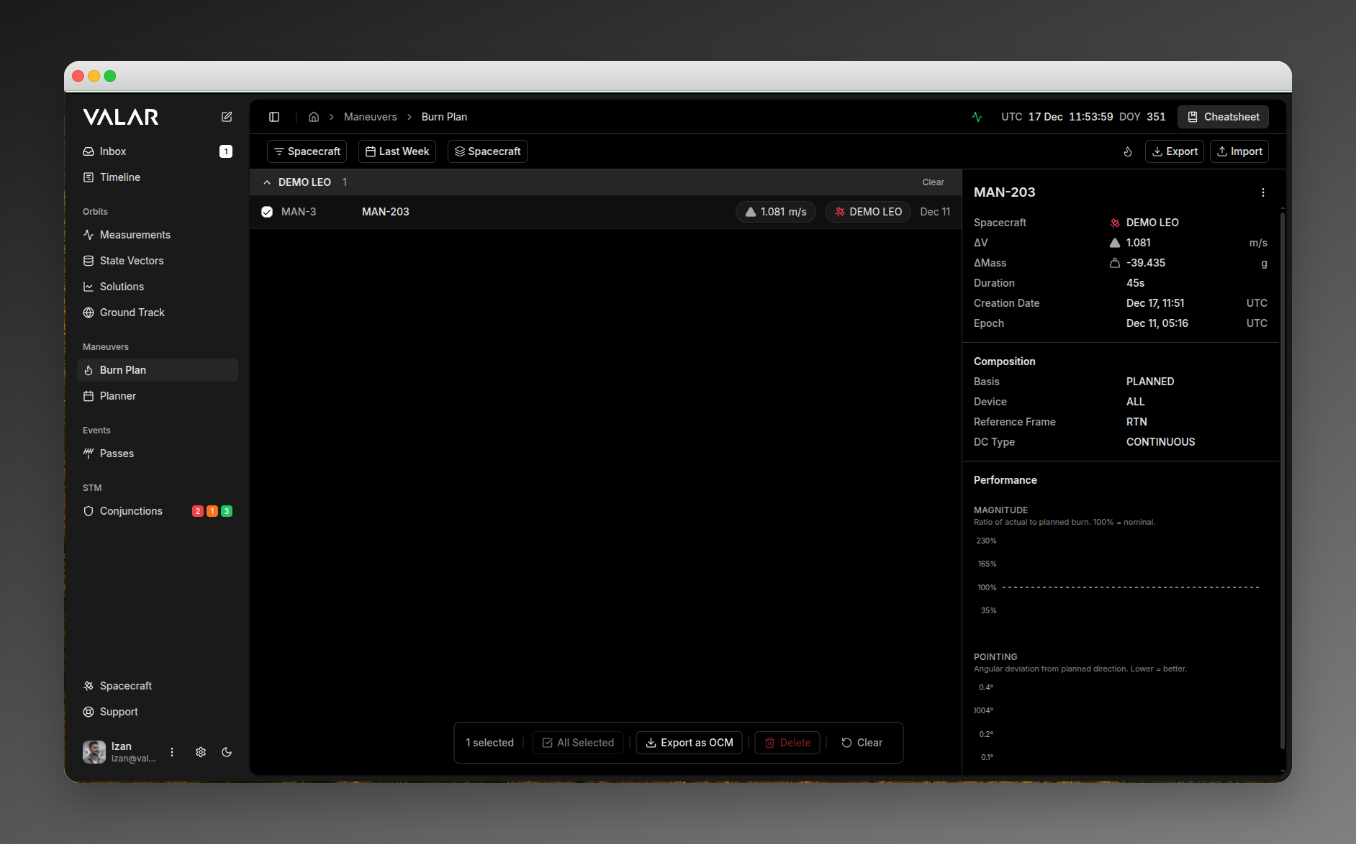 ## Filtering
### Spacecraft Filter
Filter which spacecraft's burn plans are displayed.
| Element | Description |
| ------------ | --------------------------------------- |
| **Location** | First control in topbar |
| **Control** | Multi-select dropdown |
| **Default** | Shows all spacecraft when none selected |
**Actions:**
* Click to open popover dropdown
* Check/uncheck spacecraft to include
* Click **Apply** to confirm
* Click **Clear All** to deselect
### Time Range Filter
Filter burn plans by execution date.
| Option | Description |
| ---------- | --------------------- |
| **Week** | Last 7 days (default) |
| **Month** | Last 30 days |
| **Custom** | Select specific range |
### Group By Option
| Option | Effect |
| -------------- | ------------------------------------------------------------- |
| **Spacecraft** | Groups burns by spacecraft with collapsible headers (default) |
| **None** | Flat list without grouping |
## Burn Plan List
### List Item Display
Each row shows:
| Element | Description |
| -------------------- | ------------------------------------------- |
| **Checkbox** | Hover-reveal, for bulk selection |
| **Display ID** | User-facing ID (e.g., "MAN-1") |
| **Maneuver ID** | System identifier |
| **Delta-V Badge** | Total delta-v (e.g., "2.500 m/s") |
| **Spacecraft Badge** | Spacecraft name with colored satellite icon |
| **Execution Date** | "Mon DD" format with full tooltip |
### Row Interactions
* **Click row:** Selects burn plan and shows details in right panel
* **Click checkbox:** Toggles selection for bulk actions (doesn't change details view)
* **Hover:** Reveals checkbox
### Grouped View
When grouped by spacecraft, the group header shows:
* Spacecraft name
* Maneuver count
* Collapse/expand chevron
* Page navigation (10 items per page per group)
**Per-group actions:**
* **Select All:** Select all burns in current page of group
* **Clear:** Deselect all in group
## Details Panel
### Header
Shows the Maneuver ID with a more menu containing:
| Action | Description |
| ---------------------- | ------------------------------ |
| **Edit Composition** | Open modal to edit epoch times |
| **Expand Composition** | View full CCSDS OCM format |
| **Export** | Download as OCM file |
| **Delete** | Delete with confirmation |
### Essential Information
| Field | Description | Format |
| ----------------- | --------------------- | --------------------------- |
| **Spacecraft** | Spacecraft name | With colored satellite icon |
| **Delta-V** | Total velocity change | X.XXX m/s |
| **Delta-Mass** | Propellant consumed | Auto-converts (kg or g) |
| **Duration** | Burn duration | Xh Ym Zs format |
| **Creation Date** | When created | Mon DD, HH:MM UTC |
| **Epoch** | Execution time | Mon DD, HH:MM UTC |
### Composition Section
| Field | Description |
| ------------------- | ------------------------------------- |
| **Basis** | PLANNED or TELEMETRY |
| **Device** | Thruster device (default: "ALL") |
| **Reference Frame** | RTN (Radial-Tangential-Normal) or TNW |
| **DC Type** | CONTINUOUS or IMPULSIVE |
### Performance Section
Shows burn execution analysis when telemetry data is available.
**Magnitude Chart:**
* Purpose: Shows burn efficiency (actual vs planned)
* Display: Bar chart with percentage centered at 100% (nominal)
* Color coding:
* Green (95-105%): Excellent - within 5% of plan
* Yellow (90-110%): Good - within 10% of plan
* Red (outside range): Review needed
**Pointing Chart:**
* Purpose: Shows angular deviation from planned direction
* Display: Dual bar chart
* Blue: In-Plane (Azimuth) deviation
* Orange: Out-of-Plane (Elevation) deviation
* Unit: Degrees
* Interpretation: Lower values = better accuracy
A reference-frame indicator badge appears next to each burn-quality chart title showing `LVLH (burn-local)` — the frame the Azimuth / Elevation deviations are expressed in. Hover the badge for the full frame name; click **Learn more** to open the [reference frame catalog](/platform-overview/reference-frames).
## Import Dialog
Access by clicking the **Import** button in the topbar.
## Filtering
### Spacecraft Filter
Filter which spacecraft's burn plans are displayed.
| Element | Description |
| ------------ | --------------------------------------- |
| **Location** | First control in topbar |
| **Control** | Multi-select dropdown |
| **Default** | Shows all spacecraft when none selected |
**Actions:**
* Click to open popover dropdown
* Check/uncheck spacecraft to include
* Click **Apply** to confirm
* Click **Clear All** to deselect
### Time Range Filter
Filter burn plans by execution date.
| Option | Description |
| ---------- | --------------------- |
| **Week** | Last 7 days (default) |
| **Month** | Last 30 days |
| **Custom** | Select specific range |
### Group By Option
| Option | Effect |
| -------------- | ------------------------------------------------------------- |
| **Spacecraft** | Groups burns by spacecraft with collapsible headers (default) |
| **None** | Flat list without grouping |
## Burn Plan List
### List Item Display
Each row shows:
| Element | Description |
| -------------------- | ------------------------------------------- |
| **Checkbox** | Hover-reveal, for bulk selection |
| **Display ID** | User-facing ID (e.g., "MAN-1") |
| **Maneuver ID** | System identifier |
| **Delta-V Badge** | Total delta-v (e.g., "2.500 m/s") |
| **Spacecraft Badge** | Spacecraft name with colored satellite icon |
| **Execution Date** | "Mon DD" format with full tooltip |
### Row Interactions
* **Click row:** Selects burn plan and shows details in right panel
* **Click checkbox:** Toggles selection for bulk actions (doesn't change details view)
* **Hover:** Reveals checkbox
### Grouped View
When grouped by spacecraft, the group header shows:
* Spacecraft name
* Maneuver count
* Collapse/expand chevron
* Page navigation (10 items per page per group)
**Per-group actions:**
* **Select All:** Select all burns in current page of group
* **Clear:** Deselect all in group
## Details Panel
### Header
Shows the Maneuver ID with a more menu containing:
| Action | Description |
| ---------------------- | ------------------------------ |
| **Edit Composition** | Open modal to edit epoch times |
| **Expand Composition** | View full CCSDS OCM format |
| **Export** | Download as OCM file |
| **Delete** | Delete with confirmation |
### Essential Information
| Field | Description | Format |
| ----------------- | --------------------- | --------------------------- |
| **Spacecraft** | Spacecraft name | With colored satellite icon |
| **Delta-V** | Total velocity change | X.XXX m/s |
| **Delta-Mass** | Propellant consumed | Auto-converts (kg or g) |
| **Duration** | Burn duration | Xh Ym Zs format |
| **Creation Date** | When created | Mon DD, HH:MM UTC |
| **Epoch** | Execution time | Mon DD, HH:MM UTC |
### Composition Section
| Field | Description |
| ------------------- | ------------------------------------- |
| **Basis** | PLANNED or TELEMETRY |
| **Device** | Thruster device (default: "ALL") |
| **Reference Frame** | RTN (Radial-Tangential-Normal) or TNW |
| **DC Type** | CONTINUOUS or IMPULSIVE |
### Performance Section
Shows burn execution analysis when telemetry data is available.
**Magnitude Chart:**
* Purpose: Shows burn efficiency (actual vs planned)
* Display: Bar chart with percentage centered at 100% (nominal)
* Color coding:
* Green (95-105%): Excellent - within 5% of plan
* Yellow (90-110%): Good - within 10% of plan
* Red (outside range): Review needed
**Pointing Chart:**
* Purpose: Shows angular deviation from planned direction
* Display: Dual bar chart
* Blue: In-Plane (Azimuth) deviation
* Orange: Out-of-Plane (Elevation) deviation
* Unit: Degrees
* Interpretation: Lower values = better accuracy
A reference-frame indicator badge appears next to each burn-quality chart title showing `LVLH (burn-local)` — the frame the Azimuth / Elevation deviations are expressed in. Hover the badge for the full frame name; click **Learn more** to open the [reference frame catalog](/platform-overview/reference-frames).
## Import Dialog
Access by clicking the **Import** button in the topbar.
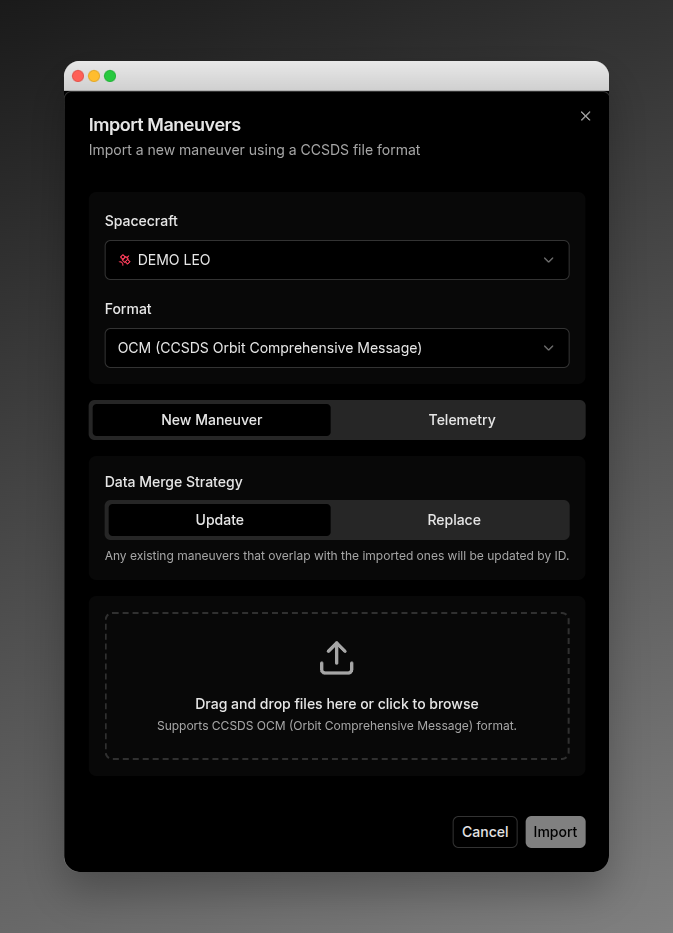 ### Configuration
**Spacecraft Selection:** Choose target spacecraft for import.
**Format Selection:**
| Format | Description |
| ------- | --------------------------------- |
| **OCM** | CCSDS Orbit Comprehensive Message |
### Import Mode
| Mode | Description |
| ---------------- | -------------------------------------- |
| **New Maneuver** | Import new planned maneuvers |
| **Telemetry** | Report execution of existing maneuvers |
### Data Merge Strategy
| Strategy | Description |
| ----------- | ------------------------------------------ |
| **Update** | Overlapping maneuvers updated by ID |
| **Replace** | Overlapping maneuvers removed and replaced |
### File Upload
Drag and drop files onto the upload zone, or click to browse.
**Accepted Files:**
* New Maneuver (OCM): `.ocm`, `.txt`
* Telemetry: `.tdm`, `.oem`, `.csv`, `.txt`, `.ocm`
Multiple files are supported.
### Upload Status
| Status | Display |
| ------------- | ------------------------ |
| **Idle** | Pending upload |
| **Uploading** | Progress bar |
| **Success** | Green checkmark |
| **Error** | Red X with error message |
## Export Dialog
Access by clicking the **Export** button in the topbar.
**Configuration:**
* **Spacecraft:** Select spacecraft to export from
* **Date Range:** Select time period
* **Format:** OCM (CCSDS standard)
**Output:** OCM file download with filename including spacecraft ID and date.
## Edit Composition Dialog
Access from Details panel > More menu > **Edit Composition**.
Updates epoch times based on telemetry data.
| Field | Description | Format |
| --------------- | ------------------- | -------------------------- |
| **Maneuver ID** | Read-only reference | - |
| **Start Epoch** | Actual burn start | YYYY-MM-DD HH:mm:ss.SSSSSS |
| **End Epoch** | Actual burn end | YYYY-MM-DD HH:mm:ss.SSSSSS |
## Expand Composition Dialog
Access from Details panel > More menu > **Expand Composition**.
Displays the full CCSDS OCM format of the maneuver in a scrollable code block.
## Bulk Actions Toolbar
Appears when one or more rows are selected via checkboxes. Fixed at bottom center.
### Configuration
**Spacecraft Selection:** Choose target spacecraft for import.
**Format Selection:**
| Format | Description |
| ------- | --------------------------------- |
| **OCM** | CCSDS Orbit Comprehensive Message |
### Import Mode
| Mode | Description |
| ---------------- | -------------------------------------- |
| **New Maneuver** | Import new planned maneuvers |
| **Telemetry** | Report execution of existing maneuvers |
### Data Merge Strategy
| Strategy | Description |
| ----------- | ------------------------------------------ |
| **Update** | Overlapping maneuvers updated by ID |
| **Replace** | Overlapping maneuvers removed and replaced |
### File Upload
Drag and drop files onto the upload zone, or click to browse.
**Accepted Files:**
* New Maneuver (OCM): `.ocm`, `.txt`
* Telemetry: `.tdm`, `.oem`, `.csv`, `.txt`, `.ocm`
Multiple files are supported.
### Upload Status
| Status | Display |
| ------------- | ------------------------ |
| **Idle** | Pending upload |
| **Uploading** | Progress bar |
| **Success** | Green checkmark |
| **Error** | Red X with error message |
## Export Dialog
Access by clicking the **Export** button in the topbar.
**Configuration:**
* **Spacecraft:** Select spacecraft to export from
* **Date Range:** Select time period
* **Format:** OCM (CCSDS standard)
**Output:** OCM file download with filename including spacecraft ID and date.
## Edit Composition Dialog
Access from Details panel > More menu > **Edit Composition**.
Updates epoch times based on telemetry data.
| Field | Description | Format |
| --------------- | ------------------- | -------------------------- |
| **Maneuver ID** | Read-only reference | - |
| **Start Epoch** | Actual burn start | YYYY-MM-DD HH:mm:ss.SSSSSS |
| **End Epoch** | Actual burn end | YYYY-MM-DD HH:mm:ss.SSSSSS |
## Expand Composition Dialog
Access from Details panel > More menu > **Expand Composition**.
Displays the full CCSDS OCM format of the maneuver in a scrollable code block.
## Bulk Actions Toolbar
Appears when one or more rows are selected via checkboxes. Fixed at bottom center.
 | Action | Description |
| ----------------- | ----------------------------- |
| **X selected** | Shows selection count |
| **Select All** | Select all visible maneuvers |
| **Export as OCM** | Export selected to OCM files |
| **Delete** | Bulk delete with confirmation |
| **Clear** | Deselect all |
**Export Output:**
* Single maneuver: Direct OCM file download
* Multiple maneuvers: ZIP file containing OCM files
* Filename: `maneuvers-{spacecraftId}-{date}.zip`
## Delete Confirmation
Single delete confirmation dialog:
| Action | Description |
| ----------------- | ----------------------------- |
| **X selected** | Shows selection count |
| **Select All** | Select all visible maneuvers |
| **Export as OCM** | Export selected to OCM files |
| **Delete** | Bulk delete with confirmation |
| **Clear** | Deselect all |
**Export Output:**
* Single maneuver: Direct OCM file download
* Multiple maneuvers: ZIP file containing OCM files
* Filename: `maneuvers-{spacecraftId}-{date}.zip`
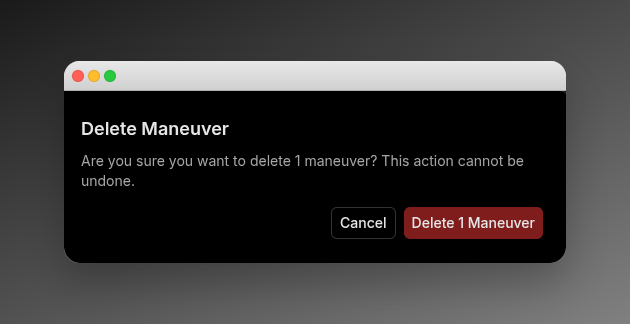
## Delete Confirmation
Single delete confirmation dialog:
 ## Timeline View
A horizontal Gantt-style visualization of every burn for the selected spacecraft, with orbital events overlaid as bands and markers to give thruster timing the right context.
**Route:** `/maneuvers/burn-plan/timeline`
The timeline is anchored to a UTC time axis along the top. Each spacecraft row holds the burns scheduled or executed within the current window, drawn as Gantt-style segments. Orbital events are overlaid above the burn rows as either shaded bands (entry-to-exit duration) or instantaneous markers (single-epoch events).
## Timeline View
A horizontal Gantt-style visualization of every burn for the selected spacecraft, with orbital events overlaid as bands and markers to give thruster timing the right context.
**Route:** `/maneuvers/burn-plan/timeline`
The timeline is anchored to a UTC time axis along the top. Each spacecraft row holds the burns scheduled or executed within the current window, drawn as Gantt-style segments. Orbital events are overlaid above the burn rows as either shaded bands (entry-to-exit duration) or instantaneous markers (single-epoch events).
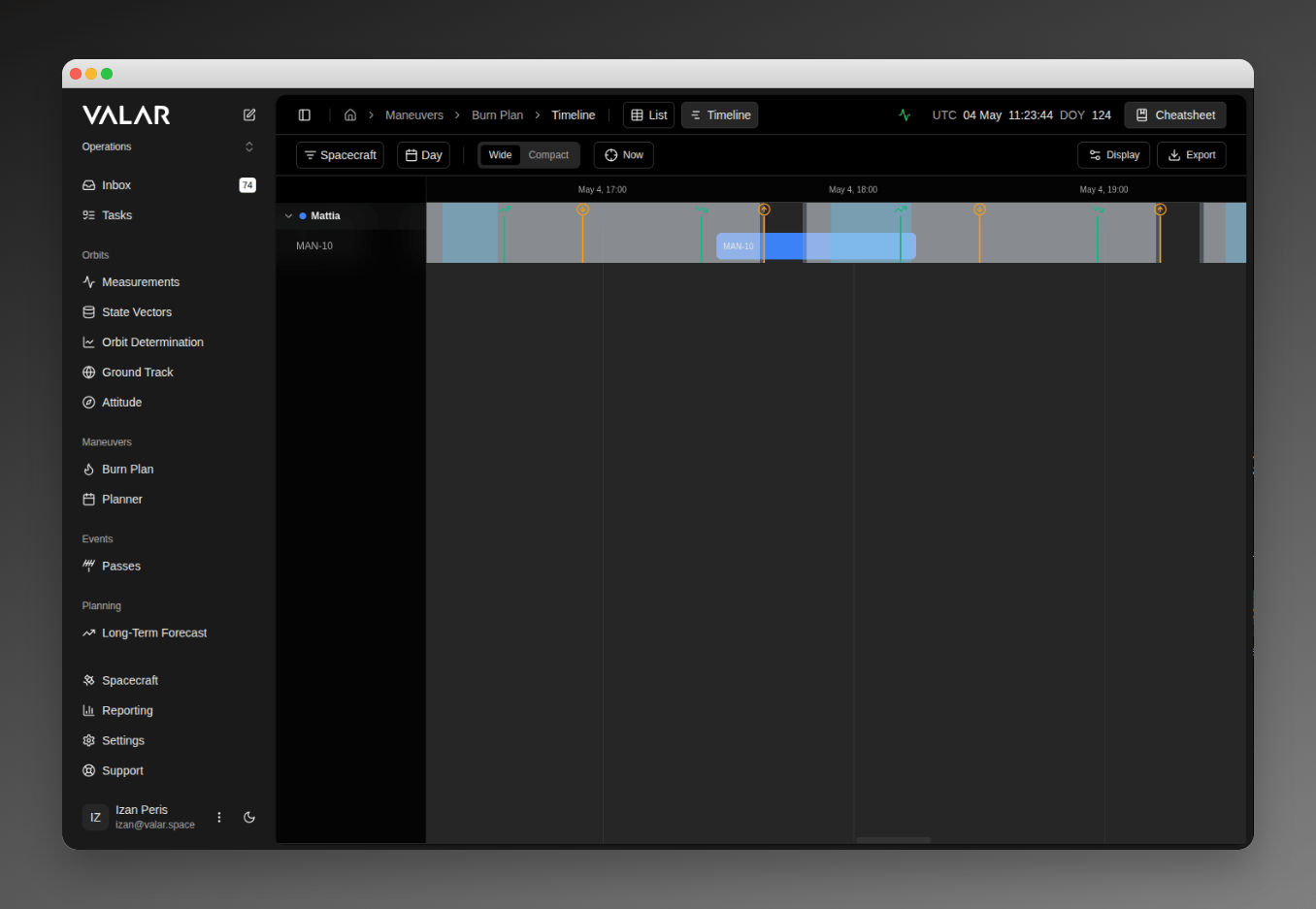 ### Zoom Toggle
Two zoom levels control how densely time is packed onto the horizontal axis.
| Mode | Description |
| ----------- | ------------------------------------------------------------------------------------------ |
| **Wide** | More pixels per hour, useful for inspecting individual burns and short-duration events |
| **Compact** | Fewer pixels per hour, useful for scanning multi-day windows and long-arc revisit patterns |
A **Now** button to the right of the zoom toggle scrolls the timeline to the current UTC instant.
### Orbital Events
Four orbital event types overlay onto the timeline. Each renders either as a shaded band (covering an entry-to-exit interval) or as an instantaneous marker (a single-epoch crossing).
| Event | Display | Description |
| -------------------------------- | ------- | ----------------------------------------------------------------------------------------------------------------------------------------------------------- |
| **Eclipses** | Band | Shadow events. Distinguished into **Umbra** (full shadow) and **Penumbra** (partial shadow); each subtype renders as a band spanning entry-to-exit duration |
| **South Atlantic Anomaly (SAA)** | Band | Geographic region of elevated radiation; band spans entry-to-exit duration |
| **Apsis** | Marker | Periapsis and apoapsis crossings; rendered as instantaneous vertical markers |
| **Nodes** | Marker | Ascending and descending node crossings; rendered as instantaneous vertical markers |
### Display Popover
Click **Display** in the topbar's right-aligned controls (accessibility name **Display settings**) to open the **Orbital events** popover. Each toggle controls visibility for one event type on the timeline; flipping a toggle is reflected immediately on the visible bands and markers.
| Toggle | State | Effect |
| ------------ | ------------ | -------------------------------------------------- |
| **Eclipses** | On (default) | Show or hide umbra and penumbra bands |
| **Apsis** | On (default) | Show or hide periapsis and apoapsis markers |
| **Nodes** | On (default) | Show or hide ascending and descending node markers |
| **SAA** | On (default) | Show or hide South Atlantic Anomaly bands |
### Schedule Export Dialog
Click **Export Schedule** in the topbar's right-aligned controls to open the **Export Schedule** dialog. The dialog generates a Spacecraft Schedule File ([`.ssf`](/file-formats/ssf)) listing every selected event over a chosen window. The same dialog is also accessible from the passes timeline at `/passes/timeline`.
### Zoom Toggle
Two zoom levels control how densely time is packed onto the horizontal axis.
| Mode | Description |
| ----------- | ------------------------------------------------------------------------------------------ |
| **Wide** | More pixels per hour, useful for inspecting individual burns and short-duration events |
| **Compact** | Fewer pixels per hour, useful for scanning multi-day windows and long-arc revisit patterns |
A **Now** button to the right of the zoom toggle scrolls the timeline to the current UTC instant.
### Orbital Events
Four orbital event types overlay onto the timeline. Each renders either as a shaded band (covering an entry-to-exit interval) or as an instantaneous marker (a single-epoch crossing).
| Event | Display | Description |
| -------------------------------- | ------- | ----------------------------------------------------------------------------------------------------------------------------------------------------------- |
| **Eclipses** | Band | Shadow events. Distinguished into **Umbra** (full shadow) and **Penumbra** (partial shadow); each subtype renders as a band spanning entry-to-exit duration |
| **South Atlantic Anomaly (SAA)** | Band | Geographic region of elevated radiation; band spans entry-to-exit duration |
| **Apsis** | Marker | Periapsis and apoapsis crossings; rendered as instantaneous vertical markers |
| **Nodes** | Marker | Ascending and descending node crossings; rendered as instantaneous vertical markers |
### Display Popover
Click **Display** in the topbar's right-aligned controls (accessibility name **Display settings**) to open the **Orbital events** popover. Each toggle controls visibility for one event type on the timeline; flipping a toggle is reflected immediately on the visible bands and markers.
| Toggle | State | Effect |
| ------------ | ------------ | -------------------------------------------------- |
| **Eclipses** | On (default) | Show or hide umbra and penumbra bands |
| **Apsis** | On (default) | Show or hide periapsis and apoapsis markers |
| **Nodes** | On (default) | Show or hide ascending and descending node markers |
| **SAA** | On (default) | Show or hide South Atlantic Anomaly bands |
### Schedule Export Dialog
Click **Export Schedule** in the topbar's right-aligned controls to open the **Export Schedule** dialog. The dialog generates a Spacecraft Schedule File ([`.ssf`](/file-formats/ssf)) listing every selected event over a chosen window. The same dialog is also accessible from the passes timeline at `/passes/timeline`.
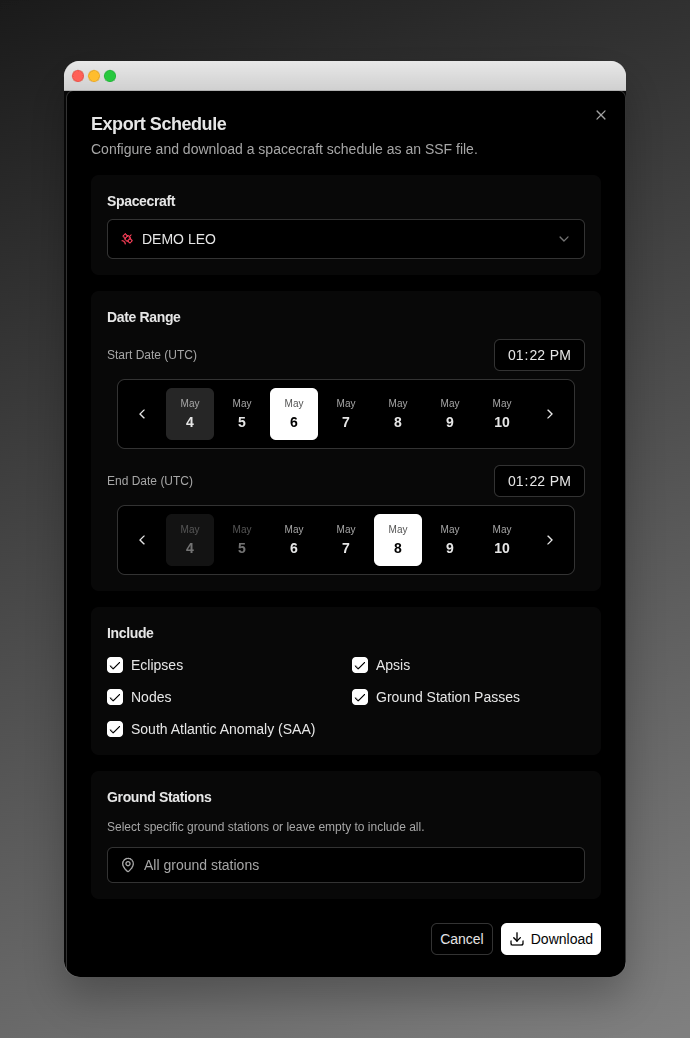 #### Spacecraft
A single-select dropdown listing every spacecraft in your tenant. The dialog defaults to the spacecraft already selected on the timeline.
#### Date Range
| Element | Description |
| ------------------ | ---------------------------------------------------------------------------------------------------- |
| **Start Date** | Calendar picker; selectable range covers 7 days before today through 7 days after today |
| **End Date** | Calendar picker; cannot be earlier than **Start Date** and cannot exceed 7 days after **Start Date** |
| **Time inputs** | `HH:MM` format, **UTC** for both Start and End |
| **Maximum window** | 7 days |
#### Include
Five checkboxes determine what the exported `.ssf` file contains. All five are checked by default. With every checkbox unchecked the **Download** button is disabled and the dialog displays the validation message **Select at least one event type**.
| Checkbox | State | What it includes |
| -------------------------------- | ----------------- | ----------------------------------------------- |
| **Eclipses** | Checked (default) | Umbra and penumbra entry/exit events |
| **Apsis** | Checked (default) | Periapsis and apoapsis crossings |
| **Nodes** | Checked (default) | Ascending and descending node crossings |
| **Ground Station Passes** | Checked (default) | Visibility windows for selected ground stations |
| **South Atlantic Anomaly (SAA)** | Checked (default) | SAA entry/exit events |
#### Ground Stations
The **Ground Stations** card appears only when **Ground Station Passes** is checked. Use it to restrict the exported passes to specific ground stations.
* Click the trigger button to open the picker.
* Check the stations to include; leave the selection empty to include all configured stations.
* The trigger label reads **All ground stations** when no stations are selected, or **N selected** when one or more are picked.
The card's helper text reads **Select specific ground stations or leave empty to include all**.
#### Footer
| Button | Description |
| ------------ | ------------------------------------------------------------------------------------------------------------------ |
| **Cancel** | Close the dialog without exporting |
| **Download** | Generate and download the `.ssf` file. While the export is in flight, the button label changes to **Exporting...** |
When you export a spacecraft that is running on the fallback (see [Orbit age](/features/orbit-age#degraded-level)), the generated `.ssf` includes that spacecraft's fallback orbital events and carries an in-file `COMMENT Orbital events derived from public TLE - indicative timing` note, so a downstream reader treats their exact timing as indicative. When no fresh orbit is available and the fallback cannot rescue the craft, the file retains the `COMMENT Orbital events unavailable - no fresh state vector` note it carries today.
## Quick Reference
| Category | Action | Location |
| -------- | -------------------------- | ------------------------------- |
| Filter | Select spacecraft | Topbar dropdown |
| Filter | Set time range | Topbar dropdown |
| View | Group by spacecraft | Topbar popover |
| View | Collapse/expand group | Group header chevron |
| View | Navigate group pages | Group header arrows |
| Select | Click row for details | List row |
| Select | Checkbox for bulk | List row checkbox |
| Select | Select all in group | Group header |
| Select | Select all visible | Bulk toolbar |
| Select | Clear selection | Bulk toolbar |
| Edit | Edit composition | Details menu |
| View | Expand composition | Details menu |
| Export | Single OCM | Details menu |
| Export | Bulk OCM/ZIP | Bulk toolbar |
| Export | All via dialog | Topbar Export button |
| Import | New maneuvers | Import dialog |
| Import | Telemetry data | Import dialog |
| Delete | Single burn | Details menu |
| Delete | Bulk delete | Bulk toolbar |
| View | Open timeline | Burn-plan list nav |
| View | Switch zoom (Wide/Compact) | Timeline topbar tabs |
| View | Toggle event visibility | Display popover |
| Export | Schedule (`.ssf`) | Timeline Export Schedule button |
## Key Concepts
### What is a Burn Plan?
A burn plan (maneuver) represents a planned or executed thruster firing to change a spacecraft's orbit. Key parameters include:
* **Delta-V:** Velocity change in m/s
* **Delta-Mass:** Propellant consumed
* **Duration:** Burn length in seconds
* **Reference Frame:** Coordinate system (RTN or TNW)
### Maneuver Lifecycle
1. **PLANNED:** Maneuver is scheduled but not yet executed
2. **TELEMETRY:** Execution reported with actual timing data
3. **Performance Analysis:** Compare actual vs planned after execution
### Performance Metrics
* **Magnitude (Efficiency):** Actual delta-V vs planned delta-V (100% = perfect)
* **Pointing:** Angular deviation from planned direction (0 degrees = perfect)
## Related Pages
* [Importing Maneuvers](/features/maneuver-import) - Import planned maneuvers from OCM files
* [Exporting Maneuvers](/features/maneuver-export) - Export maneuvers in CCSDS formats
* [Reporting Telemetry](/features/maneuver-telemetry) - Report actual execution data
#### Spacecraft
A single-select dropdown listing every spacecraft in your tenant. The dialog defaults to the spacecraft already selected on the timeline.
#### Date Range
| Element | Description |
| ------------------ | ---------------------------------------------------------------------------------------------------- |
| **Start Date** | Calendar picker; selectable range covers 7 days before today through 7 days after today |
| **End Date** | Calendar picker; cannot be earlier than **Start Date** and cannot exceed 7 days after **Start Date** |
| **Time inputs** | `HH:MM` format, **UTC** for both Start and End |
| **Maximum window** | 7 days |
#### Include
Five checkboxes determine what the exported `.ssf` file contains. All five are checked by default. With every checkbox unchecked the **Download** button is disabled and the dialog displays the validation message **Select at least one event type**.
| Checkbox | State | What it includes |
| -------------------------------- | ----------------- | ----------------------------------------------- |
| **Eclipses** | Checked (default) | Umbra and penumbra entry/exit events |
| **Apsis** | Checked (default) | Periapsis and apoapsis crossings |
| **Nodes** | Checked (default) | Ascending and descending node crossings |
| **Ground Station Passes** | Checked (default) | Visibility windows for selected ground stations |
| **South Atlantic Anomaly (SAA)** | Checked (default) | SAA entry/exit events |
#### Ground Stations
The **Ground Stations** card appears only when **Ground Station Passes** is checked. Use it to restrict the exported passes to specific ground stations.
* Click the trigger button to open the picker.
* Check the stations to include; leave the selection empty to include all configured stations.
* The trigger label reads **All ground stations** when no stations are selected, or **N selected** when one or more are picked.
The card's helper text reads **Select specific ground stations or leave empty to include all**.
#### Footer
| Button | Description |
| ------------ | ------------------------------------------------------------------------------------------------------------------ |
| **Cancel** | Close the dialog without exporting |
| **Download** | Generate and download the `.ssf` file. While the export is in flight, the button label changes to **Exporting...** |
When you export a spacecraft that is running on the fallback (see [Orbit age](/features/orbit-age#degraded-level)), the generated `.ssf` includes that spacecraft's fallback orbital events and carries an in-file `COMMENT Orbital events derived from public TLE - indicative timing` note, so a downstream reader treats their exact timing as indicative. When no fresh orbit is available and the fallback cannot rescue the craft, the file retains the `COMMENT Orbital events unavailable - no fresh state vector` note it carries today.
## Quick Reference
| Category | Action | Location |
| -------- | -------------------------- | ------------------------------- |
| Filter | Select spacecraft | Topbar dropdown |
| Filter | Set time range | Topbar dropdown |
| View | Group by spacecraft | Topbar popover |
| View | Collapse/expand group | Group header chevron |
| View | Navigate group pages | Group header arrows |
| Select | Click row for details | List row |
| Select | Checkbox for bulk | List row checkbox |
| Select | Select all in group | Group header |
| Select | Select all visible | Bulk toolbar |
| Select | Clear selection | Bulk toolbar |
| Edit | Edit composition | Details menu |
| View | Expand composition | Details menu |
| Export | Single OCM | Details menu |
| Export | Bulk OCM/ZIP | Bulk toolbar |
| Export | All via dialog | Topbar Export button |
| Import | New maneuvers | Import dialog |
| Import | Telemetry data | Import dialog |
| Delete | Single burn | Details menu |
| Delete | Bulk delete | Bulk toolbar |
| View | Open timeline | Burn-plan list nav |
| View | Switch zoom (Wide/Compact) | Timeline topbar tabs |
| View | Toggle event visibility | Display popover |
| Export | Schedule (`.ssf`) | Timeline Export Schedule button |
## Key Concepts
### What is a Burn Plan?
A burn plan (maneuver) represents a planned or executed thruster firing to change a spacecraft's orbit. Key parameters include:
* **Delta-V:** Velocity change in m/s
* **Delta-Mass:** Propellant consumed
* **Duration:** Burn length in seconds
* **Reference Frame:** Coordinate system (RTN or TNW)
### Maneuver Lifecycle
1. **PLANNED:** Maneuver is scheduled but not yet executed
2. **TELEMETRY:** Execution reported with actual timing data
3. **Performance Analysis:** Compare actual vs planned after execution
### Performance Metrics
* **Magnitude (Efficiency):** Actual delta-V vs planned delta-V (100% = perfect)
* **Pointing:** Angular deviation from planned direction (0 degrees = perfect)
## Related Pages
* [Importing Maneuvers](/features/maneuver-import) - Import planned maneuvers from OCM files
* [Exporting Maneuvers](/features/maneuver-export) - Export maneuvers in CCSDS formats
* [Reporting Telemetry](/features/maneuver-telemetry) - Report actual execution data