> ## Documentation Index
> Fetch the complete documentation index at: https://docs.valar.space/llms.txt
> Use this file to discover all available pages before exploring further.
# Conjunction Classification
> Monitor conjunction events and assess collision risk for your spacecraft
> For the complete documentation index, see [llms.txt](/llms.txt).
The Conjunction Classification page lets you monitor close approach events between your spacecraft and other space objects. View conjunction data, assess collision risk levels, and manage alerts from different originators.
**Route:** `/conjunctions/current` or `/conjunctions/historical`
## Page Layout
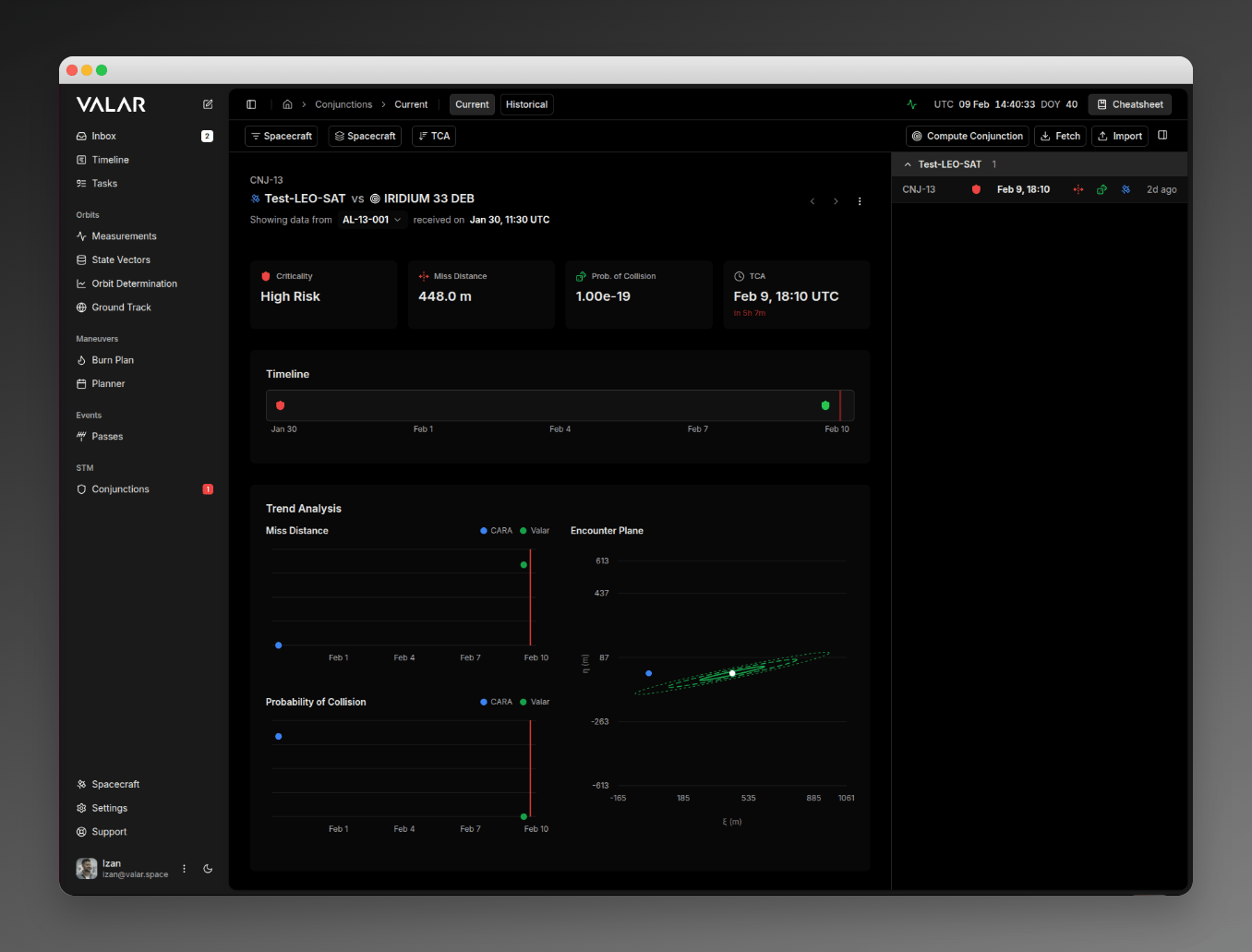
The page displays a details panel on the left and a scrollable conjunction list on the right. Two tabs at the top switch between views:
* **Current** — Active conjunctions with upcoming TCA (Time of Closest Approach)
* **Historical** — Past conjunction events for review
 ## Filtering and Sorting
### Spacecraft Filter
Use the spacecraft dropdown in the toolbar to show conjunctions for specific spacecraft only. Select one or more spacecraft, then click **Apply**. When no spacecraft are selected, all conjunctions are shown.
### Grouping
Group conjunctions by:
* **Spacecraft** — Groups by your primary spacecraft
* **Criticality** — Groups by risk level (High, Medium, Low)
* **None** — Flat list with no grouping
### Sorting
Sort in **Ascending** (earliest TCA first) or **Descending** (latest TCA first) order.
## Conjunction List
Each row in the list displays:
* **Code** — Conjunction identifier
* **Risk Shield** — Color-coded icon indicating criticality (red, yellow, or green)
* **TCA** — Date and time of closest approach (hover for full UTC timestamp)
* **Miss Distance** — Color-coded icon (hover for value in meters)
* **PoC** — Color-coded icon (hover for Probability of Collision value)
* **Spacecraft** — Colored satellite icon matching your spacecraft (hover for name)
* **Last Updated** — Relative time since the conjunction was last updated (hover for full timestamp)
Click any row to view its details in the left panel.
### Risk Levels
Conjunctions are classified into three risk levels based on your configured thresholds (see [Settings](#settings)):
| Level | Color | Meaning |
| ---------- | ------ | -------------------------------- |
| **High** | Red | Immediate attention required |
| **Medium** | Yellow | Monitor closely, may need action |
| **Low** | Green | Within acceptable parameters |
The classification workflow and risk thresholds apply equally to conjunctions from all providers (SpaceTrack and EU SST). Alerts from any source are processed and classified using the same criteria.
## Details Panel
Selecting a conjunction opens its details on the left. The panel includes:
### Summary
Key parameters at a glance:
* **Criticality** — Risk level (High, Medium, Low) with color-coded shield
* **Miss Distance** — Predicted closest approach in meters, with radial, along-track, and cross-track breakdown on hover
* **PoC** — Probability of Collision in scientific notation
* **TCA** — Time of Closest Approach with countdown timer
### Trend Analysis
When multiple alerts exist for a conjunction, a chart shows how miss distance or PoC has evolved over time. Each data point is color-coded by its originator (e.g., CSpOC, ESA, Valar).
### Encounter Plane (B-Plane)
For conjunctions with B-plane data, an interactive visualization shows the relative geometry at closest approach:
* **Primary object** at the center with its covariance ellipse
* **Secondary object** position relative to the primary
* **Uncertainty boundaries** at 1σ, 2σ, and 3σ levels
A reference-frame indicator badge appears next to the chart title showing `CCSDS encounter plane` — the frame the B-plane projection is computed in. Hover the badge for the full frame name; click **Learn more** to open the [reference frame catalog](/platform-overview/reference-frames).
### State Vectors
Expandable sections display orbital state data for both objects, including position and velocity in Cartesian coordinates, position uncertainty in the RTN frame, and the reference frame used.
## Import Alerts
Import alerts from CDM files:
1. Click **Import** in the toolbar
2. Select the target spacecraft
3. Drag and drop files or click to browse
4. Supported formats: `.cdm`, `.xml`, `.txt`
## Export Alerts
Export a conjunction's alerts as CDM files:
1. Select a conjunction from the list
2. Click the **More** menu (**⋮**) in the details panel header
3. Select **Export Alerts**
## Delete Conjunction
1. Select the conjunction
2. Click the **More** menu (**⋮**) in the details panel header
3. Select **Delete** and confirm
## Settings
Configure how conjunctions are classified via **Settings → Integrations → STM**.
## Filtering and Sorting
### Spacecraft Filter
Use the spacecraft dropdown in the toolbar to show conjunctions for specific spacecraft only. Select one or more spacecraft, then click **Apply**. When no spacecraft are selected, all conjunctions are shown.
### Grouping
Group conjunctions by:
* **Spacecraft** — Groups by your primary spacecraft
* **Criticality** — Groups by risk level (High, Medium, Low)
* **None** — Flat list with no grouping
### Sorting
Sort in **Ascending** (earliest TCA first) or **Descending** (latest TCA first) order.
## Conjunction List
Each row in the list displays:
* **Code** — Conjunction identifier
* **Risk Shield** — Color-coded icon indicating criticality (red, yellow, or green)
* **TCA** — Date and time of closest approach (hover for full UTC timestamp)
* **Miss Distance** — Color-coded icon (hover for value in meters)
* **PoC** — Color-coded icon (hover for Probability of Collision value)
* **Spacecraft** — Colored satellite icon matching your spacecraft (hover for name)
* **Last Updated** — Relative time since the conjunction was last updated (hover for full timestamp)
Click any row to view its details in the left panel.
### Risk Levels
Conjunctions are classified into three risk levels based on your configured thresholds (see [Settings](#settings)):
| Level | Color | Meaning |
| ---------- | ------ | -------------------------------- |
| **High** | Red | Immediate attention required |
| **Medium** | Yellow | Monitor closely, may need action |
| **Low** | Green | Within acceptable parameters |
The classification workflow and risk thresholds apply equally to conjunctions from all providers (SpaceTrack and EU SST). Alerts from any source are processed and classified using the same criteria.
## Details Panel
Selecting a conjunction opens its details on the left. The panel includes:
### Summary
Key parameters at a glance:
* **Criticality** — Risk level (High, Medium, Low) with color-coded shield
* **Miss Distance** — Predicted closest approach in meters, with radial, along-track, and cross-track breakdown on hover
* **PoC** — Probability of Collision in scientific notation
* **TCA** — Time of Closest Approach with countdown timer
### Trend Analysis
When multiple alerts exist for a conjunction, a chart shows how miss distance or PoC has evolved over time. Each data point is color-coded by its originator (e.g., CSpOC, ESA, Valar).
### Encounter Plane (B-Plane)
For conjunctions with B-plane data, an interactive visualization shows the relative geometry at closest approach:
* **Primary object** at the center with its covariance ellipse
* **Secondary object** position relative to the primary
* **Uncertainty boundaries** at 1σ, 2σ, and 3σ levels
A reference-frame indicator badge appears next to the chart title showing `CCSDS encounter plane` — the frame the B-plane projection is computed in. Hover the badge for the full frame name; click **Learn more** to open the [reference frame catalog](/platform-overview/reference-frames).
### State Vectors
Expandable sections display orbital state data for both objects, including position and velocity in Cartesian coordinates, position uncertainty in the RTN frame, and the reference frame used.
## Import Alerts
Import alerts from CDM files:
1. Click **Import** in the toolbar
2. Select the target spacecraft
3. Drag and drop files or click to browse
4. Supported formats: `.cdm`, `.xml`, `.txt`
## Export Alerts
Export a conjunction's alerts as CDM files:
1. Select a conjunction from the list
2. Click the **More** menu (**⋮**) in the details panel header
3. Select **Export Alerts**
## Delete Conjunction
1. Select the conjunction
2. Click the **More** menu (**⋮**) in the details panel header
3. Select **Delete** and confirm
## Settings
Configure how conjunctions are classified via **Settings → Integrations → STM**.
 ### PoC Thresholds
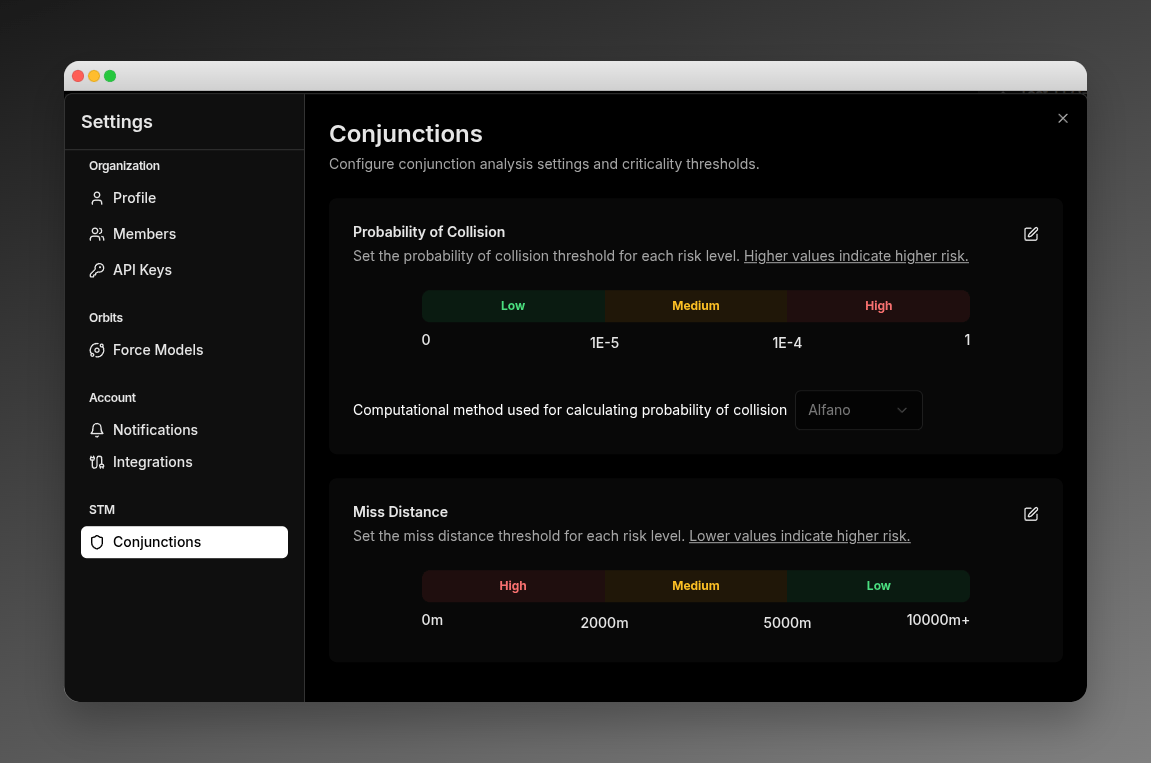
Set the Probability of Collision values that define each risk level:
| Threshold | Description | Default |
| ---------- | -------------------------------------------------- | ------- |
| **High** | PoC at or above this value is classified as High | 1E-04 |
| **Medium** | PoC at or above this value is classified as Medium | 1E-05 |
Conjunctions below the Medium threshold are classified as Low risk.
### Miss Distance Thresholds
Set the miss distance values that define each risk level. Lower distances indicate higher risk:
| Threshold | Description | Default |
| ---------- | -------------------------------------------------------------- | ------- |
| **High** | Miss distances at or below this value are classified as High | 500 m |
| **Medium** | Miss distances at or below this value are classified as Medium | 2000 m |
Conjunctions above the Medium threshold are classified as Low risk.
### PoC Computation Method
Select the algorithm used to calculate Probability of Collision:
| Method | Description |
| ---------- | -------------------------------- |
| **Alfano** | 2D integral method (default) |
| **Foster** | Foster's approximation method |
| **Patera** | Suited for elongated covariances |
| **Chan** | Chan's analytical method |
### Editing Thresholds
1. Click the **Edit** icon next to a threshold section
2. Enter new values (scientific notation for PoC, meters for miss distance)
3. Click **Save** to apply
This page also lets you configure credentials for external data providers (SpaceTrack, EU SST). See [Fetch Alerts — Provider Credentials](/features/fetch-alerts#provider-credentials) for details. Credentials are managed in **Settings → Integrations → STM**.
Settings changes apply to all users in your organization.
## Related Pages
* [Conjunction Computation](/features/conjunction-computation) — Compute conjunctions using your own state vectors
* [Fetch Alerts](/features/fetch-alerts) — Download alerts from external space surveillance providers
* [CDM Format](/file-formats/cdm) — Conjunction Data Message file format reference
### PoC Thresholds
Set the Probability of Collision values that define each risk level:
| Threshold | Description | Default |
| ---------- | -------------------------------------------------- | ------- |
| **High** | PoC at or above this value is classified as High | 1E-04 |
| **Medium** | PoC at or above this value is classified as Medium | 1E-05 |
Conjunctions below the Medium threshold are classified as Low risk.
### Miss Distance Thresholds
Set the miss distance values that define each risk level. Lower distances indicate higher risk:
| Threshold | Description | Default |
| ---------- | -------------------------------------------------------------- | ------- |
| **High** | Miss distances at or below this value are classified as High | 500 m |
| **Medium** | Miss distances at or below this value are classified as Medium | 2000 m |
Conjunctions above the Medium threshold are classified as Low risk.
### PoC Computation Method
Select the algorithm used to calculate Probability of Collision:
| Method | Description |
| ---------- | -------------------------------- |
| **Alfano** | 2D integral method (default) |
| **Foster** | Foster's approximation method |
| **Patera** | Suited for elongated covariances |
| **Chan** | Chan's analytical method |
### Editing Thresholds
1. Click the **Edit** icon next to a threshold section
2. Enter new values (scientific notation for PoC, meters for miss distance)
3. Click **Save** to apply
This page also lets you configure credentials for external data providers (SpaceTrack, EU SST). See [Fetch Alerts — Provider Credentials](/features/fetch-alerts#provider-credentials) for details. Credentials are managed in **Settings → Integrations → STM**.
Settings changes apply to all users in your organization.
## Related Pages
* [Conjunction Computation](/features/conjunction-computation) — Compute conjunctions using your own state vectors
* [Fetch Alerts](/features/fetch-alerts) — Download alerts from external space surveillance providers
* [CDM Format](/file-formats/cdm) — Conjunction Data Message file format reference