> ## Documentation Index
> Fetch the complete documentation index at: https://docs.valar.space/llms.txt
> Use this file to discover all available pages before exploring further.
# Reporting Maneuver Execution
> Capture real-time telemetry to improve estimation of maneuver performance
> For the complete documentation index, see [llms.txt](/llms.txt).
Capturing real-time telemetry to improve estimation of maneuver performance.
When a maneuver is executed, it may deviate from the originally planned values or only be partially executed. Onboard sensors measure these deviations, and the data is sent via telemetry. This information lets users reconstruct the actual maneuver execution and improve the modelling of spacecraft dynamics.
Once TELEMETRY data is reported, details of the original PLANNED maneuver are no longer linked to that maneuver. Essentially, the planned data is replaced by the actual execution data.
## File Requirements for Telemetry OCM
When reporting telemetry via an OCM file, the same structural requirements as a planned import apply, with these key differences:
* Every maneuver block must have `MAN_BASIS = TELEMETRY` (or `DETERMINED_TLM`)
* Each `MAN_ID` in the file **must match** an existing maneuver in VALAR (either `PLANNED` or `TELEMETRY`). You cannot create new maneuvers through telemetry reporting.
* All other field requirements apply: thrust vector, specific impulse, wet mass, reference frame, spacecraft matching, and no temporal overlaps within the file.
For the complete list of validation rules, accepted reference frames, and field requirements, see [VALAR Import Requirements](/file-formats/ocm#valar-import-requirements).
## Reporting Telemetry via OCM
You can report the actual execution details using an OCM file. To do this:
1. Go to the `/burn-plan` page.
2. Click the **Telemetry** button.
3. Upload the OCM file containing the real execution data. All maneuvers must have `MAN_BASIS` set to `TELEMETRY` or `DETERMINED_TLM`.
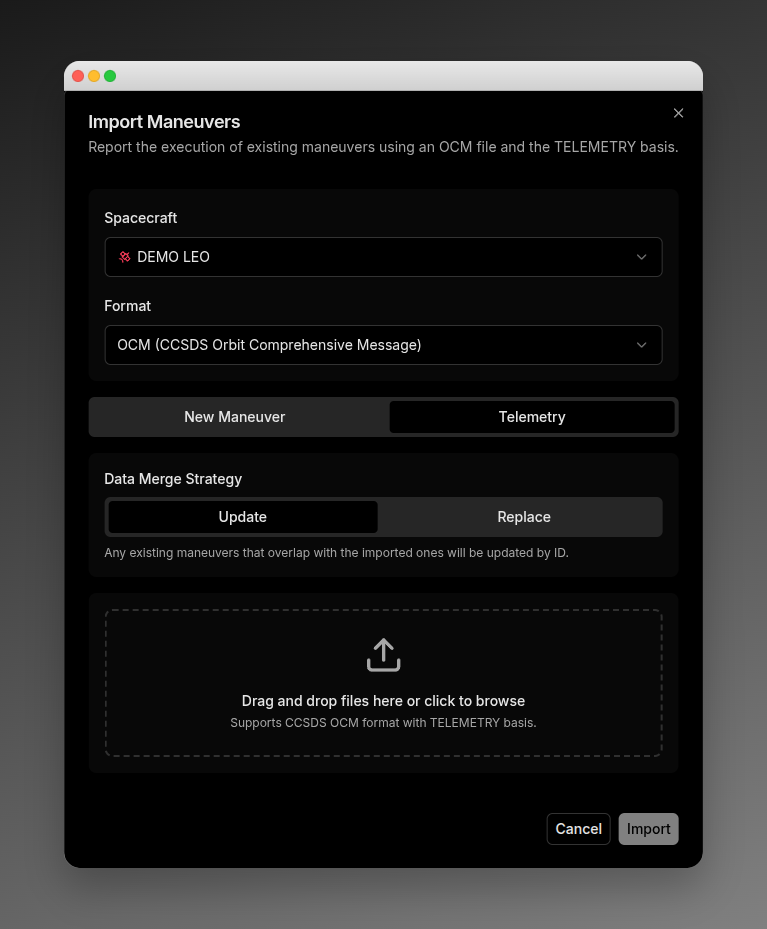 This method is recommended if:
* The actual maneuver magnitude and epoch differ significantly from the planned values.
* You want to report telemetry for multiple maneuvers at once.
## Merging Existing Telemetry
If a user has already uploaded telemetry for a specific time range and need to include new or updated data, there are two merge strategies:
* **Update**: Each `MAN_ID` must match an existing maneuver (either `PLANNED` or `TELEMETRY`). Only the matching maneuvers are updated. Any maneuvers without matching IDs remain unchanged.
* **Replace**: Removes any existing maneuvers that overlap with the newly imported ones. This action is permanent; you cannot undo it.
Merge actions act on existing datasets, regardless if it was formerly reported as PLANNED or TELEMETRY data.
Via the API, telemetry of a maneuver can be reported using these endpoints:
* `POST /v1/maneuvers/report/file`: to update existing data with telemetry values
* `POST /v1/maneuvers/report/file/override`: to replace existing data with telemetry values
## Reporting Execution Epochs
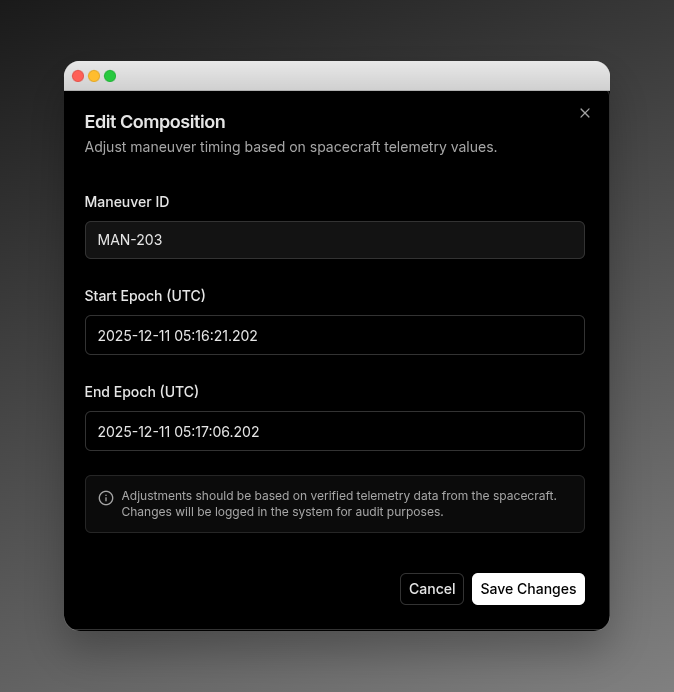
This option is recommended if a maneuver was partially executed but the maneuver's magnitude stayed nominal. Users can update each maneuver individually through the platform:
1. Click the edit icon in the maneuver composition section.
2. Enter the actual execution epochs in the popup window.
When the epoch values are updated, the system automatically truncates the original planned maneuver to reflect the partial execution.
This method is recommended if:
* The actual maneuver magnitude and epoch differ significantly from the planned values.
* You want to report telemetry for multiple maneuvers at once.
## Merging Existing Telemetry
If a user has already uploaded telemetry for a specific time range and need to include new or updated data, there are two merge strategies:
* **Update**: Each `MAN_ID` must match an existing maneuver (either `PLANNED` or `TELEMETRY`). Only the matching maneuvers are updated. Any maneuvers without matching IDs remain unchanged.
* **Replace**: Removes any existing maneuvers that overlap with the newly imported ones. This action is permanent; you cannot undo it.
Merge actions act on existing datasets, regardless if it was formerly reported as PLANNED or TELEMETRY data.
Via the API, telemetry of a maneuver can be reported using these endpoints:
* `POST /v1/maneuvers/report/file`: to update existing data with telemetry values
* `POST /v1/maneuvers/report/file/override`: to replace existing data with telemetry values
## Reporting Execution Epochs
This option is recommended if a maneuver was partially executed but the maneuver's magnitude stayed nominal. Users can update each maneuver individually through the platform:
1. Click the edit icon in the maneuver composition section.
2. Enter the actual execution epochs in the popup window.
When the epoch values are updated, the system automatically truncates the original planned maneuver to reflect the partial execution.
 To report partial execution programmatically via the API, send the real execution epochs to: `PUT /v1/maneuvers/{maneuverID}/report/epoch`.
## Troubleshooting
Below are telemetry-specific errors you may encounter. For file format, size, and field validation errors shared with planned imports, see the [Import Troubleshooting](/features/maneuver-import#troubleshooting) section.
| Error Message | Description |
| ---------------------------------------------------------------------------------------- | ---------------------------------------------------------------------------------------------------------------------- |
| Unsupported file format: not all maneuvers are telemetry. Conflicting maneuver: {MAN_ID} | All maneuvers in a telemetry OCM file must have `MAN_BASIS` set to `TELEMETRY` or `DETERMINED_TLM`. |
| No maneuver found with ID {MAN_ID}. | The file references a maneuver ID that does not exist in VALAR. Each telemetry maneuver must match an existing record. |
To report partial execution programmatically via the API, send the real execution epochs to: `PUT /v1/maneuvers/{maneuverID}/report/epoch`.
## Troubleshooting
Below are telemetry-specific errors you may encounter. For file format, size, and field validation errors shared with planned imports, see the [Import Troubleshooting](/features/maneuver-import#troubleshooting) section.
| Error Message | Description |
| ---------------------------------------------------------------------------------------- | ---------------------------------------------------------------------------------------------------------------------- |
| Unsupported file format: not all maneuvers are telemetry. Conflicting maneuver: {MAN_ID} | All maneuvers in a telemetry OCM file must have `MAN_BASIS` set to `TELEMETRY` or `DETERMINED_TLM`. |
| No maneuver found with ID {MAN_ID}. | The file references a maneuver ID that does not exist in VALAR. Each telemetry maneuver must match an existing record. |