> ## Documentation Index
> Fetch the complete documentation index at: https://docs.valar.space/llms.txt
> Use this file to discover all available pages before exploring further.
# Orbit age
> Learn what a spacecraft's orbit age is and how its two graded levels — the degraded level (lower-accuracy public-TLE fallback) and the stale level (a stale-orbit warning) — govern every orbit-dependent product and surface in one orbit-data-age footer.
> For the complete documentation index, see [llms.txt](/llms.txt).
Orbit age is how long it has been since a spacecraft's orbit was last updated. VALAR governs it with one workspace-wide policy that has **two graded levels**: the **degraded level**, where a spacecraft falls back to a lower-accuracy public-catalog orbit and the platform signals it, and the **stale level**, where the orbit is too old to trust and VALAR warns you on the products that depend on it. Both levels are measured from the same point — each spacecraft's latest [state vector](/features/state-vectors) — and you set them together in one place. Both levels surface in **one** signal: the [orbit-data-age footer](#the-orbit-data-age-footer) that sits at the bottom of every page, tagging each affected spacecraft as **Degraded** or **Blocked**.
**Route:** **Settings → Orbits → Orbit age** (the orbit-data-age footer appears across every page of the operations workspace).
## Orbit age
A spacecraft's **orbit age** is the time elapsed since its latest [state vector](/features/state-vectors) — the position and velocity at an epoch you provide through orbit determination, an OPM import, or manual entry. It is **now minus that latest state-vector epoch**, expressed in **whole days** (all times UTC).
Orbit age is a single, workspace-wide measure: the same definition applies to every spacecraft in the operations workspace, so an "old" orbit means one consistent thing across your fleet. As a spacecraft's orbit ages, it crosses two thresholds in turn — first the **degraded level**, then the **stale level** — and each one changes how VALAR treats that spacecraft:
| Level | Crossed when the orbit age exceeds… | What VALAR does | Default |
| ------------------------------------- | ----------------------------------- | ----------------------------------------------------------------------------------------------------------------------------------------------- | ------------- |
| **[Degraded level](#degraded-level)** | the degraded level you set | Falls back to a lower-accuracy public TLE and tags the spacecraft **Degraded** in the orbit-data-age footer | On |
| **[Stale level](#stale-level)** | the stale level you set | Gates the orbit-dependent products behind a stale-orbit warning, explains why, and tags the spacecraft **Blocked** in the orbit-data-age footer | `14 days`, on |
The two levels are ordered: the **degraded level must be at or below the stale level**, so a spacecraft falls back to a public orbit *before* it is ever flagged stale. You configure both — together with the block switch — in the **Orbit age** settings [below](#configuring-orbit-age).
## Degraded level
The **degraded level** is the orbit age at which a spacecraft stops using its own now-old precise orbit and **falls back to a public TLE** — a [Two-Line Element set](/file-formats/tle) the platform fetches itself from the public catalog, located by the spacecraft's NORAD catalog ID. The spacecraft keeps planning and plotting, but on a lower-accuracy orbit, and the [orbit-data-age footer](#the-orbit-data-age-footer) names it with a **Degraded** tag, alongside any spacecraft tagged **Blocked** at the stale level. You never upload or paste a TLE; the platform retrieves it for you.
The degraded level is **on by default** — a spacecraft that loses a fresh precise orbit automatically falls back to a public TLE, unless your workspace has deliberately turned degraded mode off (in which case such a spacecraft is governed only by the stale level). A spacecraft enters the degraded level automatically when either condition applies:
| Condition | When a spacecraft enters the degraded level |
| ------------------------------------- | --------------------------------------------------------------------------------------------------- |
| **No state vector** | The spacecraft has no state vector at all. Always active while degraded mode is on. |
| **Orbit age past the degraded level** | The spacecraft's orbit age is older than the **Degraded level** you set, in days (minimum `1 day`). |
This is the lower-impact of the two levels: it keeps a product working, with a clear signal, rather than gating it behind a stale-orbit warning. What falls back to the public TLE — and which spacecraft the fallback cannot rescue — is detailed under [How each product behaves](#how-each-product-behaves).
### What "Lower Accuracy" Means
A public TLE is a general-catalog orbit located by NORAD catalog ID, and it is less precise than an operator-provided state vector — so every result a spacecraft produces while it is at the degraded level is an approximation rather than a precise prediction. The platform never hides this: the [orbit-data-age footer](#the-orbit-data-age-footer) names every spacecraft currently running on a public TLE with a **Degraded** tag, and both the footer and the settings page describe that orbit as **lower accuracy**. Treat results for a degraded spacecraft as indicative, and restore a precise [state vector](/features/state-vectors) when you need full accuracy.
## Stale level
The **stale level** is the orbit age at which VALAR considers a spacecraft's orbit too old to trust and **warns you** on the products that depend on it. The verdict is judged per spacecraft: a stale spacecraft is flagged while every fresher spacecraft in the same view still computes normally. The stale level has a default of `14 days`.
Enforcement is controlled by the **Block orbit-dependent products on stale orbits** switch in the **Orbit age** settings, **on by default**. When it is on, a spacecraft whose orbit age is past the stale level has its orbit-dependent products gated or warned as described below; turning it off lets every product compute from an old orbit without the warning — the stale level still defines "stale", it is just no longer enforced.
### The Stale-Orbit Warning
When a spacecraft's orbit is stale but still usable, VALAR does not refuse the product — it warns you, and lets you proceed. How the warning appears depends on the product:
* On the **interactive** products — the **ground-station passes** timeline, the [Keplerian-elements plot](/features/orbit-elements-plots), and the [ground-track map](/features/3d-ground-track) — the result is held behind a **stale-orbit panel** with a **Compute anyway** button. The chart, timeline, or map is withheld until you press **Compute anyway**, which computes and renders the result on the stale orbit. Proceeding is a conscious choice, not a silent default.
* On a **background recompute** — [AOI overflight](/features/areas-of-interest/overflight-events) — the events still compute, and the same stale-orbit panel appears **inline, above the result** as a warning rather than a gate. Triggering the recompute is itself the conscious act, so no separate button is needed.
* On a **file export** — the [attitude AEM export](#attitude-profiles-&-export-on-the-fallback) and the [schedule export](/features/burn-plan#schedule-export-dialog) — there is no panel: the file downloads with an in-file `COMMENT` line noting the orbit's reduced confidence, so a reader of the file outside VALAR is not misled about its precision. Requesting the export is itself the conscious act.
* The one exception is the **state-vector [OEM](/file-formats/oem) export**: VALAR refuses outright rather than warning, because an orbit-data export must never embed a stale orbit. Provide fresher tracking data to continue — this export never proceeds on acknowledgment.
* A **degraded** (not stale) orbit on an interactive product is warned the same inline way, not gated — you keep the result, with the warning shown above it.
The stale-orbit panel explains why the orbit is stale and what to do next:
| Line | What it reads |
| --------------- | ----------------------------------------------------------------- |
| **Reason** | **This spacecraft's orbit is stale** |
| **Age** | `last determined N days ago` |
| **Threshold** | `exceeds your N-day threshold` |
| **Next action** | A situation-specific line — see the table below |
| **Consequence** | `The risk of an inaccurate result is growing with the N-day age.` |
| **Remedy** | **Update tracking data, or change the threshold in Settings** |
Both `N` values are whole days — the spacecraft's actual orbit age and your configured stale level. The **Next action** line reflects which orbits the platform holds for the spacecraft:
| Situation | Next-action line |
| ---------------------------------------------------- | -------------------------------------------------------------------------------------------------------- |
| **Precise orbit stale, public-TLE fallback fresh** | `Update tracking data to refresh the precise orbit, or proceed on the fresher public-TLE fallback.` |
| **No precise orbit, public-TLE fallback fresh** | `Add a precise orbit determination, or proceed on the public-TLE fallback.` |
| **Precise orbit and public-TLE fallback both stale** | `Both the precise orbit and the public-TLE fallback are stale — update tracking data before proceeding.` |
| **Any other stale orbit** | `This orbit is stale — review the orbit data before proceeding.` |
The remedy names the two ways to clear the warning: provide fresher tracking data (a new [state vector](/features/state-vectors)) for the spacecraft, or raise the stale level in Settings. When the orbit in use came from the public-TLE fallback rather than your own tracking data, the panel adds the line **the public-TLE fallback is also stale**, so you know that refreshing your own data is what clears it.
### When There Is No Usable Orbit
Warning-and-proceeding only applies when there is an orbit to proceed on. When a spacecraft has **no usable orbit at all**, the product cannot be computed no matter what you acknowledge — so in place of a stale-orbit warning, the result is replaced by a **can't-compute panel**:
| Situation | What the panel reads |
| ---------------------------------------- | ----------------------------------------------------------------------------------------------------------------------------------------------------------------------------------- |
| **No usable orbit data** | **Can't compute — `{spacecraft}` has no usable orbit**, then `There is no usable orbit data for this spacecraft, so this product can't be computed. Add tracking data to continue.` |
| **Numerically-invalid or decayed orbit** | **Can't compute — `{spacecraft}` has no usable orbit**, then `This orbit can't be computed — its state is no longer numerically valid.` |
The panel names the spacecraft — or reads **This spacecraft** when it has no name — and carries an **Add orbit data** action that opens the [spacecraft page](/features/spacecraft-management) so you can supply an orbit. Because there is nothing to compute, **Compute anyway** is not offered here: acknowledging staleness never unlocks a spacecraft that has no usable orbit. A numerically-invalid or decayed orbit gets the same panel with its own message, so a physically impossible orbit is always explained plainly rather than surfacing a raw error.
This verdict is consistent everywhere the spacecraft appears: the same classification that drives the panel tags the spacecraft **Blocked** in the [orbit-data-age footer](#the-orbit-data-age-footer) and **Stale** on its [cheatsheet](#orbit-age-on-the-cheatsheet), and it governs [maneuver planning](/features/planner#when-a-spacecraft-has-no-usable-orbit) too — creating a plan for a spacecraft with no usable orbit returns the same can't-compute response immediately, rather than accepting the request and producing nothing.
## The Orbit-Data-Age Footer
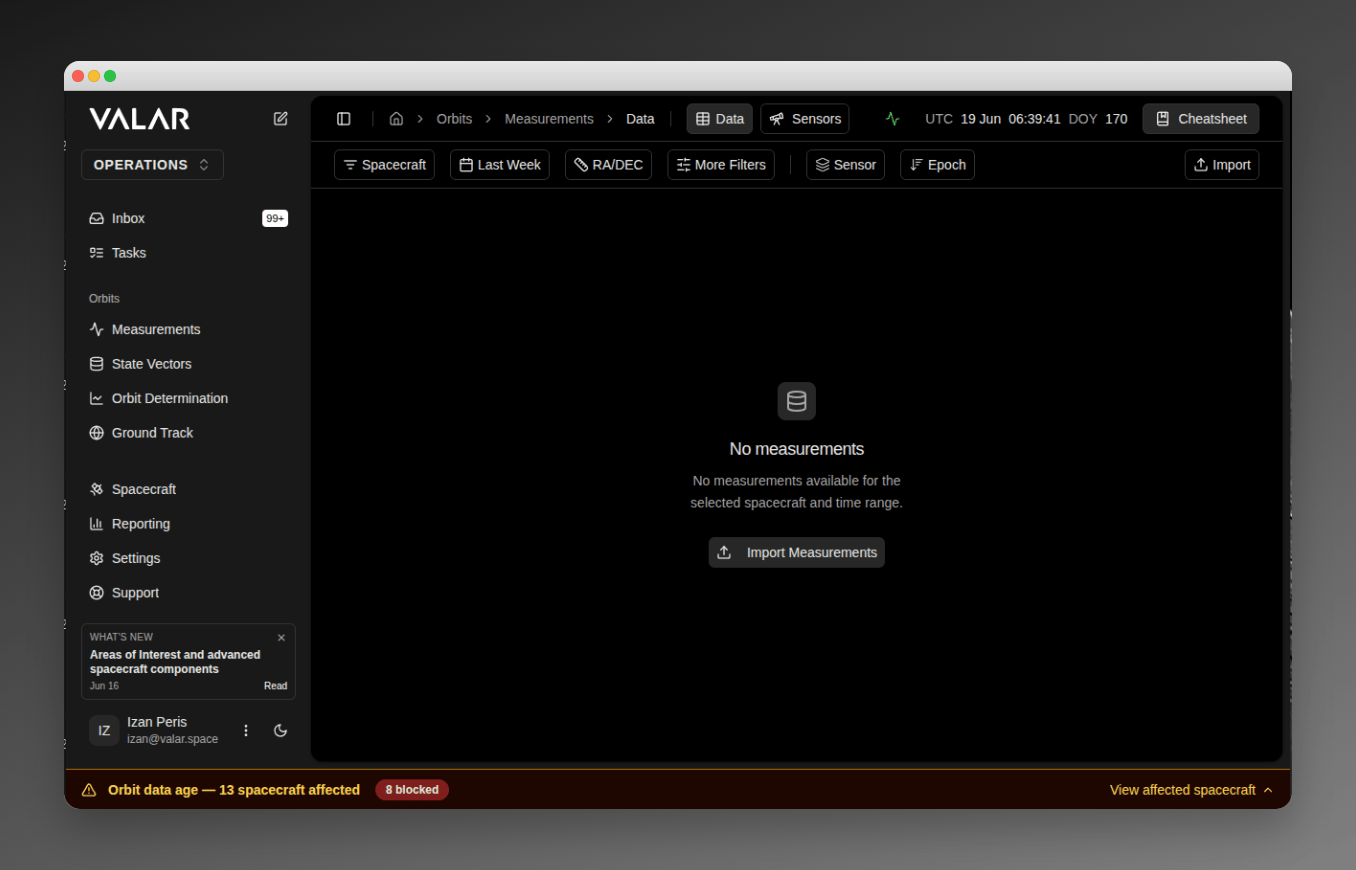
Both levels of the orbit-age policy — the [degraded level](#degraded-level) and the [stale level](#stale-level) — surface in **one** signal: the orbit-data-age footer. Whenever any spacecraft in the workspace is affected at either level, a persistent footer sits at the bottom of every page of the operations workspace, spanning the full width beneath the sidebar and content. When **no** spacecraft is affected, no footer is shown.
A spacecraft with **no state vector at all** — in a workspace where degraded mode is off, so it has no public-TLE fallback to stand in — now appears in this footer too, tagged **Blocked**, the same treatment as a stale orbit. It has no usable orbit of any kind; previously such a spacecraft was absent from the footer.
### The Collapsed Strip
By default the footer is a single collapsed strip reading **Orbit data age — N spacecraft affected**, where `N` is the count of affected spacecraft. For a single spacecraft it reads **1 spacecraft affected**.
The strip carries a **blocked-severity cue**: when one or more affected spacecraft are at the **Blocked** (stale) level, the strip switches to a higher-severity amber palette and shows an **N blocked** count, so "some are blocked" reads at a visibly higher severity than "all merely degraded". When every affected spacecraft is only **Degraded**, the strip uses the softer degraded-yellow palette and shows no blocked count.
 ### The Drawer
Select **View affected spacecraft** to open the **Orbit age warnings** drawer, described as **Spacecraft affected by orbit data age — degraded or blocked** — a grid showing **one card per affected spacecraft**. Each card carries:
| Card element | What it shows |
| -------------------- | ------------------------------------------------------------------------------------------------------------------------------------------------------------------------------------ |
| **Identity** | The spacecraft **name**, or its **NORAD ID** when it has no name — never a raw internal identifier. |
| **Level tag** | A **Degraded** or **Blocked** tag, marking which level that spacecraft has crossed. |
| **State vector** age | The age of the spacecraft's latest state vector in whole days, **colour-coded** — highlighted once it crosses the degraded threshold, and again once it crosses the stale threshold. |
| **Public TLE** age | The age of the fetched public TLE in whole days, **colour-coded** — highlighted once it crosses the stale threshold. |
A spacecraft that qualifies at **both** levels appears **once, at its most severe level — Blocked**; blocked spacecraft are ordered ahead of degraded ones, so a single spacecraft never reads as both "degraded" and "blocked".
When an age is unavailable, the card shows **—** in place of the number, with a tooltip explaining why:
| Readout | Tooltip | When it appears |
| -------------------- | ----------------------------------------------------- | -------------------------------------------------------------------- |
| **—** (state vector) | **No state vector available.** | The spacecraft has no state vector. |
| **—** (public TLE) | **No public TLE available for the registered NORAD.** | No usable public TLE could be fetched for the spacecraft's NORAD ID. |
The footer is the **workspace-wide** orbit-data-age signal. A complementary **per-spacecraft** status also appears on each spacecraft's [cheatsheet](#orbit-age-on-the-cheatsheet), described next; there is still no orbit-age status on the spacecraft page or in the spacecraft selector.
## Orbit Age on the Cheatsheet
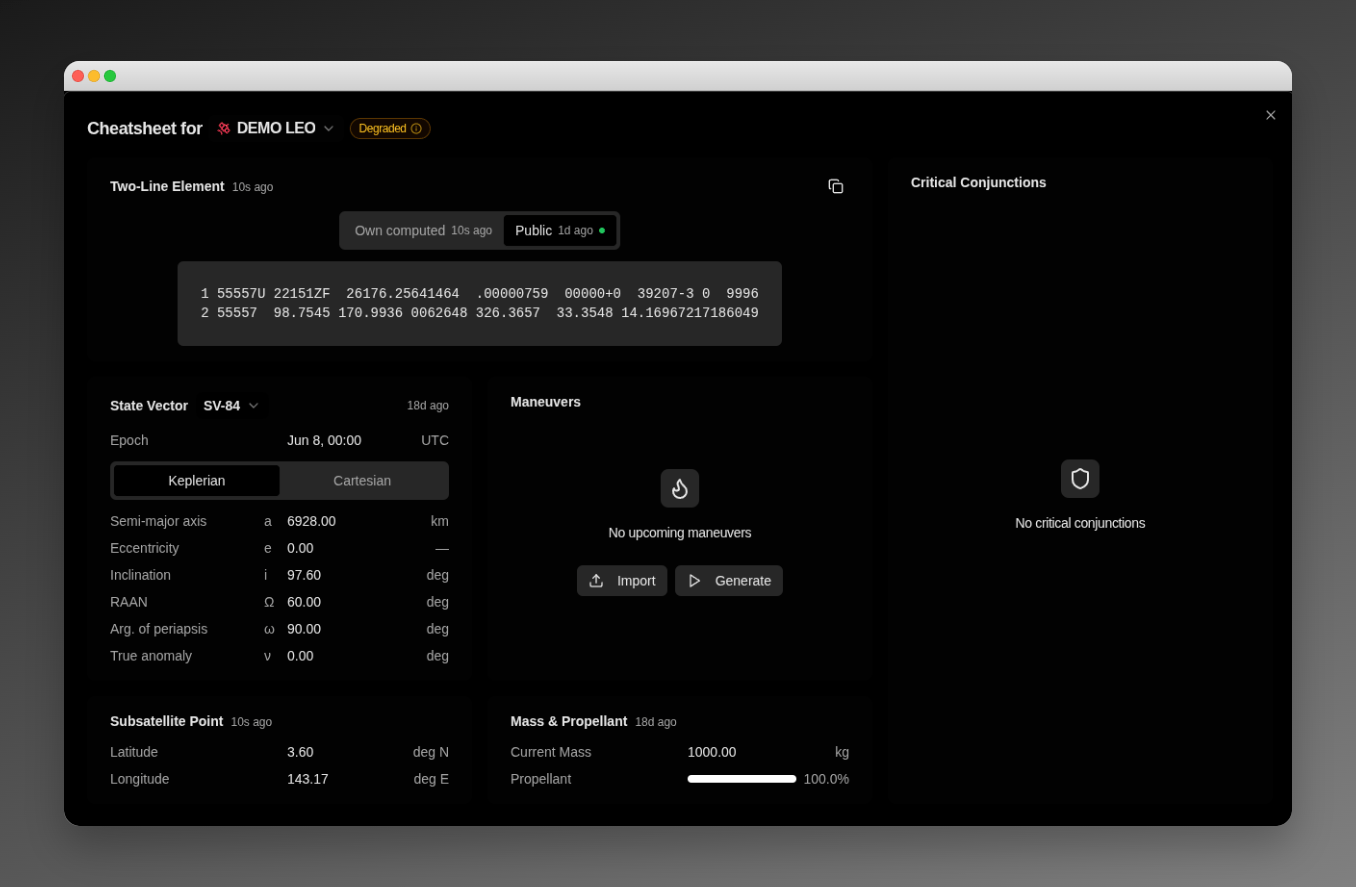
Every spacecraft's **cheatsheet** surfaces that spacecraft's own live orbit-age status, so the orbit-age signal sits right beside its orbit data, not only in the workspace-wide footer. The cheatsheet applies the same orbit-age policy as the footer — the [degraded level](#degraded-level) and the [stale level](#stale-level) — to the single spacecraft you are viewing, read fresh each time you open it, and pairs that status with both of the orbits the platform holds for the spacecraft. It is the per-spacecraft view of the same signal the [orbit-data-age footer](#the-orbit-data-age-footer) carries across the workspace.
### The Drawer
Select **View affected spacecraft** to open the **Orbit age warnings** drawer, described as **Spacecraft affected by orbit data age — degraded or blocked** — a grid showing **one card per affected spacecraft**. Each card carries:
| Card element | What it shows |
| -------------------- | ------------------------------------------------------------------------------------------------------------------------------------------------------------------------------------ |
| **Identity** | The spacecraft **name**, or its **NORAD ID** when it has no name — never a raw internal identifier. |
| **Level tag** | A **Degraded** or **Blocked** tag, marking which level that spacecraft has crossed. |
| **State vector** age | The age of the spacecraft's latest state vector in whole days, **colour-coded** — highlighted once it crosses the degraded threshold, and again once it crosses the stale threshold. |
| **Public TLE** age | The age of the fetched public TLE in whole days, **colour-coded** — highlighted once it crosses the stale threshold. |
A spacecraft that qualifies at **both** levels appears **once, at its most severe level — Blocked**; blocked spacecraft are ordered ahead of degraded ones, so a single spacecraft never reads as both "degraded" and "blocked".
When an age is unavailable, the card shows **—** in place of the number, with a tooltip explaining why:
| Readout | Tooltip | When it appears |
| -------------------- | ----------------------------------------------------- | -------------------------------------------------------------------- |
| **—** (state vector) | **No state vector available.** | The spacecraft has no state vector. |
| **—** (public TLE) | **No public TLE available for the registered NORAD.** | No usable public TLE could be fetched for the spacecraft's NORAD ID. |
The footer is the **workspace-wide** orbit-data-age signal. A complementary **per-spacecraft** status also appears on each spacecraft's [cheatsheet](#orbit-age-on-the-cheatsheet), described next; there is still no orbit-age status on the spacecraft page or in the spacecraft selector.
## Orbit Age on the Cheatsheet
Every spacecraft's **cheatsheet** surfaces that spacecraft's own live orbit-age status, so the orbit-age signal sits right beside its orbit data, not only in the workspace-wide footer. The cheatsheet applies the same orbit-age policy as the footer — the [degraded level](#degraded-level) and the [stale level](#stale-level) — to the single spacecraft you are viewing, read fresh each time you open it, and pairs that status with both of the orbits the platform holds for the spacecraft. It is the per-spacecraft view of the same signal the [orbit-data-age footer](#the-orbit-data-age-footer) carries across the workspace.
 ### The Header Status Chip
A colour-coded **status chip** sits in the cheatsheet **header**, beside the spacecraft selector at the top of the panel, showing the spacecraft's live orbit-age status:
| Status | What it means | How the [footer](#the-orbit-data-age-footer) tags the same spacecraft |
| ------------ | ------------------------------------------------------------------------------------------------------------------------------ | --------------------------------------------------------------------- |
| **Nominal** | A fresh precise orbit — the spacecraft's latest [state vector](/features/state-vectors) — is in use. | Not listed (the spacecraft is unaffected) |
| **Degraded** | The spacecraft has fallen back to the lower-accuracy public [TLE](/file-formats/tle) at the [degraded level](#degraded-level). | **Degraded** |
| **Stale** | The orbit is past the [stale level](#stale-level) and too old to trust — or the spacecraft has no usable orbit of any kind. | **Blocked** |
The chip carries a small information glyph; **hover** or focus it to reveal a short **reason** that explains the status in plain terms — for a **Degraded** spacecraft, that no precise orbit is available and a fresh public TLE is standing in for it. The reason shows only on hover, keeping the header compact.
### Own and Public TLE Tabs
The cheatsheet's **Two-Line Element** card shows both of the orbits the platform holds for the spacecraft, on two tabs:
| Tab | What it shows |
| ---------------- | ------------------------------------------------------------------------------------------------------------- |
| **Own computed** | The TLE derived from the spacecraft's own precise orbit — its latest [state vector](/features/state-vectors). |
| **Public** | The public-catalog TLE the platform fetched for the spacecraft, located by its NORAD catalog ID. |
Each tab shows that orbit's two TLE lines, and its label shows **how old** that orbit is. A small **in-use dot** marks whichever orbit is currently driving the spacecraft's products — the precise own orbit when the spacecraft is **Nominal**, the public TLE when it is **Degraded** — and the card opens to that in-use source by default. When the spacecraft has no orbit of a given kind, that tab reads **No own TLE available** or **No public TLE available** instead of the lines, never an error.
## Proactive orbit-age alerts
The [orbit-data-age footer](#the-orbit-data-age-footer) and each spacecraft's [cheatsheet](#orbit-age-on-the-cheatsheet) show orbit-age status *when you look at them*. VALAR also **notifies you the moment a spacecraft's status changes**, so an orbit that ages into **Degraded** or **Stale** — or recovers — reaches you even when you are working on something else. The notification arrives in your **in-app notification inbox**; it is the proactive companion to the footer, which remains the live snapshot you pull up.
### What raises a notification
A notification is raised whenever a spacecraft's orbit-age status changes from one level to another, in **either direction**:
| Change | Examples | What you see |
| ------------- | ----------------------------------------------------------------- | --------------------------------------------------------------------------------------------------------- |
| **Worsening** | **Nominal → Degraded**, **Degraded → Stale**, **Nominal → Stale** | A cautionary notification for a move to **Degraded**, and a higher-prominence one for a move to **Stale** |
| **Recovery** | **Stale → Nominal**, **Degraded → Nominal**, **Stale → Degraded** | A positive notification confirming the orbit recovered |
Each notification names the **spacecraft** and the **reason** its status changed — the same plain-language reason the footer and cheatsheet show — so you can triage it without leaving the inbox. The notification is **informational**: it is a signal, not a link, so there is no click-through — you act in your own time through the products and the footer. Delivery is **in-app only** — there is no email or Slack notification, and no new page.
### What does not raise a notification
VALAR notifies you on a **change**, never on a standing condition, so your inbox is not flooded:
* A spacecraft that **stays** at the same status raises **no** repeat notification — you are told once, when it changes, not again while it remains there.
* The **first time** VALAR records a spacecraft's status — a newly onboarded spacecraft, for instance — it notes that starting status **silently** and notifies you only when the status later changes.
* An **identical** change repeated on the **same day (UTC)** — a spacecraft that goes **Nominal → Stale**, recovers, then goes **Nominal → Stale** again the same day — raises one notification for that change that day. A *different* change, or the same change on a *later* day, always raises a new notification.
A status change for a spacecraft in your workspace only ever notifies your own workspace.
## How each product behaves
Orbit age governs every orbit-dependent product together, though not every product responds to the **stale level** the same way. At the **degraded level**, the products that support the public-TLE fallback keep working on the fetched orbit. At the **stale level**, most orbit-dependent products show the [stale-orbit warning](#the-stale-orbit-warning) above — a conscious-proceed gate on the interactive products and an inline warning on a background recompute — while a spacecraft with [no usable orbit](#when-there-is-no-usable-orbit) gets the can't-compute panel instead. A few products are exceptions: orbital events and attitude aren't gated by this policy at all, and conjunction/collision-avoidance maneuvers refuse outright rather than offering a warning. The table below states exactly how each product responds. A gated or warned spacecraft is named in the one [orbit-data-age footer](#the-orbit-data-age-footer) — tagged **Degraded** at the degraded level, **Blocked** at the stale level — so a single signal covers both. The warning governs the *result* of an affected product; the footer is the *workspace-wide* signal that lists every affected spacecraft.
| Product | At the degraded level | At the stale level |
| ----------------------------------------------------------------------------- | ----------------------------------------------------------------------- | ------------------------------------------------------------------------------------------------------------------------------------------------------------------------------------ |
| **Ground-station passes** | Computes visibility windows from the public TLE | Held behind the stale-orbit panel; **Compute anyway** renders that spacecraft's passes |
| **[Keplerian-elements plot](/features/orbit-elements-plots)** | Plots the orbital-element time-series from the public TLE | Held behind the stale-orbit panel; **Compute anyway** renders the element charts |
| **[Ground-track map](/features/3d-ground-track)** | Draws the ground track and globe position from the public TLE | Held behind the stale-orbit panel; **Compute anyway** renders the map |
| **[AOI overflight](/features/areas-of-interest/overflight-events)** | Computes overflight events from the public TLE | Events still compute, with the stale-orbit warning shown inline above them; fresher spacecraft in the same recompute are unaffected |
| **[Orbital events](/features/burn-plan)** | Computes eclipse, apsis, node, and SAA crossings from the public TLE | Computes regardless — not gated by the stale-orbit policy; a separate propagation-window limit unrelated to orbit age governs how far the computation can run from the orbit's epoch |
| **[Attitude profiles & export](/features/attitude/overview)** | Computes the pointing profile and quaternion charts from the public TLE | Computes regardless — not gated by the stale-orbit policy; the exported AEM file's `COMMENT` line notes the reduced confidence, exactly as it does on the public-TLE fallback |
| **[Maneuver optimization](/features/planner)** | Initialize a plan from a chosen public TLE in the planner | **Create Plan** asks you to acknowledge before planning on a stale orbit — **Create anyway** proceeds |
| **[Conjunction / collision-avoidance maneuvers](/features/cam-optimization)** | Optimizes candidate maneuvers from the public TLE | Refuses to create the maneuver plan — provide fresher tracking data to continue |
Ground-station pass prediction (`/passes/timeline`) has no settings of its own — it follows this one workspace orbit-age policy, at both levels. Maneuver optimization's stale-orbit acknowledgment and its can't-compute response are documented in full on the [Planner](/features/planner#when-the-orbit-is-stale) page. The subsections below detail how each product behaves on the degraded-level public-TLE fallback.
### Ground-Station Passes on the Fallback
Ground-station pass prediction is the first planning function that runs on the fallback. While a spacecraft is at the degraded level, the **Passes** timeline computes its visibility windows from the **public TLE** the platform fetched for it, instead of skipping the spacecraft as it would without a fresh precise orbit. The fallback passes render exactly like passes computed from a precise **state vector** — the same timeline bars, and the same hover details (spacecraft, ground station, AOS, LOS, and duration). No individual pass is marked as degraded.
Pass prediction follows the workspace degraded level in both directions: a spacecraft whose orbit age is past the degraded level computes its passes on the public TLE, while a spacecraft within the degraded level computes on its precise state vector and is not sent to the fallback. Passes computed from the fallback book exactly like precise-orbit passes — a booked fallback pass appears in your booked-passes list and its details panel, indistinguishable from any other pass.
With degraded mode enabled, the skipped-spacecraft notice lists only the spacecraft the fallback could not rescue:
| Situation | Skip Reason |
| ----------------------------------- | ----------------------------------------------------------------------------------------------------------------------------------------------------------------------------------- |
| **No public TLE found** | "Couldn't retrieve a public TLE for NORAD {id} — degraded mode unavailable for this spacecraft." |
| **No state vector and no NORAD ID** | The spacecraft has no usable orbit — add orbit data on the [spacecraft page](/features/spacecraft-management); see [When There Is No Usable Orbit](#when-there-is-no-usable-orbit). |
Degraded operation on the timeline is signalled solely by the unified [orbit-data-age footer](#the-orbit-data-age-footer) above, which tags the spacecraft **Degraded**; an individual fallback pass carries no separate marker. While degraded mode is **off**, nothing falls back to a public TLE: a spacecraft with no state vector is skipped with the usual "no state vector available" reason, and one whose orbit age is past the [stale level](#stale-level) shows the stale-orbit warning in place of its passes — and the footer tags that spacecraft **Blocked**.
### AOI Overflight on the Fallback
Area-of-interest overflight planning also runs on the fallback. While a spacecraft is at the degraded level, VALAR computes its overflight events from the **public TLE** the platform fetched for it, instead of skipping the spacecraft as it would without a fresh precise orbit. A spacecraft located by a NORAD catalog ID alone — with no operator **state vector** — becomes overflight-plannable for its configured payloads. Fallback-computed overflight events render exactly like events computed from a precise state vector — the same per-payload rows, the same entry, exit, and peak times, and the same off-boresight and blinding detail — with no per-event marker that the orbit was a public TLE.
An overflight recompute follows the workspace degraded level in both directions: a spacecraft whose orbit age is past the degraded level computes its overflights on the public TLE, while a spacecraft within the degraded level computes on its precise state vector and is not sent to the fallback.
The fallback can't rescue a degraded spacecraft in two cases — when no public TLE can be retrieved for it, or when it has neither a state vector nor a NORAD ID. In either case the spacecraft contributes no overflight events; unlike the Passes timeline, AOI overflight shows no per-spacecraft notice on the page. The reasons are the same two above for ground-station passes:
| Situation | Reason |
| ----------------------------------- | ----------------------------------------------------------------------------------------------------------------------------------------------------------------------------------- |
| **No public TLE found** | "Couldn't retrieve a public TLE for NORAD {id} — degraded mode unavailable for this spacecraft." |
| **No state vector and no NORAD ID** | The spacecraft has no usable orbit — add orbit data on the [spacecraft page](/features/spacecraft-management); see [When There Is No Usable Orbit](#when-there-is-no-usable-orbit). |
Degraded operation for AOI overflight is signalled solely by the unified [orbit-data-age footer](#the-orbit-data-age-footer), which tags the spacecraft **Degraded**; no individual overflight event carries a separate marker. While degraded mode is **off**, nothing falls back to a public TLE: a spacecraft with no state vector contributes no events, and one whose orbit age is past the [stale level](#stale-level) shows the stale-orbit warning in the forecast — and the footer tags that spacecraft **Blocked**.
### Orbit Plots & Ground Track on the Fallback
Orbit plotting is the everyday visualization that runs on the fallback. While a spacecraft is at the degraded level, both orbit-plot surfaces propagate it from the **public TLE** the platform fetched and plot the result, instead of skipping it as they would without a fresh precise orbit. The [**Ground Track**](/features/3d-ground-track) page computes its ground track, 2D/3D globe position, and latitude/longitude plots from that public TLE; the [**Keplerian Elements**](/features/orbit-elements-plots) page computes its six orbital-element time-series from the same fallback. A spacecraft located by a NORAD catalog ID alone — with no operator **state vector** — becomes plottable on both surfaces, and the fallback-propagated results render exactly like results computed from a precise state vector, with no per-result marker that the orbit was a public TLE.
Both plot surfaces follow the workspace degraded level in both directions: a spacecraft whose orbit age is past the degraded level plots on the public TLE, while a spacecraft within the degraded level plots on its precise state vector and is not sent to the fallback. No per-track, per-position, or per-series source marker distinguishes a fallback plot from a precise one. Degraded operation on both surfaces is conveyed solely by the unified [orbit-data-age footer](#the-orbit-data-age-footer), which tags the spacecraft **Degraded** (or **Blocked** once past the stale level); an individual plot carries no separate indicator, deliberately.
With degraded mode enabled, the skipped-spacecraft warning lists only the spacecraft the fallback could not rescue. The reasons are the same two above for ground-station passes:
| Situation | Skip Reason |
| ----------------------------------- | ----------------------------------------------------------------------------------------------------------------------------------------------------------------------------------- |
| **No public TLE found** | "Couldn't retrieve a public TLE for NORAD {id} — degraded mode unavailable for this spacecraft." |
| **No state vector and no NORAD ID** | The spacecraft has no usable orbit — add orbit data on the [spacecraft page](/features/spacecraft-management); see [When There Is No Usable Orbit](#when-there-is-no-usable-orbit). |
While degraded mode is **off**, nothing falls back to a public TLE: a spacecraft with no state vector cannot plot, and a spacecraft whose orbit age is past the [stale level](#stale-level) shows the stale-orbit warning in place of its plots.
### Orbital Events on the Fallback
Orbital-event computation also runs on the fallback. While a spacecraft is at the degraded level, the **Burn Plan** timeline computes its eclipse, apsis, node, and South Atlantic Anomaly (SAA) crossings from the **public TLE** the platform fetched for it, instead of skipping the spacecraft as it would without a fresh precise orbit. The fallback events render exactly like events computed from a precise **state vector** — the same eclipse and SAA bands, the same apsis and node markers, and the same per-event-type toggles in the **Display** popover — with no per-event marker that the orbit was a public TLE. Because a public TLE is lower accuracy, treat the exact entry and exit timing of a degraded spacecraft's events as indicative.
Orbital-event computation follows the workspace degraded level in both directions: a spacecraft whose orbit age is past the degraded level computes its orbital events on the public TLE, while a spacecraft within the degraded level computes on its precise state vector and is not sent to the fallback.
A degraded spacecraft's fallback events flow into the exported schedule alongside precise-orbit events. When the events came from a public TLE, the exported [`.ssf`](/file-formats/ssf) file carries an in-file `COMMENT` line — `Orbital events derived from public TLE - indicative timing` — so a downstream reader of the file is not misled about their precision. Separately, whenever the spacecraft's orbit-age verdict is not nominal — a public-TLE fallback in use, **or** a stale precise orbit — the file also carries the line `Orbit age is non-nominal - schedule timing may be degraded`. A degraded (public-TLE) export normally carries **both** lines together; a stale precise orbit that never fell back to a public TLE carries only the second. A spacecraft on a fresh precise orbit carries neither line. See the [Schedule Export Dialog](/features/burn-plan#schedule-export-dialog) for the export controls.
The fallback can't rescue a degraded spacecraft in two cases — when no public TLE can be retrieved for it, or when it has neither a state vector nor a NORAD ID. In either case the spacecraft contributes no orbital events, and the skipped-spacecraft notice names the reason. The reasons are the same two above for ground-station passes:
| Situation | Reason |
| ----------------------------------- | ----------------------------------------------------------------------------------------------------------------------------------------------------------------------------------- |
| **No public TLE found** | "Couldn't retrieve a public TLE for NORAD {id} — degraded mode unavailable for this spacecraft." |
| **No state vector and no NORAD ID** | The spacecraft has no usable orbit — add orbit data on the [spacecraft page](/features/spacecraft-management); see [When There Is No Usable Orbit](#when-there-is-no-usable-orbit). |
Degraded operation for orbital events is signalled solely by the unified [orbit-data-age footer](#the-orbit-data-age-footer), which tags the spacecraft **Degraded** (or **Blocked** once past the stale level); no individual event carries a separate marker. While degraded mode is **off**, orbital-event computation is unchanged — a spacecraft with no fresh precise orbit is skipped exactly as it is today, and nothing falls back to a public TLE.
### Attitude Profiles & Export on the Fallback
Attitude profiles also run on the fallback. While a spacecraft is at the degraded level, the attitude pages — the pointing-mode configuration and the quaternion-profile charts — compute its orientation over time from the **public TLE** the platform fetched for it, instead of showing the **No state vector available** block that asks you to define a precise orbit first. The pointing profile and the quaternion-component charts render exactly as they do for a spacecraft with a precise **state vector**, with no per-result marker that the orbit was a public TLE.
Every pointing mode runs on the public TLE; none is excluded. How much the lower-accuracy orbit matters depends on the mode family:
| Mode Family | Pointing Modes | On the Fallback |
| ------------------------ | ---------------------------------------------------------------------------------- | -------------------------------------------------------------------------------------------------------- |
| **Orbit-relative** | Earth/nadir, velocity-tracking, ground-track, orbit-angular-momentum, ground-point | Carries a small pointing error, since orientation is derived from the spacecraft's position and velocity |
| **Inertial / celestial** | Inertial-pointing, sun-pointing, celestial-body | Essentially unaffected — orientation barely depends on orbital position |
| **Custom** | Interpolated from an imported AEM file | Unaffected — orientation comes from the imported file, not the orbit |
| **Free drift** | Uncontrolled | Unaffected — no orbit-derived pointing |
The orbit-relative modes are the only ones a public TLE perturbs, and only slightly — treat their pointing as indicative rather than precise, exactly as for any other degraded result. See [What "Lower Accuracy" Means](#what-lower-accuracy-means) for the general caveat; there is no separate per-mode accuracy read-out on the page.
The **Export** action is enabled for a degraded spacecraft — it is no longer disabled with a **No state vector available** reason — so you can still hand off an attitude product for a spacecraft running on the public TLE. The exported [AEM](/file-formats/aem) file is generated from the fallback orbit, with the same window, step size, representation, reference-frame, and Euler-sequence options as a precise-orbit export. When the attitude was computed from a public TLE, the downloaded AEM file carries an in-file `COMMENT` line — `Attitude derived from public TLE - lower accuracy` — so a downstream reader of the file is not misled about its precision once it leaves the platform. The same line also appears when the attitude was computed from a **stale** precise orbit rather than a fresh one — it signals reduced confidence in the orbit generally, not specifically that a public TLE was used. For a spacecraft with a fresh precise orbit the exported file is unchanged and carries no such comment line.
Because the attitude pages compute for the single spacecraft you are viewing, a spacecraft the fallback can't rescue is not dropped from a list — instead the page reports the reason inline, on both the profile and the export:
| Situation | Message |
| ----------------------------------- | ----------------------------------------------------------------------------------------------------------------------------------------------------------------------------------- |
| **No state vector and no NORAD ID** | The spacecraft has no usable orbit — add orbit data on the [spacecraft page](/features/spacecraft-management); see [When There Is No Usable Orbit](#when-there-is-no-usable-orbit). |
| **No public TLE found** | "Couldn't retrieve a public TLE for NORAD {id} — degraded mode unavailable for this spacecraft." |
| **Public TLE can't be propagated** | "The public TLE for NORAD {id} could not be propagated — degraded mode unavailable for this spacecraft." |
Degraded operation for attitude is signalled solely by the unified [orbit-data-age footer](#the-orbit-data-age-footer), which lists every affected spacecraft — tagging each **Degraded** or **Blocked** — so degraded attitude is never silent; no individual profile or chart carries a separate marker. While degraded mode is **off**, the attitude pages are unchanged — a spacecraft with no fresh precise orbit shows the **No state vector available** block, and nothing falls back to a public TLE.
## Configuring orbit age
Open **Settings → Orbits → Orbit age**. One section sets both levels together, along with the block switch; the policy applies to every spacecraft in the operations workspace.
### The Header Status Chip
A colour-coded **status chip** sits in the cheatsheet **header**, beside the spacecraft selector at the top of the panel, showing the spacecraft's live orbit-age status:
| Status | What it means | How the [footer](#the-orbit-data-age-footer) tags the same spacecraft |
| ------------ | ------------------------------------------------------------------------------------------------------------------------------ | --------------------------------------------------------------------- |
| **Nominal** | A fresh precise orbit — the spacecraft's latest [state vector](/features/state-vectors) — is in use. | Not listed (the spacecraft is unaffected) |
| **Degraded** | The spacecraft has fallen back to the lower-accuracy public [TLE](/file-formats/tle) at the [degraded level](#degraded-level). | **Degraded** |
| **Stale** | The orbit is past the [stale level](#stale-level) and too old to trust — or the spacecraft has no usable orbit of any kind. | **Blocked** |
The chip carries a small information glyph; **hover** or focus it to reveal a short **reason** that explains the status in plain terms — for a **Degraded** spacecraft, that no precise orbit is available and a fresh public TLE is standing in for it. The reason shows only on hover, keeping the header compact.
### Own and Public TLE Tabs
The cheatsheet's **Two-Line Element** card shows both of the orbits the platform holds for the spacecraft, on two tabs:
| Tab | What it shows |
| ---------------- | ------------------------------------------------------------------------------------------------------------- |
| **Own computed** | The TLE derived from the spacecraft's own precise orbit — its latest [state vector](/features/state-vectors). |
| **Public** | The public-catalog TLE the platform fetched for the spacecraft, located by its NORAD catalog ID. |
Each tab shows that orbit's two TLE lines, and its label shows **how old** that orbit is. A small **in-use dot** marks whichever orbit is currently driving the spacecraft's products — the precise own orbit when the spacecraft is **Nominal**, the public TLE when it is **Degraded** — and the card opens to that in-use source by default. When the spacecraft has no orbit of a given kind, that tab reads **No own TLE available** or **No public TLE available** instead of the lines, never an error.
## Proactive orbit-age alerts
The [orbit-data-age footer](#the-orbit-data-age-footer) and each spacecraft's [cheatsheet](#orbit-age-on-the-cheatsheet) show orbit-age status *when you look at them*. VALAR also **notifies you the moment a spacecraft's status changes**, so an orbit that ages into **Degraded** or **Stale** — or recovers — reaches you even when you are working on something else. The notification arrives in your **in-app notification inbox**; it is the proactive companion to the footer, which remains the live snapshot you pull up.
### What raises a notification
A notification is raised whenever a spacecraft's orbit-age status changes from one level to another, in **either direction**:
| Change | Examples | What you see |
| ------------- | ----------------------------------------------------------------- | --------------------------------------------------------------------------------------------------------- |
| **Worsening** | **Nominal → Degraded**, **Degraded → Stale**, **Nominal → Stale** | A cautionary notification for a move to **Degraded**, and a higher-prominence one for a move to **Stale** |
| **Recovery** | **Stale → Nominal**, **Degraded → Nominal**, **Stale → Degraded** | A positive notification confirming the orbit recovered |
Each notification names the **spacecraft** and the **reason** its status changed — the same plain-language reason the footer and cheatsheet show — so you can triage it without leaving the inbox. The notification is **informational**: it is a signal, not a link, so there is no click-through — you act in your own time through the products and the footer. Delivery is **in-app only** — there is no email or Slack notification, and no new page.
### What does not raise a notification
VALAR notifies you on a **change**, never on a standing condition, so your inbox is not flooded:
* A spacecraft that **stays** at the same status raises **no** repeat notification — you are told once, when it changes, not again while it remains there.
* The **first time** VALAR records a spacecraft's status — a newly onboarded spacecraft, for instance — it notes that starting status **silently** and notifies you only when the status later changes.
* An **identical** change repeated on the **same day (UTC)** — a spacecraft that goes **Nominal → Stale**, recovers, then goes **Nominal → Stale** again the same day — raises one notification for that change that day. A *different* change, or the same change on a *later* day, always raises a new notification.
A status change for a spacecraft in your workspace only ever notifies your own workspace.
## How each product behaves
Orbit age governs every orbit-dependent product together, though not every product responds to the **stale level** the same way. At the **degraded level**, the products that support the public-TLE fallback keep working on the fetched orbit. At the **stale level**, most orbit-dependent products show the [stale-orbit warning](#the-stale-orbit-warning) above — a conscious-proceed gate on the interactive products and an inline warning on a background recompute — while a spacecraft with [no usable orbit](#when-there-is-no-usable-orbit) gets the can't-compute panel instead. A few products are exceptions: orbital events and attitude aren't gated by this policy at all, and conjunction/collision-avoidance maneuvers refuse outright rather than offering a warning. The table below states exactly how each product responds. A gated or warned spacecraft is named in the one [orbit-data-age footer](#the-orbit-data-age-footer) — tagged **Degraded** at the degraded level, **Blocked** at the stale level — so a single signal covers both. The warning governs the *result* of an affected product; the footer is the *workspace-wide* signal that lists every affected spacecraft.
| Product | At the degraded level | At the stale level |
| ----------------------------------------------------------------------------- | ----------------------------------------------------------------------- | ------------------------------------------------------------------------------------------------------------------------------------------------------------------------------------ |
| **Ground-station passes** | Computes visibility windows from the public TLE | Held behind the stale-orbit panel; **Compute anyway** renders that spacecraft's passes |
| **[Keplerian-elements plot](/features/orbit-elements-plots)** | Plots the orbital-element time-series from the public TLE | Held behind the stale-orbit panel; **Compute anyway** renders the element charts |
| **[Ground-track map](/features/3d-ground-track)** | Draws the ground track and globe position from the public TLE | Held behind the stale-orbit panel; **Compute anyway** renders the map |
| **[AOI overflight](/features/areas-of-interest/overflight-events)** | Computes overflight events from the public TLE | Events still compute, with the stale-orbit warning shown inline above them; fresher spacecraft in the same recompute are unaffected |
| **[Orbital events](/features/burn-plan)** | Computes eclipse, apsis, node, and SAA crossings from the public TLE | Computes regardless — not gated by the stale-orbit policy; a separate propagation-window limit unrelated to orbit age governs how far the computation can run from the orbit's epoch |
| **[Attitude profiles & export](/features/attitude/overview)** | Computes the pointing profile and quaternion charts from the public TLE | Computes regardless — not gated by the stale-orbit policy; the exported AEM file's `COMMENT` line notes the reduced confidence, exactly as it does on the public-TLE fallback |
| **[Maneuver optimization](/features/planner)** | Initialize a plan from a chosen public TLE in the planner | **Create Plan** asks you to acknowledge before planning on a stale orbit — **Create anyway** proceeds |
| **[Conjunction / collision-avoidance maneuvers](/features/cam-optimization)** | Optimizes candidate maneuvers from the public TLE | Refuses to create the maneuver plan — provide fresher tracking data to continue |
Ground-station pass prediction (`/passes/timeline`) has no settings of its own — it follows this one workspace orbit-age policy, at both levels. Maneuver optimization's stale-orbit acknowledgment and its can't-compute response are documented in full on the [Planner](/features/planner#when-the-orbit-is-stale) page. The subsections below detail how each product behaves on the degraded-level public-TLE fallback.
### Ground-Station Passes on the Fallback
Ground-station pass prediction is the first planning function that runs on the fallback. While a spacecraft is at the degraded level, the **Passes** timeline computes its visibility windows from the **public TLE** the platform fetched for it, instead of skipping the spacecraft as it would without a fresh precise orbit. The fallback passes render exactly like passes computed from a precise **state vector** — the same timeline bars, and the same hover details (spacecraft, ground station, AOS, LOS, and duration). No individual pass is marked as degraded.
Pass prediction follows the workspace degraded level in both directions: a spacecraft whose orbit age is past the degraded level computes its passes on the public TLE, while a spacecraft within the degraded level computes on its precise state vector and is not sent to the fallback. Passes computed from the fallback book exactly like precise-orbit passes — a booked fallback pass appears in your booked-passes list and its details panel, indistinguishable from any other pass.
With degraded mode enabled, the skipped-spacecraft notice lists only the spacecraft the fallback could not rescue:
| Situation | Skip Reason |
| ----------------------------------- | ----------------------------------------------------------------------------------------------------------------------------------------------------------------------------------- |
| **No public TLE found** | "Couldn't retrieve a public TLE for NORAD {id} — degraded mode unavailable for this spacecraft." |
| **No state vector and no NORAD ID** | The spacecraft has no usable orbit — add orbit data on the [spacecraft page](/features/spacecraft-management); see [When There Is No Usable Orbit](#when-there-is-no-usable-orbit). |
Degraded operation on the timeline is signalled solely by the unified [orbit-data-age footer](#the-orbit-data-age-footer) above, which tags the spacecraft **Degraded**; an individual fallback pass carries no separate marker. While degraded mode is **off**, nothing falls back to a public TLE: a spacecraft with no state vector is skipped with the usual "no state vector available" reason, and one whose orbit age is past the [stale level](#stale-level) shows the stale-orbit warning in place of its passes — and the footer tags that spacecraft **Blocked**.
### AOI Overflight on the Fallback
Area-of-interest overflight planning also runs on the fallback. While a spacecraft is at the degraded level, VALAR computes its overflight events from the **public TLE** the platform fetched for it, instead of skipping the spacecraft as it would without a fresh precise orbit. A spacecraft located by a NORAD catalog ID alone — with no operator **state vector** — becomes overflight-plannable for its configured payloads. Fallback-computed overflight events render exactly like events computed from a precise state vector — the same per-payload rows, the same entry, exit, and peak times, and the same off-boresight and blinding detail — with no per-event marker that the orbit was a public TLE.
An overflight recompute follows the workspace degraded level in both directions: a spacecraft whose orbit age is past the degraded level computes its overflights on the public TLE, while a spacecraft within the degraded level computes on its precise state vector and is not sent to the fallback.
The fallback can't rescue a degraded spacecraft in two cases — when no public TLE can be retrieved for it, or when it has neither a state vector nor a NORAD ID. In either case the spacecraft contributes no overflight events; unlike the Passes timeline, AOI overflight shows no per-spacecraft notice on the page. The reasons are the same two above for ground-station passes:
| Situation | Reason |
| ----------------------------------- | ----------------------------------------------------------------------------------------------------------------------------------------------------------------------------------- |
| **No public TLE found** | "Couldn't retrieve a public TLE for NORAD {id} — degraded mode unavailable for this spacecraft." |
| **No state vector and no NORAD ID** | The spacecraft has no usable orbit — add orbit data on the [spacecraft page](/features/spacecraft-management); see [When There Is No Usable Orbit](#when-there-is-no-usable-orbit). |
Degraded operation for AOI overflight is signalled solely by the unified [orbit-data-age footer](#the-orbit-data-age-footer), which tags the spacecraft **Degraded**; no individual overflight event carries a separate marker. While degraded mode is **off**, nothing falls back to a public TLE: a spacecraft with no state vector contributes no events, and one whose orbit age is past the [stale level](#stale-level) shows the stale-orbit warning in the forecast — and the footer tags that spacecraft **Blocked**.
### Orbit Plots & Ground Track on the Fallback
Orbit plotting is the everyday visualization that runs on the fallback. While a spacecraft is at the degraded level, both orbit-plot surfaces propagate it from the **public TLE** the platform fetched and plot the result, instead of skipping it as they would without a fresh precise orbit. The [**Ground Track**](/features/3d-ground-track) page computes its ground track, 2D/3D globe position, and latitude/longitude plots from that public TLE; the [**Keplerian Elements**](/features/orbit-elements-plots) page computes its six orbital-element time-series from the same fallback. A spacecraft located by a NORAD catalog ID alone — with no operator **state vector** — becomes plottable on both surfaces, and the fallback-propagated results render exactly like results computed from a precise state vector, with no per-result marker that the orbit was a public TLE.
Both plot surfaces follow the workspace degraded level in both directions: a spacecraft whose orbit age is past the degraded level plots on the public TLE, while a spacecraft within the degraded level plots on its precise state vector and is not sent to the fallback. No per-track, per-position, or per-series source marker distinguishes a fallback plot from a precise one. Degraded operation on both surfaces is conveyed solely by the unified [orbit-data-age footer](#the-orbit-data-age-footer), which tags the spacecraft **Degraded** (or **Blocked** once past the stale level); an individual plot carries no separate indicator, deliberately.
With degraded mode enabled, the skipped-spacecraft warning lists only the spacecraft the fallback could not rescue. The reasons are the same two above for ground-station passes:
| Situation | Skip Reason |
| ----------------------------------- | ----------------------------------------------------------------------------------------------------------------------------------------------------------------------------------- |
| **No public TLE found** | "Couldn't retrieve a public TLE for NORAD {id} — degraded mode unavailable for this spacecraft." |
| **No state vector and no NORAD ID** | The spacecraft has no usable orbit — add orbit data on the [spacecraft page](/features/spacecraft-management); see [When There Is No Usable Orbit](#when-there-is-no-usable-orbit). |
While degraded mode is **off**, nothing falls back to a public TLE: a spacecraft with no state vector cannot plot, and a spacecraft whose orbit age is past the [stale level](#stale-level) shows the stale-orbit warning in place of its plots.
### Orbital Events on the Fallback
Orbital-event computation also runs on the fallback. While a spacecraft is at the degraded level, the **Burn Plan** timeline computes its eclipse, apsis, node, and South Atlantic Anomaly (SAA) crossings from the **public TLE** the platform fetched for it, instead of skipping the spacecraft as it would without a fresh precise orbit. The fallback events render exactly like events computed from a precise **state vector** — the same eclipse and SAA bands, the same apsis and node markers, and the same per-event-type toggles in the **Display** popover — with no per-event marker that the orbit was a public TLE. Because a public TLE is lower accuracy, treat the exact entry and exit timing of a degraded spacecraft's events as indicative.
Orbital-event computation follows the workspace degraded level in both directions: a spacecraft whose orbit age is past the degraded level computes its orbital events on the public TLE, while a spacecraft within the degraded level computes on its precise state vector and is not sent to the fallback.
A degraded spacecraft's fallback events flow into the exported schedule alongside precise-orbit events. When the events came from a public TLE, the exported [`.ssf`](/file-formats/ssf) file carries an in-file `COMMENT` line — `Orbital events derived from public TLE - indicative timing` — so a downstream reader of the file is not misled about their precision. Separately, whenever the spacecraft's orbit-age verdict is not nominal — a public-TLE fallback in use, **or** a stale precise orbit — the file also carries the line `Orbit age is non-nominal - schedule timing may be degraded`. A degraded (public-TLE) export normally carries **both** lines together; a stale precise orbit that never fell back to a public TLE carries only the second. A spacecraft on a fresh precise orbit carries neither line. See the [Schedule Export Dialog](/features/burn-plan#schedule-export-dialog) for the export controls.
The fallback can't rescue a degraded spacecraft in two cases — when no public TLE can be retrieved for it, or when it has neither a state vector nor a NORAD ID. In either case the spacecraft contributes no orbital events, and the skipped-spacecraft notice names the reason. The reasons are the same two above for ground-station passes:
| Situation | Reason |
| ----------------------------------- | ----------------------------------------------------------------------------------------------------------------------------------------------------------------------------------- |
| **No public TLE found** | "Couldn't retrieve a public TLE for NORAD {id} — degraded mode unavailable for this spacecraft." |
| **No state vector and no NORAD ID** | The spacecraft has no usable orbit — add orbit data on the [spacecraft page](/features/spacecraft-management); see [When There Is No Usable Orbit](#when-there-is-no-usable-orbit). |
Degraded operation for orbital events is signalled solely by the unified [orbit-data-age footer](#the-orbit-data-age-footer), which tags the spacecraft **Degraded** (or **Blocked** once past the stale level); no individual event carries a separate marker. While degraded mode is **off**, orbital-event computation is unchanged — a spacecraft with no fresh precise orbit is skipped exactly as it is today, and nothing falls back to a public TLE.
### Attitude Profiles & Export on the Fallback
Attitude profiles also run on the fallback. While a spacecraft is at the degraded level, the attitude pages — the pointing-mode configuration and the quaternion-profile charts — compute its orientation over time from the **public TLE** the platform fetched for it, instead of showing the **No state vector available** block that asks you to define a precise orbit first. The pointing profile and the quaternion-component charts render exactly as they do for a spacecraft with a precise **state vector**, with no per-result marker that the orbit was a public TLE.
Every pointing mode runs on the public TLE; none is excluded. How much the lower-accuracy orbit matters depends on the mode family:
| Mode Family | Pointing Modes | On the Fallback |
| ------------------------ | ---------------------------------------------------------------------------------- | -------------------------------------------------------------------------------------------------------- |
| **Orbit-relative** | Earth/nadir, velocity-tracking, ground-track, orbit-angular-momentum, ground-point | Carries a small pointing error, since orientation is derived from the spacecraft's position and velocity |
| **Inertial / celestial** | Inertial-pointing, sun-pointing, celestial-body | Essentially unaffected — orientation barely depends on orbital position |
| **Custom** | Interpolated from an imported AEM file | Unaffected — orientation comes from the imported file, not the orbit |
| **Free drift** | Uncontrolled | Unaffected — no orbit-derived pointing |
The orbit-relative modes are the only ones a public TLE perturbs, and only slightly — treat their pointing as indicative rather than precise, exactly as for any other degraded result. See [What "Lower Accuracy" Means](#what-lower-accuracy-means) for the general caveat; there is no separate per-mode accuracy read-out on the page.
The **Export** action is enabled for a degraded spacecraft — it is no longer disabled with a **No state vector available** reason — so you can still hand off an attitude product for a spacecraft running on the public TLE. The exported [AEM](/file-formats/aem) file is generated from the fallback orbit, with the same window, step size, representation, reference-frame, and Euler-sequence options as a precise-orbit export. When the attitude was computed from a public TLE, the downloaded AEM file carries an in-file `COMMENT` line — `Attitude derived from public TLE - lower accuracy` — so a downstream reader of the file is not misled about its precision once it leaves the platform. The same line also appears when the attitude was computed from a **stale** precise orbit rather than a fresh one — it signals reduced confidence in the orbit generally, not specifically that a public TLE was used. For a spacecraft with a fresh precise orbit the exported file is unchanged and carries no such comment line.
Because the attitude pages compute for the single spacecraft you are viewing, a spacecraft the fallback can't rescue is not dropped from a list — instead the page reports the reason inline, on both the profile and the export:
| Situation | Message |
| ----------------------------------- | ----------------------------------------------------------------------------------------------------------------------------------------------------------------------------------- |
| **No state vector and no NORAD ID** | The spacecraft has no usable orbit — add orbit data on the [spacecraft page](/features/spacecraft-management); see [When There Is No Usable Orbit](#when-there-is-no-usable-orbit). |
| **No public TLE found** | "Couldn't retrieve a public TLE for NORAD {id} — degraded mode unavailable for this spacecraft." |
| **Public TLE can't be propagated** | "The public TLE for NORAD {id} could not be propagated — degraded mode unavailable for this spacecraft." |
Degraded operation for attitude is signalled solely by the unified [orbit-data-age footer](#the-orbit-data-age-footer), which lists every affected spacecraft — tagging each **Degraded** or **Blocked** — so degraded attitude is never silent; no individual profile or chart carries a separate marker. While degraded mode is **off**, the attitude pages are unchanged — a spacecraft with no fresh precise orbit shows the **No state vector available** block, and nothing falls back to a public TLE.
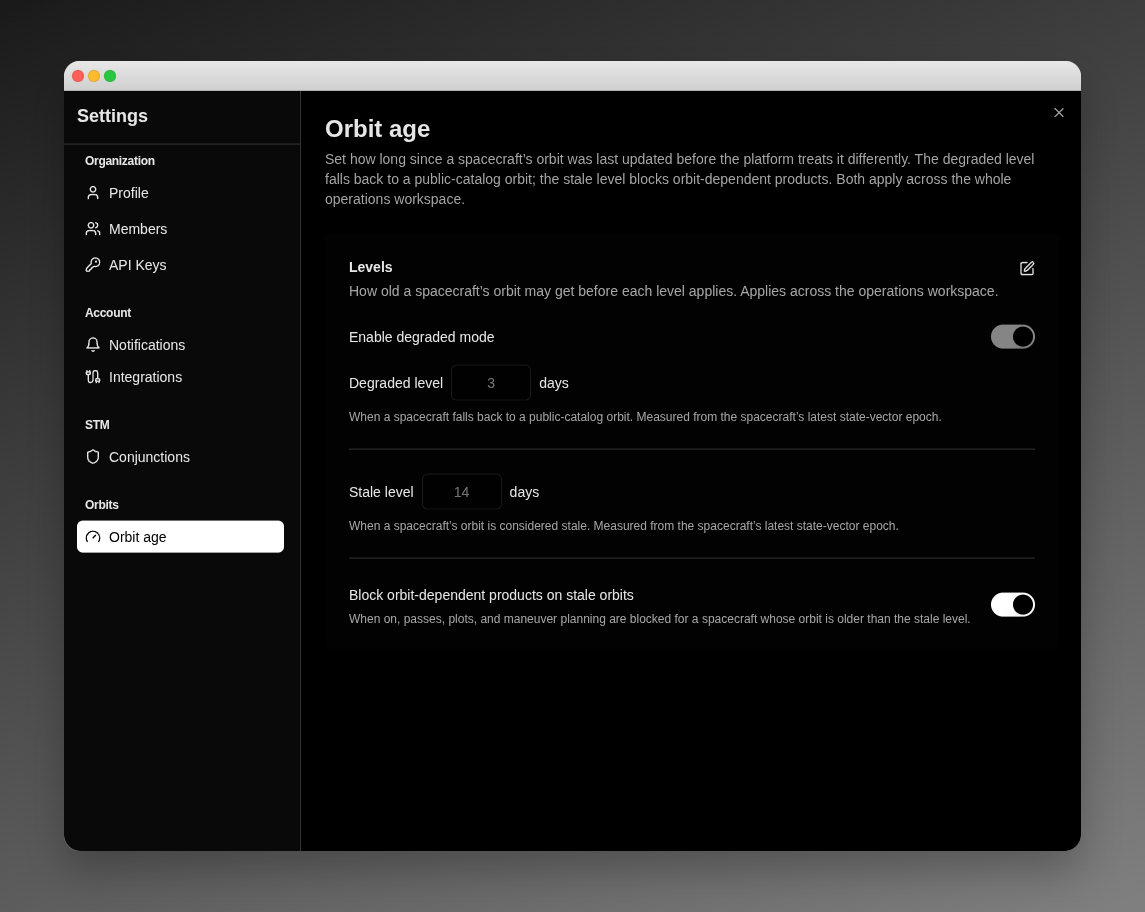
## Configuring orbit age
Open **Settings → Orbits → Orbit age**. One section sets both levels together, along with the block switch; the policy applies to every spacecraft in the operations workspace.
 | Control | Detail |
| -------------------------------------------------- | ------------------------------------------------------------------------------------------------------------------------------------------------------------ |
| **Enable degraded mode** | Master switch for the degraded level. On by default. |
| **Degraded level** | A whole number of days — the orbit age at which a spacecraft falls back to a public TLE. Required while degraded mode is on; accepted range `1`–`3650 days`. |
| **Stale level** | A whole number of days — the orbit age at which a spacecraft is flagged stale. Default `14 days`; accepted range `1`–`3650 days`. |
| **Block orbit-dependent products on stale orbits** | Enforces the stale level across passes, plots, AOI overflight, orbital events, attitude, and maneuver optimization. On by default. |
| **Scope** | Workspace-wide — one orbit-age policy for every spacecraft in the operations workspace. |
| **Measured from** | Each spacecraft's latest state-vector epoch (all times UTC). |
To change the levels, click the edit (pencil) control, enter the day counts, and click **Save**. A confirmation reads **Orbit-age policy saved**. Because the degraded level must sit at or below the stale level, saving a degraded level above the stale level is rejected inline with **Degraded level must be at or below the stale level.**
### Validation Messages
When you save, each level checks your entry and shows one of these messages inline if it cannot be accepted:
| Message | When it appears |
| ------------------------------------------------------- | --------------------------------------------------------------------------------------------------- |
| **A staleness threshold is required** | A required level was left blank — the stale level, or the degraded level while degraded mode is on. |
| **Enter a whole number of days** | The entry is not a whole number — for example a decimal or non-numeric text. |
| **Enter a positive whole number of days** | The stale level is below the minimum of 1 day. |
| **Enter a staleness threshold of 1 day or more** | The degraded level is below the minimum of 1 day. |
| **Degraded level must be at or below the stale level.** | The degraded level is greater than the stale level. |
| **Enter a value between 1 and 3650 days** | A level is outside the accepted range of 1 to 3650 days. |
### Turning degraded mode off
If you turn **Enable degraded mode** off while spacecraft are currently degraded, VALAR asks you to confirm before the change takes effect. The confirmation is titled **Turn off degraded mode?** with the body:
> N spacecraft will return to requiring a precise orbit and their planning functions will be blocked until a fresh state vector is provided. Continue?
Click **Continue** to disable degraded mode, or **Cancel** to keep it on. When no spacecraft are currently degraded, the switch turns off without a confirmation.
## Related Pages
* [State Vectors](/features/state-vectors): Provide and manage the precise orbital data whose epoch orbit age is measured against, and which the public-TLE fallback stands in for.
* [Spacecraft Management](/features/spacecraft-management): Set a spacecraft's NORAD catalog ID so it can use the public-TLE fallback at the degraded level.
* [Ground Track](/features/3d-ground-track): The ground-track map that runs on the fallback at the degraded level and shows the stale-orbit warning past the stale level.
* [Keplerian Elements](/features/orbit-elements-plots): The orbital-element time-series that run on the fallback at the degraded level and show the stale-orbit warning past the stale level.
* [Overflight Events](/features/areas-of-interest/overflight-events): AOI overflight runs on the fallback at the degraded level and warns inline past the stale level.
* [Burn Plan Timeline](/features/burn-plan): Review and export the orbital events that run on the fallback at the degraded level.
* [Attitude Profiles](/features/attitude/overview): Configure pointing modes and export the AEM attitude file that runs on the fallback at the degraded level.
* [Planner](/features/planner): Maneuver optimization asks you to acknowledge a stale orbit, and can't compute for a spacecraft with no usable orbit.
* [CAM Optimization](/features/cam-optimization): Optimize collision-avoidance maneuvers, refused outright on a stale orbit until you provide fresher tracking data.
| Control | Detail |
| -------------------------------------------------- | ------------------------------------------------------------------------------------------------------------------------------------------------------------ |
| **Enable degraded mode** | Master switch for the degraded level. On by default. |
| **Degraded level** | A whole number of days — the orbit age at which a spacecraft falls back to a public TLE. Required while degraded mode is on; accepted range `1`–`3650 days`. |
| **Stale level** | A whole number of days — the orbit age at which a spacecraft is flagged stale. Default `14 days`; accepted range `1`–`3650 days`. |
| **Block orbit-dependent products on stale orbits** | Enforces the stale level across passes, plots, AOI overflight, orbital events, attitude, and maneuver optimization. On by default. |
| **Scope** | Workspace-wide — one orbit-age policy for every spacecraft in the operations workspace. |
| **Measured from** | Each spacecraft's latest state-vector epoch (all times UTC). |
To change the levels, click the edit (pencil) control, enter the day counts, and click **Save**. A confirmation reads **Orbit-age policy saved**. Because the degraded level must sit at or below the stale level, saving a degraded level above the stale level is rejected inline with **Degraded level must be at or below the stale level.**
### Validation Messages
When you save, each level checks your entry and shows one of these messages inline if it cannot be accepted:
| Message | When it appears |
| ------------------------------------------------------- | --------------------------------------------------------------------------------------------------- |
| **A staleness threshold is required** | A required level was left blank — the stale level, or the degraded level while degraded mode is on. |
| **Enter a whole number of days** | The entry is not a whole number — for example a decimal or non-numeric text. |
| **Enter a positive whole number of days** | The stale level is below the minimum of 1 day. |
| **Enter a staleness threshold of 1 day or more** | The degraded level is below the minimum of 1 day. |
| **Degraded level must be at or below the stale level.** | The degraded level is greater than the stale level. |
| **Enter a value between 1 and 3650 days** | A level is outside the accepted range of 1 to 3650 days. |
### Turning degraded mode off
If you turn **Enable degraded mode** off while spacecraft are currently degraded, VALAR asks you to confirm before the change takes effect. The confirmation is titled **Turn off degraded mode?** with the body:
> N spacecraft will return to requiring a precise orbit and their planning functions will be blocked until a fresh state vector is provided. Continue?
Click **Continue** to disable degraded mode, or **Cancel** to keep it on. When no spacecraft are currently degraded, the switch turns off without a confirmation.
## Related Pages
* [State Vectors](/features/state-vectors): Provide and manage the precise orbital data whose epoch orbit age is measured against, and which the public-TLE fallback stands in for.
* [Spacecraft Management](/features/spacecraft-management): Set a spacecraft's NORAD catalog ID so it can use the public-TLE fallback at the degraded level.
* [Ground Track](/features/3d-ground-track): The ground-track map that runs on the fallback at the degraded level and shows the stale-orbit warning past the stale level.
* [Keplerian Elements](/features/orbit-elements-plots): The orbital-element time-series that run on the fallback at the degraded level and show the stale-orbit warning past the stale level.
* [Overflight Events](/features/areas-of-interest/overflight-events): AOI overflight runs on the fallback at the degraded level and warns inline past the stale level.
* [Burn Plan Timeline](/features/burn-plan): Review and export the orbital events that run on the fallback at the degraded level.
* [Attitude Profiles](/features/attitude/overview): Configure pointing modes and export the AEM attitude file that runs on the fallback at the degraded level.
* [Planner](/features/planner): Maneuver optimization asks you to acknowledge a stale orbit, and can't compute for a spacecraft with no usable orbit.
* [CAM Optimization](/features/cam-optimization): Optimize collision-avoidance maneuvers, refused outright on a stale orbit until you provide fresher tracking data.