> ## Documentation Index
> Fetch the complete documentation index at: https://docs.valar.space/llms.txt
> Use this file to discover all available pages before exploring further.
# State Vector Comparison
> Compare two state vectors side-by-side, or check a single state vector's mean elements against a public TLE reference
> For the complete documentation index, see [llms.txt](/llms.txt).
State Vector Comparison lets you inspect two state vectors side-by-side across their orbital elements — both osculating and DSST mean — and cross-check a single state vector's mean elements against the public TLE reference propagated with SGP4. Operators use this view to verify that orbit determination has converged, investigate divergence between theories, and spot-check their solutions against an independent SGP4 reference.
**Route:** `/state-vectors/data`
## Compare Button
The **Compare** button lives in the state vectors page toolbar, next to **Generate Ephemerides** and **Import**. The button is enabled whenever the current view contains at least one state vector. When the list is empty, the button is disabled and a tooltip reads *No state vectors to compare*.
Clicking **Compare** opens the comparison modal with two tabs: **Osculating Elements** and **Mean Elements**. The Osculating Elements tab compares two state vectors side-by-side, so you'll select two state vectors from the modal's dropdowns to populate the view. The Mean Elements tab pairs a single state vector against the public TLE reference, so one selection is enough there.
## Osculating Elements Tab
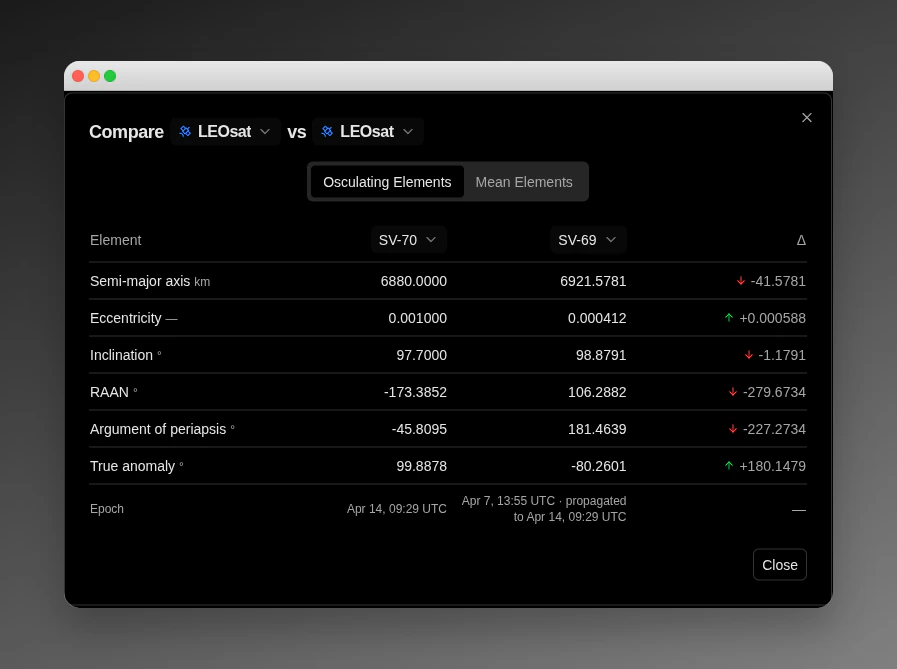
The Osculating Elements tab compares two state vectors side-by-side using their osculating Keplerian elements. The modal header contains two spacecraft dropdowns — **Spacecraft A** and **Spacecraft B** — separated by the label **vs**.
 ### Selecting State Vectors
Once a spacecraft is picked on either side, a state vector (SV) selector appears in the column header for that side. Choose an SV for **Spacecraft A** on the left and an SV for **Spacecraft B** on the right.
Selecting the same SV in both slots is prevented — if you pick an SV in one side that is already selected on the other, the other slot is cleared automatically.
### Epoch Alignment
When the two selected SVs have different epochs, SV-B is propagated to SV-A's epoch so both columns represent the same instant. The right-column epoch row shows the original SV-B label followed by a note that it was propagated:
```text theme={null}
· propagated to
```
### Elements Table
| Element | Symbol | Unit | Precision |
| --------------------- | ------ | ---- | ---------- |
| Semi-major axis | a | km | 4 decimals |
| Eccentricity | e | — | 6 decimals |
| Inclination | i | ° | 4 decimals |
| RAAN | Ω | ° | 4 decimals |
| Argument of periapsis | ω | ° | 4 decimals |
| True anomaly | ν | ° | 4 decimals |
| Epoch | — | UTC | — |
The **Δ** column shows the signed element-level difference between SV-A and SV-B for each row. A directional arrow flags which side is greater at a glance — up arrow when SV-A is larger, down arrow when SV-A is smaller — and the numeric magnitude is shown next to it.
## Mean Elements Tab
The Mean Elements tab compares a single state vector's **DSST mean elements** against the **public TLE reference** for the same spacecraft. Because only one SV is compared, the **Spacecraft B** selector is hidden on this tab and only the **Spacecraft A** / SV-A selector is shown.
### Selecting State Vectors
Once a spacecraft is picked on either side, a state vector (SV) selector appears in the column header for that side. Choose an SV for **Spacecraft A** on the left and an SV for **Spacecraft B** on the right.
Selecting the same SV in both slots is prevented — if you pick an SV in one side that is already selected on the other, the other slot is cleared automatically.
### Epoch Alignment
When the two selected SVs have different epochs, SV-B is propagated to SV-A's epoch so both columns represent the same instant. The right-column epoch row shows the original SV-B label followed by a note that it was propagated:
```text theme={null}
· propagated to
```
### Elements Table
| Element | Symbol | Unit | Precision |
| --------------------- | ------ | ---- | ---------- |
| Semi-major axis | a | km | 4 decimals |
| Eccentricity | e | — | 6 decimals |
| Inclination | i | ° | 4 decimals |
| RAAN | Ω | ° | 4 decimals |
| Argument of periapsis | ω | ° | 4 decimals |
| True anomaly | ν | ° | 4 decimals |
| Epoch | — | UTC | — |
The **Δ** column shows the signed element-level difference between SV-A and SV-B for each row. A directional arrow flags which side is greater at a glance — up arrow when SV-A is larger, down arrow when SV-A is smaller — and the numeric magnitude is shown next to it.
## Mean Elements Tab
The Mean Elements tab compares a single state vector's **DSST mean elements** against the **public TLE reference** for the same spacecraft. Because only one SV is compared, the **Spacecraft B** selector is hidden on this tab and only the **Spacecraft A** / SV-A selector is shown.
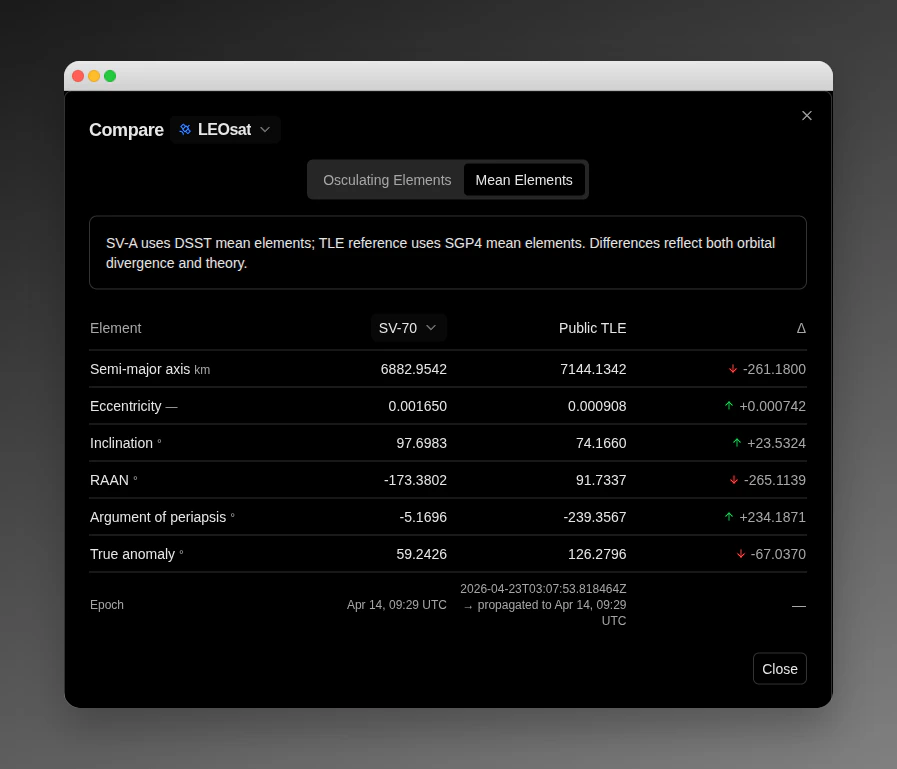 SV-A uses DSST mean elements; TLE reference uses SGP4 mean elements. Differences reflect both orbital divergence and theory.
### Reference Data
The TLE is fetched for the spacecraft's configured NORAD ID and propagated with SGP4 to SV-A's epoch so the two columns share a common instant. The epoch row shows both the TLE epoch and the propagation target:
```text theme={null}
→ propagated to
```
### Elements Table
The tab's table uses three columns — **SV-A (DSST)**, **Public TLE (SGP4)**, and **Δ** (SV-A − TLE) — for the same six Keplerian elements listed in the Osculating Elements table, with the same precision (eccentricity to 6 decimals, other elements to 4).
## Details Panel — Mean Tab
Mean elements are also available directly in the state-vectors details panel on the right-hand side, without opening the comparison modal. The Coordinates section now has three tabs:
| Tab | Contents |
| ------------- | -------------------------------------------------------------------- |
| **Keplerian** | Osculating Keplerian elements (a, e, i, Ω, ω, ν) and reference frame |
| **Cartesian** | Position and velocity components in the selected reference frame |
| **Mean** | DSST mean Keplerian elements for the selected state vector |
SV-A uses DSST mean elements; TLE reference uses SGP4 mean elements. Differences reflect both orbital divergence and theory.
### Reference Data
The TLE is fetched for the spacecraft's configured NORAD ID and propagated with SGP4 to SV-A's epoch so the two columns share a common instant. The epoch row shows both the TLE epoch and the propagation target:
```text theme={null}
→ propagated to
```
### Elements Table
The tab's table uses three columns — **SV-A (DSST)**, **Public TLE (SGP4)**, and **Δ** (SV-A − TLE) — for the same six Keplerian elements listed in the Osculating Elements table, with the same precision (eccentricity to 6 decimals, other elements to 4).
## Details Panel — Mean Tab
Mean elements are also available directly in the state-vectors details panel on the right-hand side, without opening the comparison modal. The Coordinates section now has three tabs:
| Tab | Contents |
| ------------- | -------------------------------------------------------------------- |
| **Keplerian** | Osculating Keplerian elements (a, e, i, Ω, ω, ν) and reference frame |
| **Cartesian** | Position and velocity components in the selected reference frame |
| **Mean** | DSST mean Keplerian elements for the selected state vector |
 The **Mean** tab shows the same six elements with their standard symbols and precision:
| Element | Symbol | Unit | Precision |
| ----------------- | ------ | ---- | ---------- |
| Semi-major axis | a | km | 3 decimals |
| Eccentricity | e | — | 6 decimals |
| Inclination | i | deg | 3 decimals |
| RAAN | Ω | deg | 3 decimals |
| Arg. of periapsis | ω | deg | 3 decimals |
| True anomaly | ν | deg | 3 decimals |
## When the TLE column isn't available
The Mean Elements tab depends on a public TLE for the spacecraft. When that reference is missing, the platform surfaces the reason in-place so you can act on it.
### Spacecraft has no NORAD ID
If the spacecraft selected as Spacecraft A does not have a NORAD ID configured, the TLE column is replaced with an informational notice:
Configure a NORAD ID in spacecraft settings to enable the public TLE reference.
Once a NORAD ID is added on the spacecraft's settings page, reopen the modal to see the TLE column populated.
### Space-Track temporarily unavailable
When the upstream Space-Track service is unreachable or returns an error, the TLE column surfaces a transient warning:
TLE reference temporarily unavailable. Try again shortly.
This is a system-wide condition, not tied to any specific state vector — retrying a few moments later is usually enough.
### DSST conversion failure
DSST mean elements are derived per-state-vector. When the conversion fails for a particular SV, its mean-element cell is replaced with:
Mean elements unavailable for this state vector.
This message appears in both places that render mean elements:
* In the details panel **Mean** tab — the whole cell is replaced.
* In the Mean Elements comparison tab — the SV-A column's first row is replaced.
The condition is specific to a single state vector, so other state vectors for the same spacecraft may still show mean elements normally.
## Related API endpoints
Use `GET /operations/state-vectors/{id}` to read a state vector programmatically — the response includes a `meanElements` field, which is `null` when DSST conversion failed for that state vector. See the **API Reference** tab at the top of the docs for the full schema and authentication details.
## Related Pages
* [State Vectors](/features/state-vectors): List, import, and manage state vectors
* [Spacecraft Management](/features/spacecraft-management): Configure a spacecraft's NORAD ID
* [TLE Format](/file-formats/tle): TLE file format specification
The **Mean** tab shows the same six elements with their standard symbols and precision:
| Element | Symbol | Unit | Precision |
| ----------------- | ------ | ---- | ---------- |
| Semi-major axis | a | km | 3 decimals |
| Eccentricity | e | — | 6 decimals |
| Inclination | i | deg | 3 decimals |
| RAAN | Ω | deg | 3 decimals |
| Arg. of periapsis | ω | deg | 3 decimals |
| True anomaly | ν | deg | 3 decimals |
## When the TLE column isn't available
The Mean Elements tab depends on a public TLE for the spacecraft. When that reference is missing, the platform surfaces the reason in-place so you can act on it.
### Spacecraft has no NORAD ID
If the spacecraft selected as Spacecraft A does not have a NORAD ID configured, the TLE column is replaced with an informational notice:
Configure a NORAD ID in spacecraft settings to enable the public TLE reference.
Once a NORAD ID is added on the spacecraft's settings page, reopen the modal to see the TLE column populated.
### Space-Track temporarily unavailable
When the upstream Space-Track service is unreachable or returns an error, the TLE column surfaces a transient warning:
TLE reference temporarily unavailable. Try again shortly.
This is a system-wide condition, not tied to any specific state vector — retrying a few moments later is usually enough.
### DSST conversion failure
DSST mean elements are derived per-state-vector. When the conversion fails for a particular SV, its mean-element cell is replaced with:
Mean elements unavailable for this state vector.
This message appears in both places that render mean elements:
* In the details panel **Mean** tab — the whole cell is replaced.
* In the Mean Elements comparison tab — the SV-A column's first row is replaced.
The condition is specific to a single state vector, so other state vectors for the same spacecraft may still show mean elements normally.
## Related API endpoints
Use `GET /operations/state-vectors/{id}` to read a state vector programmatically — the response includes a `meanElements` field, which is `null` when DSST conversion failed for that state vector. See the **API Reference** tab at the top of the docs for the full schema and authentication details.
## Related Pages
* [State Vectors](/features/state-vectors): List, import, and manage state vectors
* [Spacecraft Management](/features/spacecraft-management): Configure a spacecraft's NORAD ID
* [TLE Format](/file-formats/tle): TLE file format specification