> ## Documentation Index
> Fetch the complete documentation index at: https://docs.valar.space/llms.txt
> Use this file to discover all available pages before exploring further.
# State Vectors
> View, import, and manage spacecraft state vectors and orbit solutions
> For the complete documentation index, see [llms.txt](/llms.txt).
The State Vectors page displays orbit solutions for your spacecraft, including position, velocity, and covariance data. Import state vectors from [OPM](/file-formats/opm) files, view orbital elements, and export data for external use.
**Route:** `/state-vectors/data`
## Page Layout
The page uses a split-view design with a state vector list on the left and a details panel on the right:
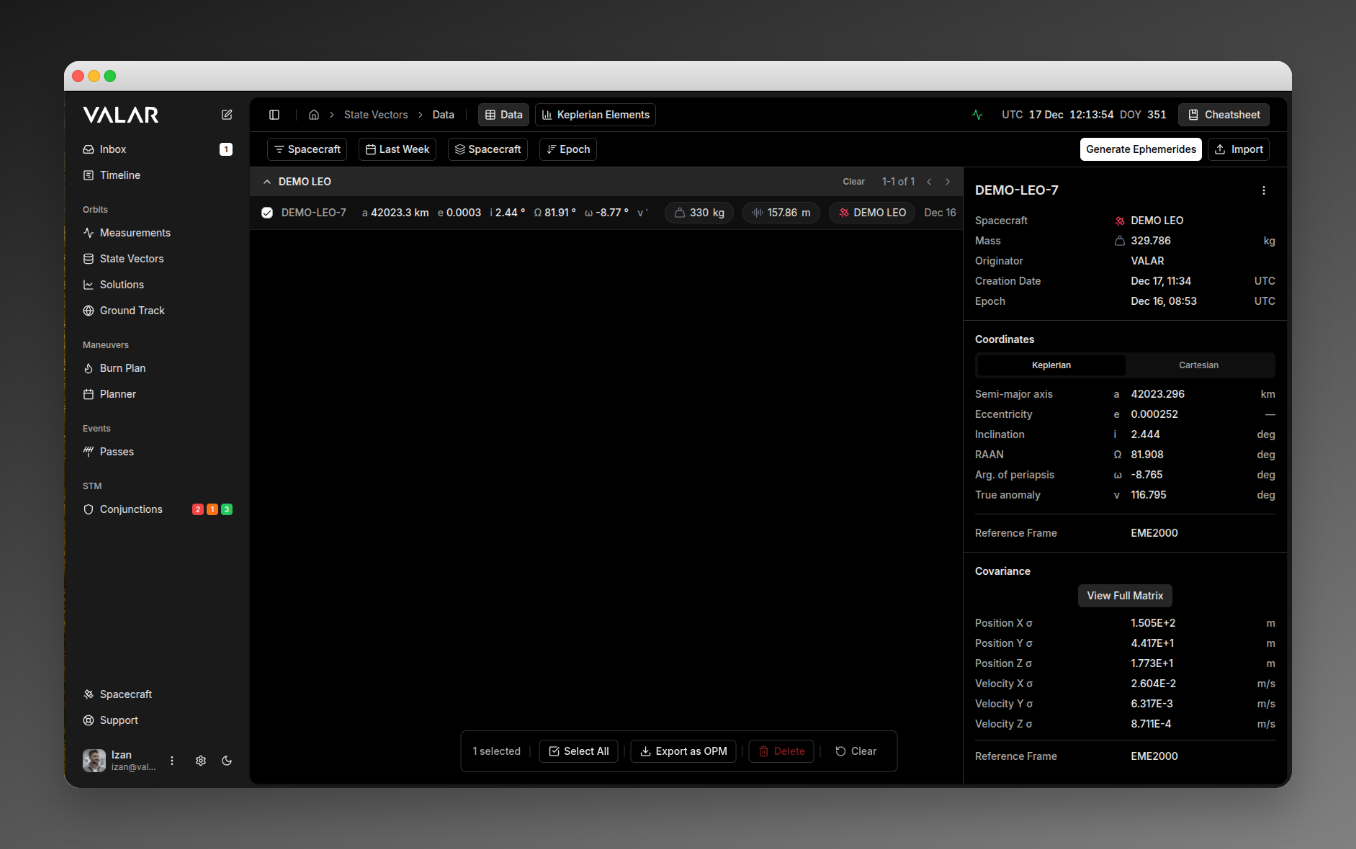 When state vectors are selected, a floating action bar appears at the bottom.
## Filtering
### Spacecraft Filter
Filter state vectors by spacecraft. Click to open a multi-select dropdown, check/uncheck spacecraft, and click **Apply** to confirm.
**Default:** Shows all spacecraft when none selected.
### Time Range Filter
| Option | Description |
| -------------- | --------------------- |
| **Today** | Last 24 hours |
| **Last Week** | Last 7 days (default) |
| **Last Month** | Last 30 days |
### Group By
| Option | Effect |
| -------------- | ---------------------------------------------------------------------------------------------- |
| **Spacecraft** | Groups state vectors by spacecraft with collapsible headers and per-group pagination (default) |
| **None** | Flat list with infinite scroll |
### Sort by Epoch
Click the **↓ Epoch** / **↑ Epoch** button to toggle sort order:
| State | Description |
| ------------------ | ---------------------------------- |
| **↓ Newest First** | Most recent epoch at top (default) |
| **↑ Oldest First** | Oldest epoch at top |
## State Vector List
### Row Information
Each row displays:
| Element | Description | Format |
| ---------- | ------------------------------ | ---------------------------- |
| Checkbox | Selection for bulk actions | Hover-reveal |
| ID | State vector identifier | Truncated (full ID on hover) |
| a | Semi-major axis | XXXX.X km |
| e | Eccentricity | 0.XXXX |
| i | Inclination | XX.XX° |
| Ω | RAAN | XX.XX° |
| ω | Arg. of periapsis | XX.XX° |
| ν | True anomaly | XX.XX° |
| Mass | Spacecraft mass | XXXX kg |
| Position σ | Position uncertainty (3D norm) | XX.XX m |
| Spacecraft | Spacecraft name | Colored badge |
| Epoch | State vector epoch | Mon DD format |
### Row Selection
* **Click row**: Selects state vector for details panel
* **Click checkbox**: Adds to bulk selection for bulk actions
## Grouped View
When grouped by spacecraft, each group has a collapsible header:
| Element | Action |
| ----------------- | ---------------------------- |
| **Chevron (▼/▶)** | Collapse/expand group |
| **Group Name** | Spacecraft name |
| **Count** | Total state vectors in group |
| **◀ / ▶** | Navigate pages within group |
### Group Selection
When items are selected within a group:
* **Select All**: Select all items in current page of this group
* **Clear**: Deselect all items in this group
## Details Panel
Click a state vector row to view its details in the right panel.
### Header
Shows the full state vector ID with a **⋮** menu button.
### More Menu Actions
| Action | Description |
| ----------------------- | --------------------------------------------- |
| **Download OPM** | Export single state vector as OPM file |
| **Delete State Vector** | Delete this state vector (opens confirmation) |
### Metadata Section
| Field | Description |
| ----------------- | ----------------------------------------------------------------------------- |
| **Spacecraft** | Name with colored satellite icon |
| **Mass** | In kilograms (kg) |
| **Originator** | Organization that created the solution (from imported OPM file, not editable) |
| **Creation Date** | When imported/created (UTC) |
| **Epoch** | State vector reference time (UTC) |
### Coordinates Section
Toggle between **Keplerian** and **Cartesian** tabs.
**Keplerian Tab:**
| Element | Symbol | Unit |
| ----------------- | ------ | ---------- |
| Semi-major axis | a | km |
| Eccentricity | e | — |
| Inclination | i | deg |
| RAAN | Ω | deg |
| Arg. of periapsis | ω | deg |
| True anomaly | ν | deg |
| Reference Frame | — | e.g., GCRF |
**Cartesian Tab:**
| Element | Unit |
| ---------------- | ---------- |
| Position X, Y, Z | km |
| Velocity X, Y, Z | km/s |
| Reference Frame | e.g., GCRF |
### Covariance Section
Only shown if covariance data exists in the state vector. The Position σ column in the list view also only appears for state vectors with covariance data.
| Field | Unit |
| -------------------------- | ----------------------- |
| Position X, Y, Z σ | m (scientific notation) |
| Velocity X, Y, Z σ | m/s |
| Covariance Reference Frame | RTN or XYZ |
Click **View Full Matrix** to open a modal with the complete 6×6 covariance matrix.
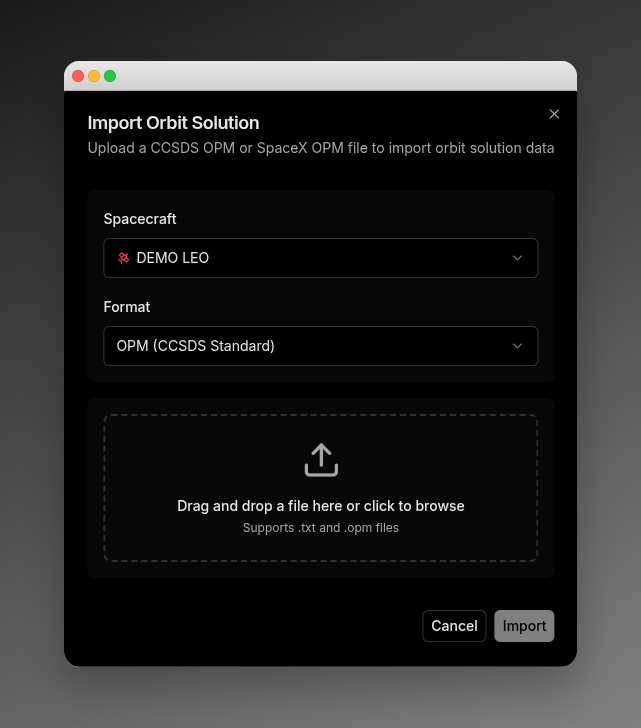
## Importing State Vectors
Click **Import** in the toolbar to open the import dialog.
When state vectors are selected, a floating action bar appears at the bottom.
## Filtering
### Spacecraft Filter
Filter state vectors by spacecraft. Click to open a multi-select dropdown, check/uncheck spacecraft, and click **Apply** to confirm.
**Default:** Shows all spacecraft when none selected.
### Time Range Filter
| Option | Description |
| -------------- | --------------------- |
| **Today** | Last 24 hours |
| **Last Week** | Last 7 days (default) |
| **Last Month** | Last 30 days |
### Group By
| Option | Effect |
| -------------- | ---------------------------------------------------------------------------------------------- |
| **Spacecraft** | Groups state vectors by spacecraft with collapsible headers and per-group pagination (default) |
| **None** | Flat list with infinite scroll |
### Sort by Epoch
Click the **↓ Epoch** / **↑ Epoch** button to toggle sort order:
| State | Description |
| ------------------ | ---------------------------------- |
| **↓ Newest First** | Most recent epoch at top (default) |
| **↑ Oldest First** | Oldest epoch at top |
## State Vector List
### Row Information
Each row displays:
| Element | Description | Format |
| ---------- | ------------------------------ | ---------------------------- |
| Checkbox | Selection for bulk actions | Hover-reveal |
| ID | State vector identifier | Truncated (full ID on hover) |
| a | Semi-major axis | XXXX.X km |
| e | Eccentricity | 0.XXXX |
| i | Inclination | XX.XX° |
| Ω | RAAN | XX.XX° |
| ω | Arg. of periapsis | XX.XX° |
| ν | True anomaly | XX.XX° |
| Mass | Spacecraft mass | XXXX kg |
| Position σ | Position uncertainty (3D norm) | XX.XX m |
| Spacecraft | Spacecraft name | Colored badge |
| Epoch | State vector epoch | Mon DD format |
### Row Selection
* **Click row**: Selects state vector for details panel
* **Click checkbox**: Adds to bulk selection for bulk actions
## Grouped View
When grouped by spacecraft, each group has a collapsible header:
| Element | Action |
| ----------------- | ---------------------------- |
| **Chevron (▼/▶)** | Collapse/expand group |
| **Group Name** | Spacecraft name |
| **Count** | Total state vectors in group |
| **◀ / ▶** | Navigate pages within group |
### Group Selection
When items are selected within a group:
* **Select All**: Select all items in current page of this group
* **Clear**: Deselect all items in this group
## Details Panel
Click a state vector row to view its details in the right panel.
### Header
Shows the full state vector ID with a **⋮** menu button.
### More Menu Actions
| Action | Description |
| ----------------------- | --------------------------------------------- |
| **Download OPM** | Export single state vector as OPM file |
| **Delete State Vector** | Delete this state vector (opens confirmation) |
### Metadata Section
| Field | Description |
| ----------------- | ----------------------------------------------------------------------------- |
| **Spacecraft** | Name with colored satellite icon |
| **Mass** | In kilograms (kg) |
| **Originator** | Organization that created the solution (from imported OPM file, not editable) |
| **Creation Date** | When imported/created (UTC) |
| **Epoch** | State vector reference time (UTC) |
### Coordinates Section
Toggle between **Keplerian** and **Cartesian** tabs.
**Keplerian Tab:**
| Element | Symbol | Unit |
| ----------------- | ------ | ---------- |
| Semi-major axis | a | km |
| Eccentricity | e | — |
| Inclination | i | deg |
| RAAN | Ω | deg |
| Arg. of periapsis | ω | deg |
| True anomaly | ν | deg |
| Reference Frame | — | e.g., GCRF |
**Cartesian Tab:**
| Element | Unit |
| ---------------- | ---------- |
| Position X, Y, Z | km |
| Velocity X, Y, Z | km/s |
| Reference Frame | e.g., GCRF |
### Covariance Section
Only shown if covariance data exists in the state vector. The Position σ column in the list view also only appears for state vectors with covariance data.
| Field | Unit |
| -------------------------- | ----------------------- |
| Position X, Y, Z σ | m (scientific notation) |
| Velocity X, Y, Z σ | m/s |
| Covariance Reference Frame | RTN or XYZ |
Click **View Full Matrix** to open a modal with the complete 6×6 covariance matrix.
## Importing State Vectors
Click **Import** in the toolbar to open the import dialog.
 ### Configuration
**Format Selection:**
| Format | Description |
| ------------------------ | -------------------------------------------------------------------------------------------------------------------------------- |
| **OPM (CCSDS Standard)** | Standard CCSDS Orbit Parameter Message. VALAR matches the spacecraft automatically from the file's `OBJECT_ID` or `OBJECT_NAME`. |
| **SpaceX OPM** | SpaceX second-stage OPM variant. You select the target spacecraft. |
**Spacecraft Selection:** Shown only for **SpaceX OPM** — choose which spacecraft the state vector belongs to. For **OPM (CCSDS Standard)**, VALAR resolves the spacecraft from the file, so no selector appears.
### File Upload
Drag and drop files onto the upload zone, or click to browse. Accepted files: `.txt`, `.opm`
### Upload Outcomes
* **Success:** Toast notification, dialog closes, data refreshes
* **Partial Success:** Warning toast with count (e.g., "Imported 1 of 2 orbit solutions")
* **Error:** Red alert with the error code and message. See [OPM Import Error Modes](/file-formats/opm#import-error-modes) for the common errors and how to resolve them.
## Generating Ephemerides
Click **Generate Ephemerides** in the toolbar to open the OEM Export wizard. This multi-step wizard creates ephemeris files from your state vectors.
### Wizard Steps
| Step | Name | Description |
| ---- | --------------------- | --------------------------------------------------------- |
| 1 | **State Vector** | Select which state vector to use as the initial condition |
| 2 | **Time Range** | Configure propagation start/end times and step size |
| 3 | **Reference Frames** | Select output reference frame(s) |
| 4 | **Review & Generate** | Review settings and generate the OEM file |
For detailed documentation of each step, see [Ephemeris Generation](/features/ephemeris-generation).
## Exporting State Vectors
### Single Export
From the details panel, click **⋮** → **Download OPM** to download a single state vector as an OPM file.
### Bulk Export
Select multiple state vectors using checkboxes, then click **Export as OPM** in the floating toolbar.
| Selection | Output |
| -------------------------- | ---------------------------------------- |
| Single state vector | Downloads single `.opm` file |
| Multiple (same spacecraft) | Downloads single `.opm` file |
| Multiple spacecraft | Downloads `.zip` with separate OPM files |
## Deleting State Vectors
### Single Delete
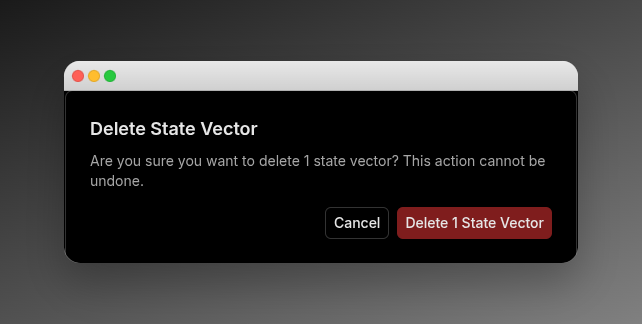
From the details panel, click **⋮** → **Delete State Vector**.
Confirmation dialog:
### Configuration
**Format Selection:**
| Format | Description |
| ------------------------ | -------------------------------------------------------------------------------------------------------------------------------- |
| **OPM (CCSDS Standard)** | Standard CCSDS Orbit Parameter Message. VALAR matches the spacecraft automatically from the file's `OBJECT_ID` or `OBJECT_NAME`. |
| **SpaceX OPM** | SpaceX second-stage OPM variant. You select the target spacecraft. |
**Spacecraft Selection:** Shown only for **SpaceX OPM** — choose which spacecraft the state vector belongs to. For **OPM (CCSDS Standard)**, VALAR resolves the spacecraft from the file, so no selector appears.
### File Upload
Drag and drop files onto the upload zone, or click to browse. Accepted files: `.txt`, `.opm`
### Upload Outcomes
* **Success:** Toast notification, dialog closes, data refreshes
* **Partial Success:** Warning toast with count (e.g., "Imported 1 of 2 orbit solutions")
* **Error:** Red alert with the error code and message. See [OPM Import Error Modes](/file-formats/opm#import-error-modes) for the common errors and how to resolve them.
## Generating Ephemerides
Click **Generate Ephemerides** in the toolbar to open the OEM Export wizard. This multi-step wizard creates ephemeris files from your state vectors.
### Wizard Steps
| Step | Name | Description |
| ---- | --------------------- | --------------------------------------------------------- |
| 1 | **State Vector** | Select which state vector to use as the initial condition |
| 2 | **Time Range** | Configure propagation start/end times and step size |
| 3 | **Reference Frames** | Select output reference frame(s) |
| 4 | **Review & Generate** | Review settings and generate the OEM file |
For detailed documentation of each step, see [Ephemeris Generation](/features/ephemeris-generation).
## Exporting State Vectors
### Single Export
From the details panel, click **⋮** → **Download OPM** to download a single state vector as an OPM file.
### Bulk Export
Select multiple state vectors using checkboxes, then click **Export as OPM** in the floating toolbar.
| Selection | Output |
| -------------------------- | ---------------------------------------- |
| Single state vector | Downloads single `.opm` file |
| Multiple (same spacecraft) | Downloads single `.opm` file |
| Multiple spacecraft | Downloads `.zip` with separate OPM files |
## Deleting State Vectors
### Single Delete
From the details panel, click **⋮** → **Delete State Vector**.
Confirmation dialog:
 ### Bulk Delete
Select multiple state vectors, then click **Delete** in the floating toolbar.
**Outcomes:**
* **Full success:** "Successfully deleted X orbit solution(s)"
* **Partial success:** "Partially successful: X deleted, Y failed"
* **Full failure:** "Failed to delete any orbit solutions"
## Bulk Actions Toolbar
Appears when one or more state vectors are selected via checkboxes.
| Button | Action |
| ----------------- | -------------------------------------- |
| **X selected** | Shows selection count |
| **Select All** | Selects all visible state vectors |
| **Export as OPM** | Exports selected as OPM file(s) or ZIP |
| **Delete** | Opens bulk delete confirmation |
| **Clear** | Deselects all rows |
## Related Pages
* [Generate OEM](/features/ephemeris-generation): Generate ephemeris files from state vectors
* [Generate TLE](/features/tle-generation): Access TLE data via the cheatsheet
* [OPM Format](/file-formats/opm): OPM file format specification
### Bulk Delete
Select multiple state vectors, then click **Delete** in the floating toolbar.
**Outcomes:**
* **Full success:** "Successfully deleted X orbit solution(s)"
* **Partial success:** "Partially successful: X deleted, Y failed"
* **Full failure:** "Failed to delete any orbit solutions"
## Bulk Actions Toolbar
Appears when one or more state vectors are selected via checkboxes.
| Button | Action |
| ----------------- | -------------------------------------- |
| **X selected** | Shows selection count |
| **Select All** | Selects all visible state vectors |
| **Export as OPM** | Exports selected as OPM file(s) or ZIP |
| **Delete** | Opens bulk delete confirmation |
| **Clear** | Deselects all rows |
## Related Pages
* [Generate OEM](/features/ephemeris-generation): Generate ephemeris files from state vectors
* [Generate TLE](/features/tle-generation): Access TLE data via the cheatsheet
* [OPM Format](/file-formats/opm): OPM file format specification