> ## Documentation Index
> Fetch the complete documentation index at: https://docs.valar.space/llms.txt
> Use this file to discover all available pages before exploring further.
# Sensors
> Managing ground station and tracking sensor configurations
> For the complete documentation index, see [llms.txt](/llms.txt).
Ground sensors are required to track spacecraft and collect telemetry data. The Sensors page allows you to create, view, and delete sensor configurations that are used for processing tracking measurements.
A tracking sensor is a fixed ground-based observer that watches spacecraft from the surface — not to be confused with an on-board spacecraft payload, which is a sensor carried by the spacecraft itself (see [Payloads](/features/spacecraft-management#payloads-tab) on the Spacecraft page).
**Route:** `/orbits/measurements/sensors`
## Page Layout
The sensors page has a split-panel design:
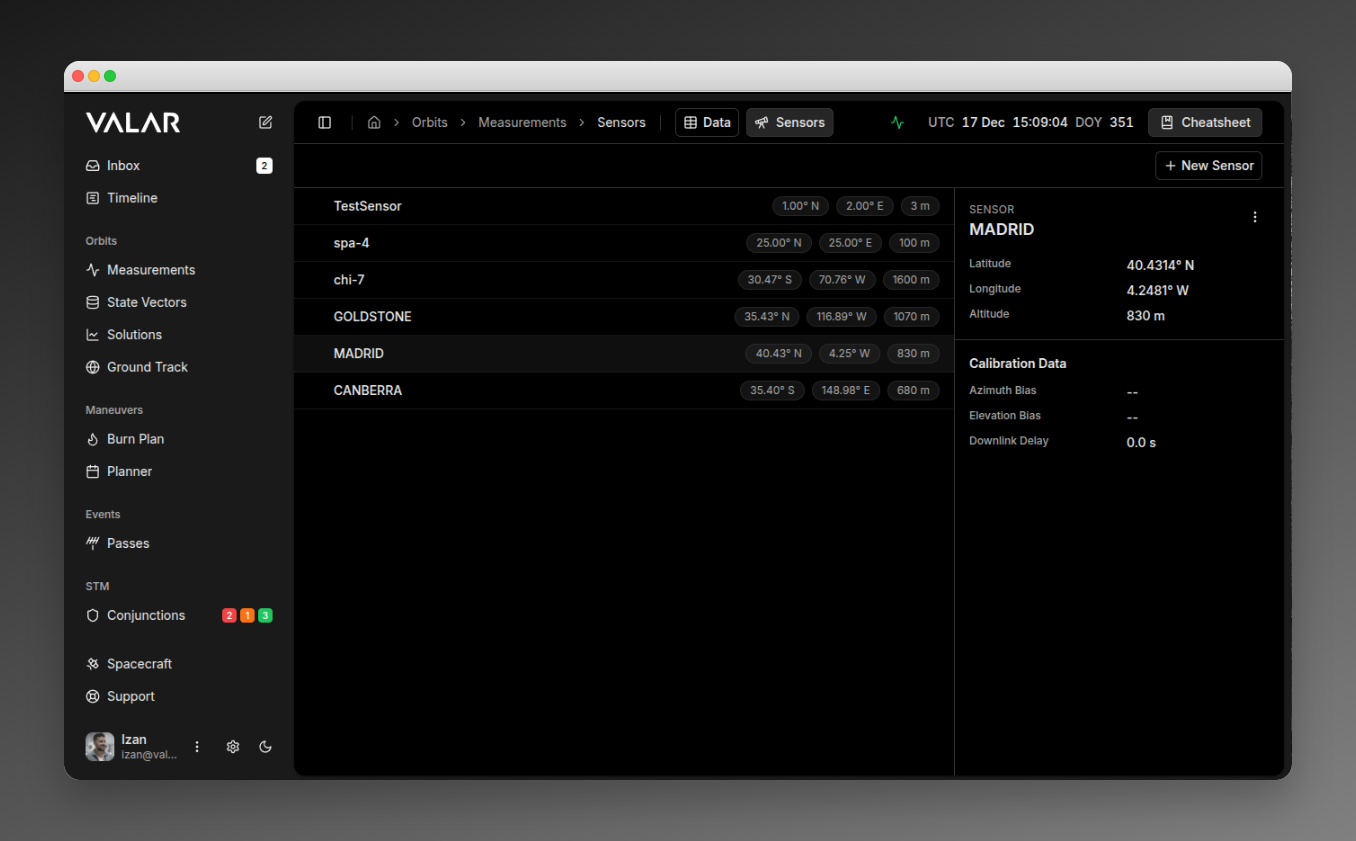 When multiple sensors are selected, a floating action bar appears at the bottom.
## Viewing Sensors
The sensor list (left panel) displays all ground sensors in your organization. Each row shows:
* **Sensor ID** (e.g., "DSN-15")
* **Latitude** (e.g., "35.43° N")
* **Longitude** (e.g., "116.89° E")
* **Altitude** (e.g., "1000 m")
The first sensor is automatically selected when the page loads.
## Viewing Sensor Details
Click any sensor row to view its details in the right panel:
| Section | Field | Format |
| --------------- | -------------- | ----------------------------------------------- |
| **Identity** | Sensor ID | Text (e.g., "DSN-15") |
| **Location** | Latitude | XX.XXXX° N/S |
| | Longitude | XX.XXXX° E/W |
| | Altitude | XXXX m |
| **Calibration** | Azimuth Bias | Scientific notation (e.g., "1.00e-03°") or "--" |
| | Elevation Bias | Scientific notation or "--" |
| | Downlink Delay | Seconds (e.g., "0.5 s") or "--" |
## Creating a Sensor
Click **+ New Sensor** in the top-right corner to open the creation dialog.
When multiple sensors are selected, a floating action bar appears at the bottom.
## Viewing Sensors
The sensor list (left panel) displays all ground sensors in your organization. Each row shows:
* **Sensor ID** (e.g., "DSN-15")
* **Latitude** (e.g., "35.43° N")
* **Longitude** (e.g., "116.89° E")
* **Altitude** (e.g., "1000 m")
The first sensor is automatically selected when the page loads.
## Viewing Sensor Details
Click any sensor row to view its details in the right panel:
| Section | Field | Format |
| --------------- | -------------- | ----------------------------------------------- |
| **Identity** | Sensor ID | Text (e.g., "DSN-15") |
| **Location** | Latitude | XX.XXXX° N/S |
| | Longitude | XX.XXXX° E/W |
| | Altitude | XXXX m |
| **Calibration** | Azimuth Bias | Scientific notation (e.g., "1.00e-03°") or "--" |
| | Elevation Bias | Scientific notation or "--" |
| | Downlink Delay | Seconds (e.g., "0.5 s") or "--" |
## Creating a Sensor
Click **+ New Sensor** in the top-right corner to open the creation dialog.
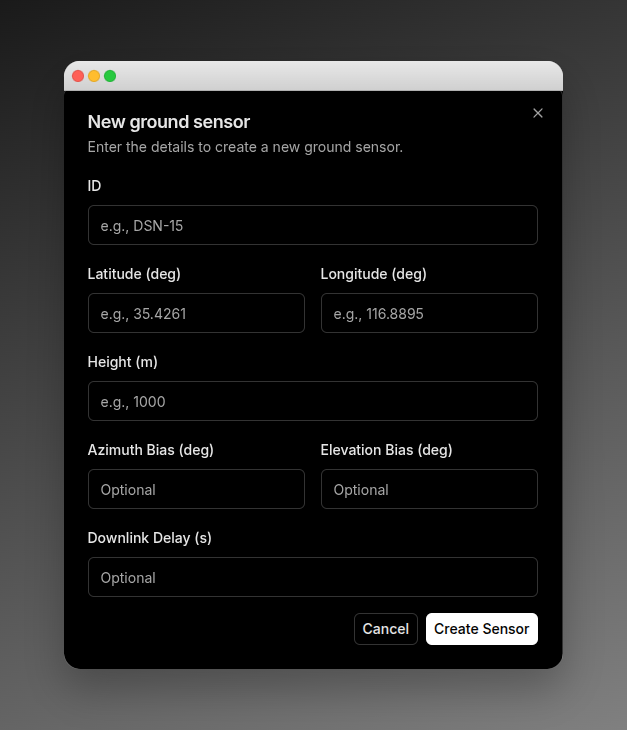 ### Required Fields
| Field | Description | Example |
| ------------------- | ---------------------------------- | -------- |
| **ID** | Unique sensor identifier | DSN-15 |
| **Latitude (deg)** | WGS84 latitude in decimal degrees | 35.4261 |
| **Longitude (deg)** | WGS84 longitude in decimal degrees | 116.8895 |
| **Height (m)** | Elevation above WGS84 ellipsoid | 1000 |
### Optional Fields (Calibration)
| Field | Description | Default | Example |
| ------------------------ | -------------------------- | ------- | ------- |
| **Azimuth Bias (deg)** | Systematic azimuth error | Not set | 0.001 |
| **Elevation Bias (deg)** | Systematic elevation error | Not set | 0.0005 |
| **Downlink Delay (s)** | Signal propagation delay | 0 | 0.5 |
### Default Configuration
When created, sensors are automatically configured with:
| Setting | Default Value |
| ----------------- | ------------------ |
| Type | GROUND\_STATION |
| Available | true |
| Elevation Mask | 0° at all azimuths |
| Measurement Types | AZEL and RANGE |
### Sensor Types
The platform supports two sensor types:
| Type | Description | UI Support |
| ------------------- | ----------------------------- | ------------- |
| **GROUND\_STATION** | Ground-based tracking station | Yes (default) |
| **TELESCOPE** | Optical telescope | API only |
Only GROUND\_STATION sensors can be created through the UI. TELESCOPE sensors must be configured via the API.
### Outcomes
* **Success:** Toast notification "Sensor ID created", sensor list refreshes
* **Error:** Toast with error message from API
## Deleting a Sensor
### Single Delete
1. Select a sensor by clicking it
2. Click the **⋮** (three-dot menu) in the details panel header
3. Click **Delete Sensor**
A confirmation dialog appears:
### Required Fields
| Field | Description | Example |
| ------------------- | ---------------------------------- | -------- |
| **ID** | Unique sensor identifier | DSN-15 |
| **Latitude (deg)** | WGS84 latitude in decimal degrees | 35.4261 |
| **Longitude (deg)** | WGS84 longitude in decimal degrees | 116.8895 |
| **Height (m)** | Elevation above WGS84 ellipsoid | 1000 |
### Optional Fields (Calibration)
| Field | Description | Default | Example |
| ------------------------ | -------------------------- | ------- | ------- |
| **Azimuth Bias (deg)** | Systematic azimuth error | Not set | 0.001 |
| **Elevation Bias (deg)** | Systematic elevation error | Not set | 0.0005 |
| **Downlink Delay (s)** | Signal propagation delay | 0 | 0.5 |
### Default Configuration
When created, sensors are automatically configured with:
| Setting | Default Value |
| ----------------- | ------------------ |
| Type | GROUND\_STATION |
| Available | true |
| Elevation Mask | 0° at all azimuths |
| Measurement Types | AZEL and RANGE |
### Sensor Types
The platform supports two sensor types:
| Type | Description | UI Support |
| ------------------- | ----------------------------- | ------------- |
| **GROUND\_STATION** | Ground-based tracking station | Yes (default) |
| **TELESCOPE** | Optical telescope | API only |
Only GROUND\_STATION sensors can be created through the UI. TELESCOPE sensors must be configured via the API.
### Outcomes
* **Success:** Toast notification "Sensor ID created", sensor list refreshes
* **Error:** Toast with error message from API
## Deleting a Sensor
### Single Delete
1. Select a sensor by clicking it
2. Click the **⋮** (three-dot menu) in the details panel header
3. Click **Delete Sensor**
A confirmation dialog appears:
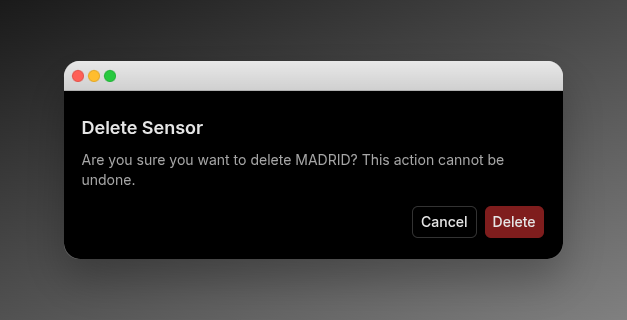 **Outcomes:**
* **Success:** Toast "Deleted sensor ID", list updates, next sensor auto-selected
* **404 Error:** Toast "Sensor 'ID' could not be deleted. It does not exist"
* **Other Error:** Toast "Something went wrong deleting sensor ID", list refreshes
### Bulk Delete
1. Select multiple sensors using checkboxes (checkboxes appear on hover)
2. A floating action bar appears at the bottom
3. Click **Delete**
| Button | Action |
| -------------- | ------------------------------ |
| **X selected** | Shows selection count |
| **Select All** | Selects all visible sensors |
| **Delete** | Opens bulk delete confirmation |
| **Clear** | Clears all selections |
**Outcomes:**
* **Success:** Toast "count sensor(s) deleted successfully", list updates
* **Partial Failure:** Toast "Failed to delete some sensors", list refreshes
* Selections are cleared after operation
## Important Limitations
**No Edit Functionality:** Sensors cannot be modified after creation. To change a sensor's configuration, you must delete and recreate it.
| Limitation | Description |
| --------------------------- | ------------------------------------------------------------------------ |
| **Fixed Measurement Types** | All sensors are created with AZEL and RANGE. Cannot be customized in UI. |
| **Elevation Mask** | Default 0° at all azimuths. Custom masks require API configuration. |
| **Organization Scope** | Sensors are scoped to your organization. |
| **Irreversible Deletion** | Both single and bulk delete operations are permanent. |
| **Sensor Type** | Only GROUND\_STATION available in UI. TELESCOPE requires API. |
## Doppler Ingestion Configuration
Each sensor may declare a per-sensor `twoWayDopplerConvention` field that tells the TDM ingestion pipeline how to interpret two-way `DOPPLER_INSTANTANEOUS` observables produced by that sensor. The two valid CCSDS conventions (MEAN and SUM) differ by a factor of two and are not distinguishable from the keyword alone — declaring the convention explicitly avoids a 100% bias in the observable.
| Setting | Behaviour |
| -------------- | ---------------------------------------------------------------------------------------------- |
| **MEAN** | Observable is the arithmetic mean of uplink and downlink instantaneous rates (DSN convention). |
| **SUM** | Observable is `d/dt` of round-trip range; halved at ingest to normalise to MEAN. |
| **UNDECLARED** | Magnitude-based auto-detection (warning) when within the 10 km/s sanity bound. |
See [Doppler (Range-Rate) Measurements](/file-formats/tdm#doppler-range-rate-measurements) for the full convention contract, default sigma values, and error code reference.
## Related Pages
* [Import measurements](/features/measurements-import): Upload TDM, OEM, and SP3 files
* [View measurements](/features/measurements-data): Filter and manage measurement data by sensor
* [TDM file format](/file-formats/tdm#doppler-range-rate-measurements): Doppler observable contract, default σ, and error codes
**Outcomes:**
* **Success:** Toast "Deleted sensor ID", list updates, next sensor auto-selected
* **404 Error:** Toast "Sensor 'ID' could not be deleted. It does not exist"
* **Other Error:** Toast "Something went wrong deleting sensor ID", list refreshes
### Bulk Delete
1. Select multiple sensors using checkboxes (checkboxes appear on hover)
2. A floating action bar appears at the bottom
3. Click **Delete**
| Button | Action |
| -------------- | ------------------------------ |
| **X selected** | Shows selection count |
| **Select All** | Selects all visible sensors |
| **Delete** | Opens bulk delete confirmation |
| **Clear** | Clears all selections |
**Outcomes:**
* **Success:** Toast "count sensor(s) deleted successfully", list updates
* **Partial Failure:** Toast "Failed to delete some sensors", list refreshes
* Selections are cleared after operation
## Important Limitations
**No Edit Functionality:** Sensors cannot be modified after creation. To change a sensor's configuration, you must delete and recreate it.
| Limitation | Description |
| --------------------------- | ------------------------------------------------------------------------ |
| **Fixed Measurement Types** | All sensors are created with AZEL and RANGE. Cannot be customized in UI. |
| **Elevation Mask** | Default 0° at all azimuths. Custom masks require API configuration. |
| **Organization Scope** | Sensors are scoped to your organization. |
| **Irreversible Deletion** | Both single and bulk delete operations are permanent. |
| **Sensor Type** | Only GROUND\_STATION available in UI. TELESCOPE requires API. |
## Doppler Ingestion Configuration
Each sensor may declare a per-sensor `twoWayDopplerConvention` field that tells the TDM ingestion pipeline how to interpret two-way `DOPPLER_INSTANTANEOUS` observables produced by that sensor. The two valid CCSDS conventions (MEAN and SUM) differ by a factor of two and are not distinguishable from the keyword alone — declaring the convention explicitly avoids a 100% bias in the observable.
| Setting | Behaviour |
| -------------- | ---------------------------------------------------------------------------------------------- |
| **MEAN** | Observable is the arithmetic mean of uplink and downlink instantaneous rates (DSN convention). |
| **SUM** | Observable is `d/dt` of round-trip range; halved at ingest to normalise to MEAN. |
| **UNDECLARED** | Magnitude-based auto-detection (warning) when within the 10 km/s sanity bound. |
See [Doppler (Range-Rate) Measurements](/file-formats/tdm#doppler-range-rate-measurements) for the full convention contract, default sigma values, and error code reference.
## Related Pages
* [Import measurements](/features/measurements-import): Upload TDM, OEM, and SP3 files
* [View measurements](/features/measurements-data): Filter and manage measurement data by sensor
* [TDM file format](/file-formats/tdm#doppler-range-rate-measurements): Doppler observable contract, default σ, and error codes