> ## Documentation Index
> Fetch the complete documentation index at: https://docs.valar.space/llms.txt
> Use this file to discover all available pages before exploring further.
# Application Overview
> Navigate and utilize the VALAR application effectively
> For the complete documentation index, see [llms.txt](/llms.txt).
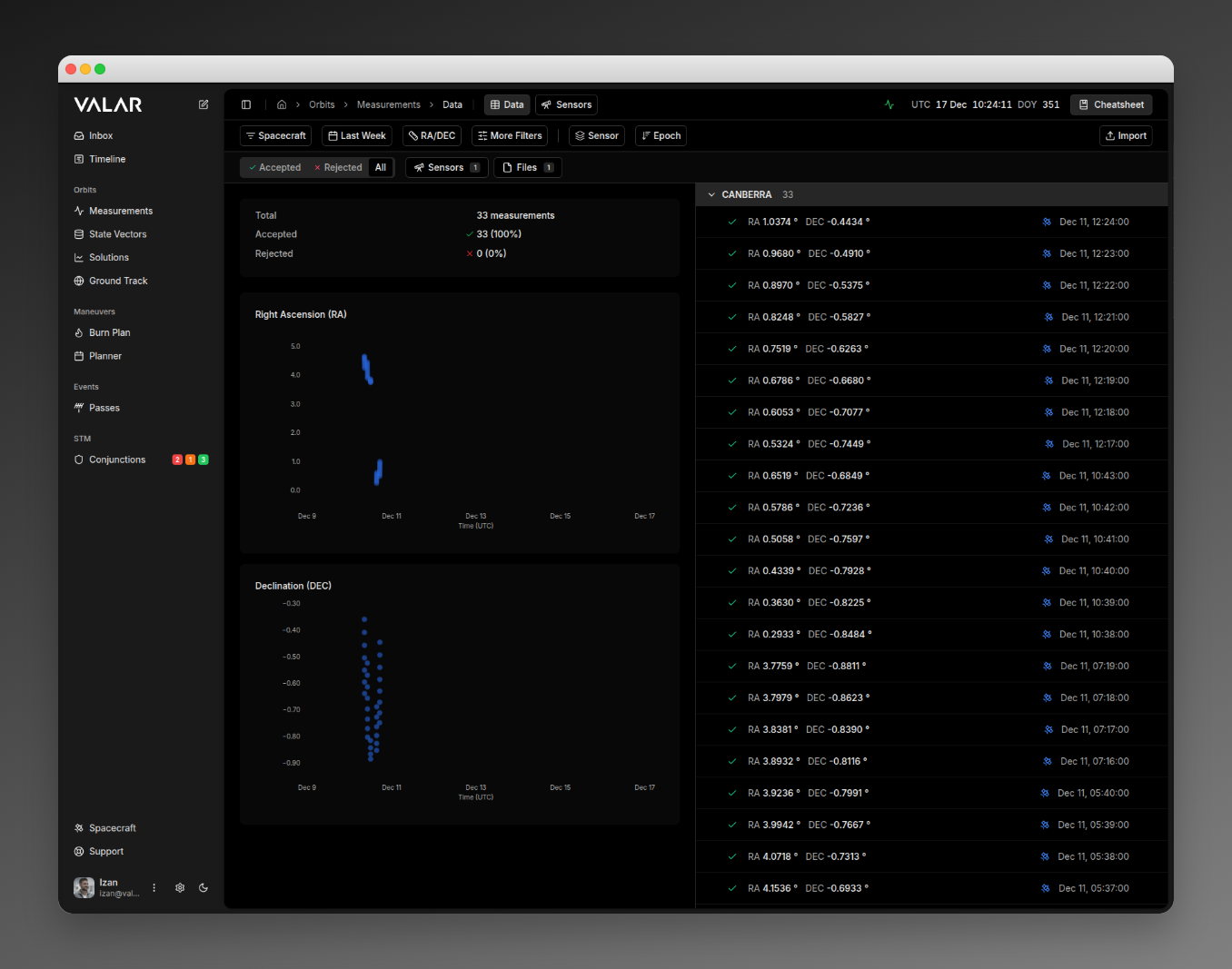
VALAR uses a **dual-navigation layout** designed for efficient spacecraft operations, with a persistent sidebar for main features and a contextual header for page-specific tools.
## Navigation Structure
 ### Left Sidebar
Your primary navigation hub for accessing all platform capabilities:
#### Main Sections
**Orbits**: Track, determine, and visualize orbital data
* Tracking measurements & sensors
* State vectors (Table & Keplerian views)
* Orbit determination solutions
* Ground track visualization
**Maneuvers**: Plan and execute spacecraft maneuvers
* Burn plan for maneuver execution
* Planner for future maneuvers
**STM**: Space Traffic Management
* Conjunction analysis with risk assessment
#### Sidebar Footer
Quick access tools at the bottom:
* **Support Menu**: Documentation, API docs, status page
* **User Profile**: Account settings and logout
* **Settings**: Platform configuration
* **Theme Toggle**: Light/Dark mode
### Top Header
Contextual navigation and real-time tools:
**Left**: Breadcrumb navigation showing current location
**Center**: Page-specific tabs
* Solutions: "Solutions" | "Configs"
* Tracking: "Measurements" | "Sensors"
* State Vectors: "Table" | "Keplerian Elements"
**Right**: Utility tools
* **Process Status**: Monitor async operations
* **UTC Clock**: Live time display
* **Cheatsheet**: Quick reference to spacecraft data
***
## Command Palette
**Trigger**: `⌘K` (Mac) / `Ctrl+K` (Windows/Linux) or pen icon in sidebar header
### Left Sidebar
Your primary navigation hub for accessing all platform capabilities:
#### Main Sections
**Orbits**: Track, determine, and visualize orbital data
* Tracking measurements & sensors
* State vectors (Table & Keplerian views)
* Orbit determination solutions
* Ground track visualization
**Maneuvers**: Plan and execute spacecraft maneuvers
* Burn plan for maneuver execution
* Planner for future maneuvers
**STM**: Space Traffic Management
* Conjunction analysis with risk assessment
#### Sidebar Footer
Quick access tools at the bottom:
* **Support Menu**: Documentation, API docs, status page
* **User Profile**: Account settings and logout
* **Settings**: Platform configuration
* **Theme Toggle**: Light/Dark mode
### Top Header
Contextual navigation and real-time tools:
**Left**: Breadcrumb navigation showing current location
**Center**: Page-specific tabs
* Solutions: "Solutions" | "Configs"
* Tracking: "Measurements" | "Sensors"
* State Vectors: "Table" | "Keplerian Elements"
**Right**: Utility tools
* **Process Status**: Monitor async operations
* **UTC Clock**: Live time display
* **Cheatsheet**: Quick reference to spacecraft data
***
## Command Palette
**Trigger**: `⌘K` (Mac) / `Ctrl+K` (Windows/Linux) or pen icon in sidebar header
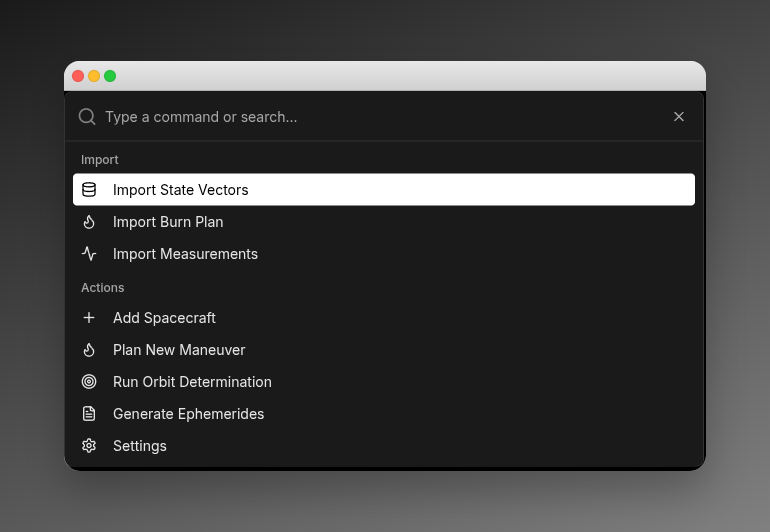 Quick access to common operations:
* **Import**: State vectors, burn plans, measurements
* **Add**: Spacecraft, maneuvers
* **Run**: Orbit determination
* **Generate**: Ephemerides
* **Open**: Settings, cheatsheet, process monitor
***
## Cheatsheet (Quick Reference)
**Access**: Bookmark icon in header
Quick access to common operations:
* **Import**: State vectors, burn plans, measurements
* **Add**: Spacecraft, maneuvers
* **Run**: Orbit determination
* **Generate**: Ephemerides
* **Open**: Settings, cheatsheet, process monitor
***
## Cheatsheet (Quick Reference)
**Access**: Bookmark icon in header
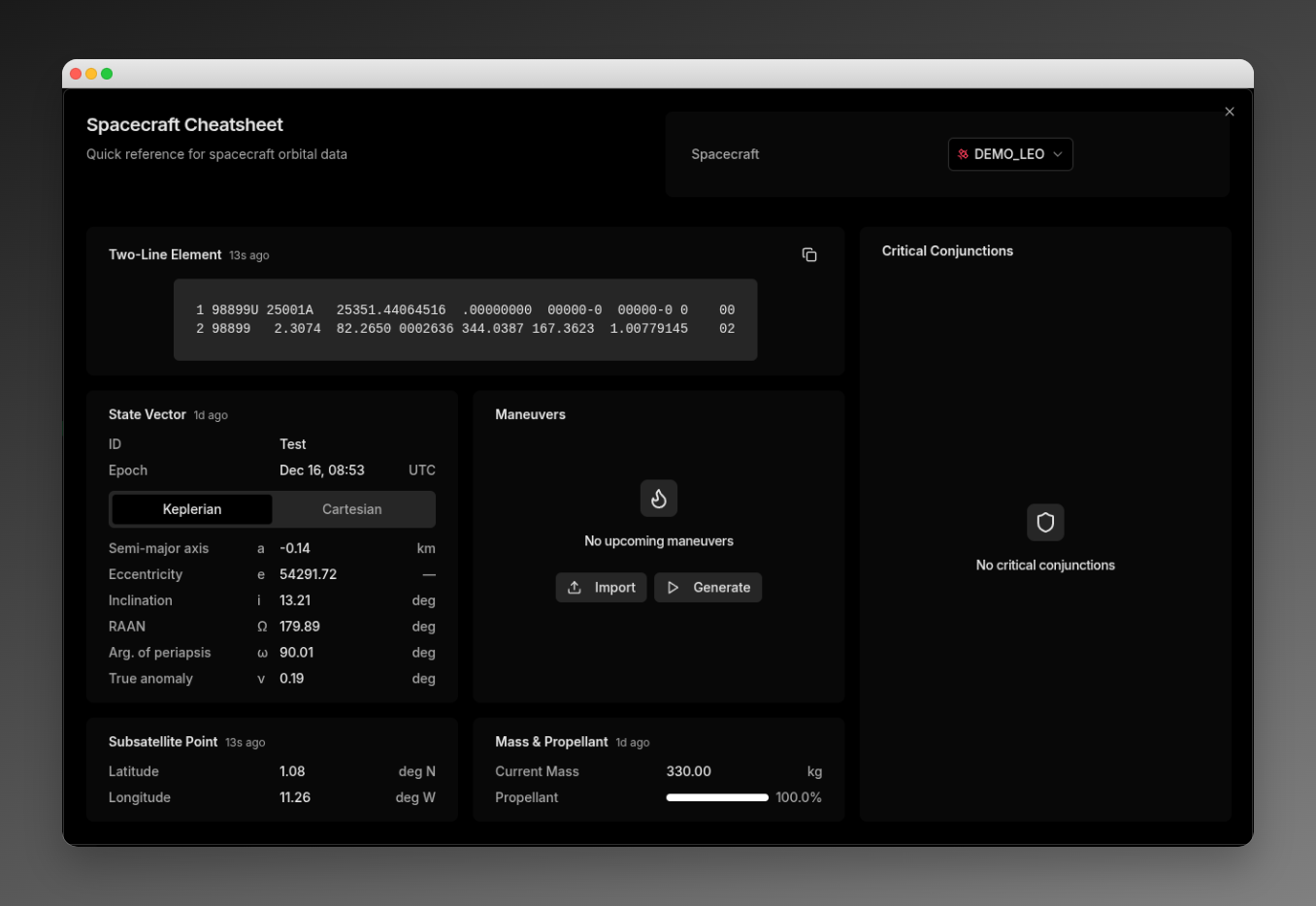 View critical spacecraft data at a glance:
* **TLE**: Two-line element set (copyable)
* **Critical Conjunctions**: High/Medium/Low risk events
* **State Vector**: Current orbital state (Keplerian & Cartesian)
* **Maneuvers**: Upcoming burns with delta-V
* **Subsatellite Point**: Current lat/lon position
* **Mass & Propellant**: Current mass and fuel percentage
***
## Settings
**Access**: Settings button in sidebar footer or Command Palette
View critical spacecraft data at a glance:
* **TLE**: Two-line element set (copyable)
* **Critical Conjunctions**: High/Medium/Low risk events
* **State Vector**: Current orbital state (Keplerian & Cartesian)
* **Maneuvers**: Upcoming burns with delta-V
* **Subsatellite Point**: Current lat/lon position
* **Mass & Propellant**: Current mass and fuel percentage
***
## Settings
**Access**: Settings button in sidebar footer or Command Palette
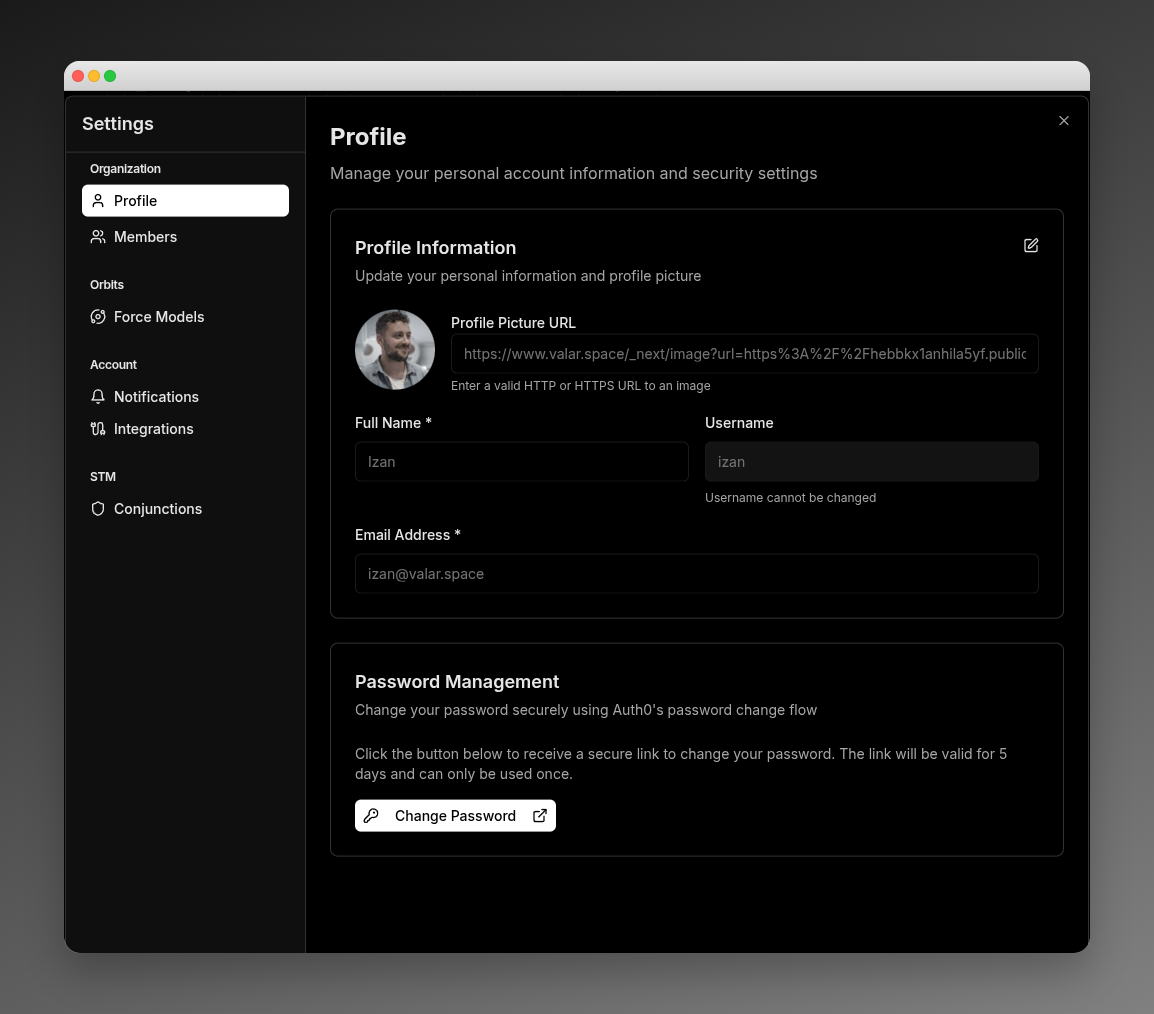 Configure your VALAR experience:
* **Profile**: Name, email, password management
* **Members**: Invite and manage team members
* **Orbits**: Force model configuration (drag, SRP, gravity field, tides)
* **Notifications**: Alert preferences and integrations
* **STM**: Conjunction thresholds and computation methods
***
## Key Features
### Modals & Dialogs
Focused workflows for:
* Importing files (OEM, burn plans, measurements)
* Adding/editing spacecraft, thrusters, stations, maneuvers
* Generating ephemerides
* Viewing covariance matrices and burn details
### Real-time Updates
* Push notifications for critical events
* Process monitoring (15s refresh)
* Live UTC clock
### Theme System
Switch between Light, Dark, or System-synced themes via sidebar footer toggle
***
## Main Routes
Default route: `/` redirects to `/orbits/measurements/data`
**Orbits**
* `/orbits/measurements/data`: Measurements
* `/orbits/measurements/sensors`: Sensors
* `/orbits/solutions`: Orbit determination solutions
* `/orbits/ground-track`: Ground track visualization
**State Vectors**
* `/state-vectors`: State vector table
* `/state-vectors/keplerian-elements`: Keplerian view
**Maneuvers**
* `/maneuvers/burn-plan`: Burn execution
* `/maneuvers/planner`: Maneuver planning
**STM**
* `/conjunctions`: Conjunction analysis
**Spacecraft**
* `/spacecraft`: Fleet overview
***
## Next Steps
Get started with your first spacecraft
Detailed architecture documentation
Manage your spacecraft fleet
Learn fundamental operations concepts
Configure your VALAR experience:
* **Profile**: Name, email, password management
* **Members**: Invite and manage team members
* **Orbits**: Force model configuration (drag, SRP, gravity field, tides)
* **Notifications**: Alert preferences and integrations
* **STM**: Conjunction thresholds and computation methods
***
## Key Features
### Modals & Dialogs
Focused workflows for:
* Importing files (OEM, burn plans, measurements)
* Adding/editing spacecraft, thrusters, stations, maneuvers
* Generating ephemerides
* Viewing covariance matrices and burn details
### Real-time Updates
* Push notifications for critical events
* Process monitoring (15s refresh)
* Live UTC clock
### Theme System
Switch between Light, Dark, or System-synced themes via sidebar footer toggle
***
## Main Routes
Default route: `/` redirects to `/orbits/measurements/data`
**Orbits**
* `/orbits/measurements/data`: Measurements
* `/orbits/measurements/sensors`: Sensors
* `/orbits/solutions`: Orbit determination solutions
* `/orbits/ground-track`: Ground track visualization
**State Vectors**
* `/state-vectors`: State vector table
* `/state-vectors/keplerian-elements`: Keplerian view
**Maneuvers**
* `/maneuvers/burn-plan`: Burn execution
* `/maneuvers/planner`: Maneuver planning
**STM**
* `/conjunctions`: Conjunction analysis
**Spacecraft**
* `/spacecraft`: Fleet overview
***
## Next Steps
Get started with your first spacecraft
Detailed architecture documentation
Manage your spacecraft fleet
Learn fundamental operations concepts