> ## Documentation Index
> Fetch the complete documentation index at: https://docs.valar.space/llms.txt
> Use this file to discover all available pages before exploring further.
# Mission Δv Assessment
> Build a complete, explainable delta-v budget for an early mission concept in your browser — no account required.
The **Mission Δv Assessment** is a free, guided delta-v budget calculator. You enter spacecraft, orbit and maneuver assumptions, and the tool computes a complete, maneuver-level delta-v budget in real time, explaining every line item. No account is needed, and nothing you enter is ever stored.
**Route:** `/mission-assessment`
## Page Layout
The page is a single scrolling workspace: the assessment panels run down the left, and the **Mission budget** sidebar on the right updates live as you edit. The tool opens with a worked example (a 150 kg satellite with 15 kg of propellant at 550 km) so you always see a complete budget, never a blank screen.
 ## Anonymity Contract
The assessment is anonymous and ephemeral by design. The banner at the top of the page, the sidebar, and the follow-up panel all state the same contract:
* The tool runs entirely in your browser — no account, no server round-trip.
* "Nothing here is saved" — nothing you enter is stored or sent anywhere.
* "Leaving this page means the run is gone." To keep a completed budget, print it (see [Printing the Budget](#printing-the-budget)).
There is no save, export, or email action anywhere in the tool — deliberately.
## The Assessment Journey
The six numbered panels walk you from assumptions to a finished budget. The budget recalculates live on every keystroke; there is no "calculate" button to wait for.
| Stage | Panel | What it collects |
| ------ | ------------------ | ---------------------------------------------------------------------------------------------------------------------------------------------------------------------------------------------- |
| **01** | **Spacecraft** | Spacecraft name, **Dry mass** (kg), **Initial propellant** (kg), and the propulsion block: **Specific impulse** (s), one value for the whole plan. A **Wet mass** metric is shown as you type. |
| **02** | **Initial orbit** | Circular **Altitude** (km) and **Inclination** (°). These seed the defaults of new maneuver rows; each maneuver line carries its own altitudes. |
| **03** | **Maneuver plan** | An ordered list of maneuver lines. Add lines from the maneuver library (see below), reorder with the up/down arrows, duplicate or delete with the row icons. |
| **04** | **Mission budget** | The live budget: every line item, propellant accounting, and totals. No input here — it mirrors your plan. |
| **05** | **Follow-up** | Print the budget, or follow **Explore VALAR →** to see the operational platform. |
### Adding Maneuvers from the Library
Clicking **+ Add maneuver** opens the maneuver library: a modal listing every supported maneuver type with a one-line description of what it computes. Pick a type and the row is added to the plan, pre-configured with the current orbit altitude where applicable, and the modal closes. Press Escape or click outside to close without adding anything. A freshly added line may not compute a budget yet — fill its remaining inputs and the named feedback clears.
## Anonymity Contract
The assessment is anonymous and ephemeral by design. The banner at the top of the page, the sidebar, and the follow-up panel all state the same contract:
* The tool runs entirely in your browser — no account, no server round-trip.
* "Nothing here is saved" — nothing you enter is stored or sent anywhere.
* "Leaving this page means the run is gone." To keep a completed budget, print it (see [Printing the Budget](#printing-the-budget)).
There is no save, export, or email action anywhere in the tool — deliberately.
## The Assessment Journey
The six numbered panels walk you from assumptions to a finished budget. The budget recalculates live on every keystroke; there is no "calculate" button to wait for.
| Stage | Panel | What it collects |
| ------ | ------------------ | ---------------------------------------------------------------------------------------------------------------------------------------------------------------------------------------------- |
| **01** | **Spacecraft** | Spacecraft name, **Dry mass** (kg), **Initial propellant** (kg), and the propulsion block: **Specific impulse** (s), one value for the whole plan. A **Wet mass** metric is shown as you type. |
| **02** | **Initial orbit** | Circular **Altitude** (km) and **Inclination** (°). These seed the defaults of new maneuver rows; each maneuver line carries its own altitudes. |
| **03** | **Maneuver plan** | An ordered list of maneuver lines. Add lines from the maneuver library (see below), reorder with the up/down arrows, duplicate or delete with the row icons. |
| **04** | **Mission budget** | The live budget: every line item, propellant accounting, and totals. No input here — it mirrors your plan. |
| **05** | **Follow-up** | Print the budget, or follow **Explore VALAR →** to see the operational platform. |
### Adding Maneuvers from the Library
Clicking **+ Add maneuver** opens the maneuver library: a modal listing every supported maneuver type with a one-line description of what it computes. Pick a type and the row is added to the plan, pre-configured with the current orbit altitude where applicable, and the modal closes. Press Escape or click outside to close without adding anything. A freshly added line may not compute a budget yet — fill its remaining inputs and the named feedback clears.
 ## Maneuver Types
Each line of the **Maneuver plan** is one of eight types. Pick the type from the row's dropdown; the input fields adapt to it. Raising, lowering, and combined lines compute a circular Hohmann transfer, with the plane change folded into the apoapsis burn where it is cheapest. Collision avoidance uses the ESA 200 m dodge-and-return heuristic with a ×2 count margin. Eccentric orbits and natural decay are not modeled.
| Type | What it computes | Inputs |
| --------------------------------- | ----------------------------------------------------------------------------------------------------------------------------------------------- | -------------------------------------------------------------------------------------------- |
| **Orbit raise (Hohmann)** | The two-burn circular-to-circular transfer from the current to the target altitude. | Current altitude (km), Target altitude (km) |
| **Orbit lower (Hohmann)** | The same transfer, downward. | Current altitude (km), Target altitude (km) |
| **Plane change** | A pure inclination change at the given circular altitude. | Altitude (km), Current inclination (°), Target inclination (°) |
| **Combined raise + plane change** | The raise with the plane change folded into the second (apoapsis) burn — cheaper than doing them separately. | Current altitude (km), Target altitude (km), Current inclination (°), Target inclination (°) |
| **Station keeping** | A direct Δv allocation, passed through as its own budget line. | Annual Δv (m/s) |
| **Collision avoidance** | Per-event Δv for a 200 m dodge and return, multiplied by the expected number of events and a ×2 count margin. The line shows the ×2 count chip. | Altitude (km), Expected CAM count |
| **Deorbit** | The perigee-lowering burn from the current orbit toward a disposal perigee. | Current altitude (km), Target perigee altitude (km) |
| **Custom Δv** | A direct Δv you specify, for anything the other types do not cover. | Δv (m/s) |
Each budget line shows its method name (for example **ESA CAM heuristic** or **Perigee-lowering deorbit**), its Δv (m/s), its propellant (kg), and its category: **Maneuver** or **Allocation**.
## The Live Budget
The **Mission budget** sidebar mirrors your plan line by line, top to bottom, in plan order.
| Element | Description |
| ------------------------------- | -------------------------------------------------------------------------------------------------------------------------------------------------------- |
| **TOTAL ΔV** | The plain sum of every line's Δv, in m/s. No contingency is added on top. |
| **Line items** | One row per maneuver, with the method name, the Δv, the per-line propellant, and the category chip. Collision-avoidance lines carry a **×2 count** chip. |
| **Total propellant** | The propellant burned by the whole plan (kg). Propellant is sized sequentially: each line burns from the mass the previous line left. |
| **Final mass** | The spacecraft mass after the full plan (kg). |
| **Residuals + gauging reserve** | A reserve line of 1% propellant residuals + 2% gauging uncertainty on the initial load, per the ESA margin structure. No margin is added to Δv. |
| **envelope v1 / scenario v1** | The version stamps of the calculation contract and the worked-example scenario. |
## When a Calculation Fails
An assumption that cannot produce a budget never fails silently: the tool shows a red, named explanation with a remedy, and the sidebar explains what is missing. Fix the named input and the budget returns immediately.
| Failure | What it means | What to change |
| ------------------------ | -------------------------------------------------------------------------------------------------------------------------------------------- | ------------------------------------------------------------------------------------------- |
| **Invalid input** | A value is missing, not a number, or physically impossible (for example a negative dry mass). | Correct the highlighted field; the affected inputs are named in the message. |
| **Outside valid range** | A well-formed value sits outside the method's supported range (for example a deorbit whose target perigee is at or above the current orbit). | Adjust the value back into the maneuver's supported range. |
| **Not supported** | The maneuver needs something the tool does not model — eccentric orbits, natural decay, and similar. | Use a circular-orbit variant of the maneuver, or contact Valar for a full mission analysis. |
| **No change needed** | The current and target states are identical, so the maneuver is a valid no-op contributing 0 m/s. | Nothing — this is an explicit zero, not an error. |
| **Something went wrong** | An unexpected internal error. | Try adjusting your inputs. If it persists, the tool may have a bug — contact Valar. |
Deleting every maneuver line also produces a named explanation ("No maneuvers") rather than a blank budget — the tool never shows an empty screen.
## Printing the Budget
The print path is how you take the budget with you — there is no other export by design.
1. Build the plan until the **Mission budget** shows what you want to keep.
2. Click **Print the budget** (in the sidebar, or in the **Follow-up** panel).
3. In your browser's print dialog, choose **Save as PDF** to retain the budget.
The printed page contains only the budget: every line item with method names and categories, the propellant accounting, the reserve, and the totals — no input controls, no navigation. If the current assumptions fail to compute a budget, the printed page shows the named failure explanation instead, so even a failed state is worth keeping.
## Maneuver Types
Each line of the **Maneuver plan** is one of eight types. Pick the type from the row's dropdown; the input fields adapt to it. Raising, lowering, and combined lines compute a circular Hohmann transfer, with the plane change folded into the apoapsis burn where it is cheapest. Collision avoidance uses the ESA 200 m dodge-and-return heuristic with a ×2 count margin. Eccentric orbits and natural decay are not modeled.
| Type | What it computes | Inputs |
| --------------------------------- | ----------------------------------------------------------------------------------------------------------------------------------------------- | -------------------------------------------------------------------------------------------- |
| **Orbit raise (Hohmann)** | The two-burn circular-to-circular transfer from the current to the target altitude. | Current altitude (km), Target altitude (km) |
| **Orbit lower (Hohmann)** | The same transfer, downward. | Current altitude (km), Target altitude (km) |
| **Plane change** | A pure inclination change at the given circular altitude. | Altitude (km), Current inclination (°), Target inclination (°) |
| **Combined raise + plane change** | The raise with the plane change folded into the second (apoapsis) burn — cheaper than doing them separately. | Current altitude (km), Target altitude (km), Current inclination (°), Target inclination (°) |
| **Station keeping** | A direct Δv allocation, passed through as its own budget line. | Annual Δv (m/s) |
| **Collision avoidance** | Per-event Δv for a 200 m dodge and return, multiplied by the expected number of events and a ×2 count margin. The line shows the ×2 count chip. | Altitude (km), Expected CAM count |
| **Deorbit** | The perigee-lowering burn from the current orbit toward a disposal perigee. | Current altitude (km), Target perigee altitude (km) |
| **Custom Δv** | A direct Δv you specify, for anything the other types do not cover. | Δv (m/s) |
Each budget line shows its method name (for example **ESA CAM heuristic** or **Perigee-lowering deorbit**), its Δv (m/s), its propellant (kg), and its category: **Maneuver** or **Allocation**.
## The Live Budget
The **Mission budget** sidebar mirrors your plan line by line, top to bottom, in plan order.
| Element | Description |
| ------------------------------- | -------------------------------------------------------------------------------------------------------------------------------------------------------- |
| **TOTAL ΔV** | The plain sum of every line's Δv, in m/s. No contingency is added on top. |
| **Line items** | One row per maneuver, with the method name, the Δv, the per-line propellant, and the category chip. Collision-avoidance lines carry a **×2 count** chip. |
| **Total propellant** | The propellant burned by the whole plan (kg). Propellant is sized sequentially: each line burns from the mass the previous line left. |
| **Final mass** | The spacecraft mass after the full plan (kg). |
| **Residuals + gauging reserve** | A reserve line of 1% propellant residuals + 2% gauging uncertainty on the initial load, per the ESA margin structure. No margin is added to Δv. |
| **envelope v1 / scenario v1** | The version stamps of the calculation contract and the worked-example scenario. |
## When a Calculation Fails
An assumption that cannot produce a budget never fails silently: the tool shows a red, named explanation with a remedy, and the sidebar explains what is missing. Fix the named input and the budget returns immediately.
| Failure | What it means | What to change |
| ------------------------ | -------------------------------------------------------------------------------------------------------------------------------------------- | ------------------------------------------------------------------------------------------- |
| **Invalid input** | A value is missing, not a number, or physically impossible (for example a negative dry mass). | Correct the highlighted field; the affected inputs are named in the message. |
| **Outside valid range** | A well-formed value sits outside the method's supported range (for example a deorbit whose target perigee is at or above the current orbit). | Adjust the value back into the maneuver's supported range. |
| **Not supported** | The maneuver needs something the tool does not model — eccentric orbits, natural decay, and similar. | Use a circular-orbit variant of the maneuver, or contact Valar for a full mission analysis. |
| **No change needed** | The current and target states are identical, so the maneuver is a valid no-op contributing 0 m/s. | Nothing — this is an explicit zero, not an error. |
| **Something went wrong** | An unexpected internal error. | Try adjusting your inputs. If it persists, the tool may have a bug — contact Valar. |
Deleting every maneuver line also produces a named explanation ("No maneuvers") rather than a blank budget — the tool never shows an empty screen.
## Printing the Budget
The print path is how you take the budget with you — there is no other export by design.
1. Build the plan until the **Mission budget** shows what you want to keep.
2. Click **Print the budget** (in the sidebar, or in the **Follow-up** panel).
3. In your browser's print dialog, choose **Save as PDF** to retain the budget.
The printed page contains only the budget: every line item with method names and categories, the propellant accounting, the reserve, and the totals — no input controls, no navigation. If the current assumptions fail to compute a budget, the printed page shows the named failure explanation instead, so even a failed state is worth keeping.
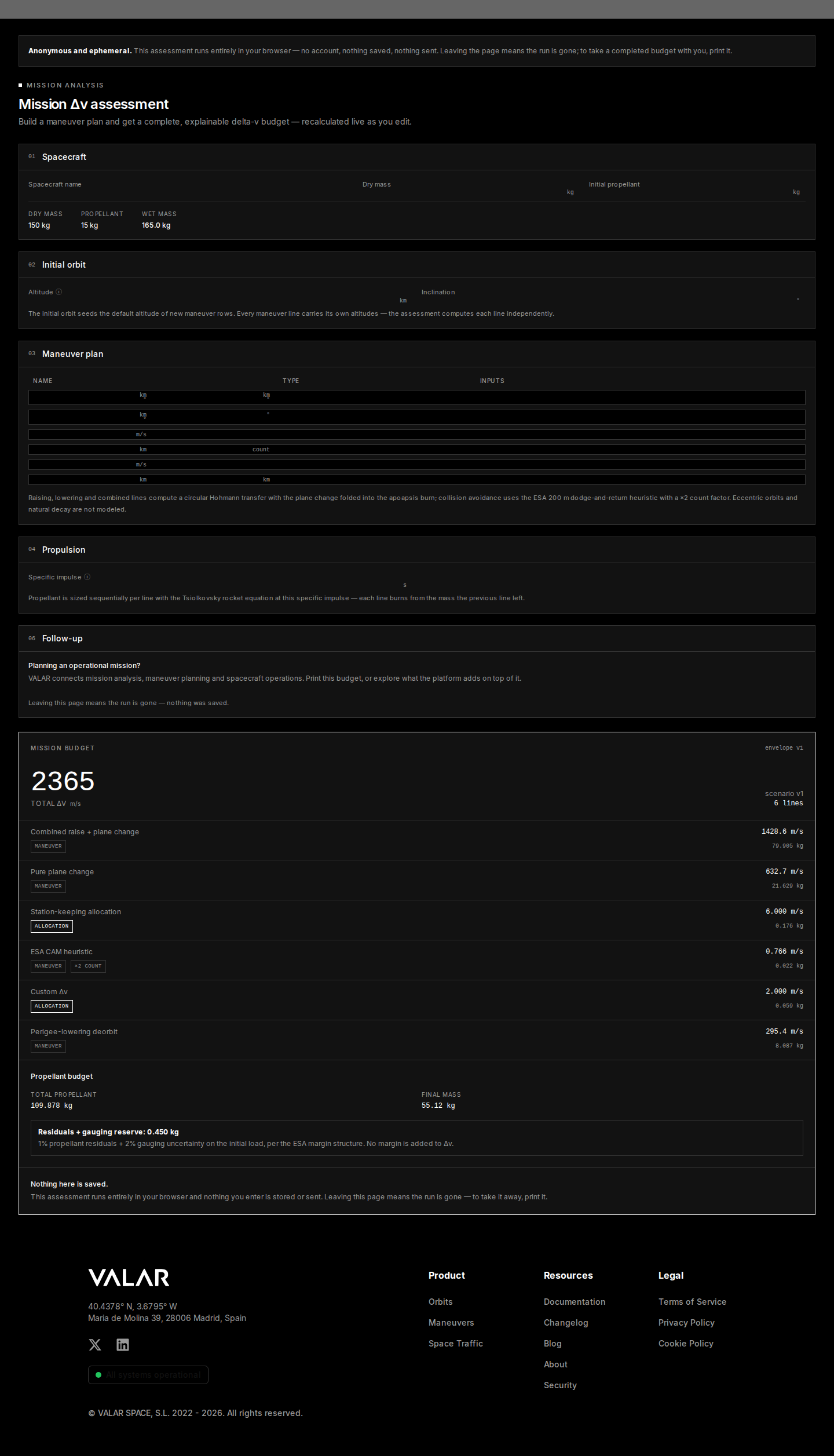 The print workflow uses your browser's print dialog — the layout is already prepared for it. Nothing is uploaded to produce the PDF.
## Related Pages
* [Burn Plan](/features/burn-plan): turn assessed maneuvers into an operational burn plan inside the platform.
* [Maneuver Import](/features/maneuver-import): bring maneuvers from third-party tools into VALAR.
* [Conjunction Computation](/features/conjunction-computation): the operational counterpart to the assessment's collision-avoidance reserve.
The print workflow uses your browser's print dialog — the layout is already prepared for it. Nothing is uploaded to produce the PDF.
## Related Pages
* [Burn Plan](/features/burn-plan): turn assessed maneuvers into an operational burn plan inside the platform.
* [Maneuver Import](/features/maneuver-import): bring maneuvers from third-party tools into VALAR.
* [Conjunction Computation](/features/conjunction-computation): the operational counterpart to the assessment's collision-avoidance reserve.