
For the complete documentation index, see llms.txt.Before you can track orbits, plan maneuvers, or predict communication windows, you need to register your spacecraft. After logging in, navigate to Spacecraft in the left sidebar. The detail page is organised by fidelity tier — Identifiers, Cannonball model (bulk mass plus single drag and SRP area coefficients), Advanced geometry (bus dimensions, panel definition, and mounted components), and a Danger Zone for archive and restore actions.
Quick Start
Click New Spacecraft in the top-bar of the Spacecraft page to navigate to the/spacecraft/new creation page. The page mirrors the detail-page layout — the same Identifiers, Cannonball model, and Advanced geometry sections — but starts empty with every card already in edit mode. Required fields are marked with an asterisk and the page-level Create Spacecraft button at the bottom refuses to submit until every required field is filled. If you submit with a required field empty or invalid, each offending field shows its inline message and the page scrolls the first field with an error into view, so a blocked submit can never hide its cause below the fold.
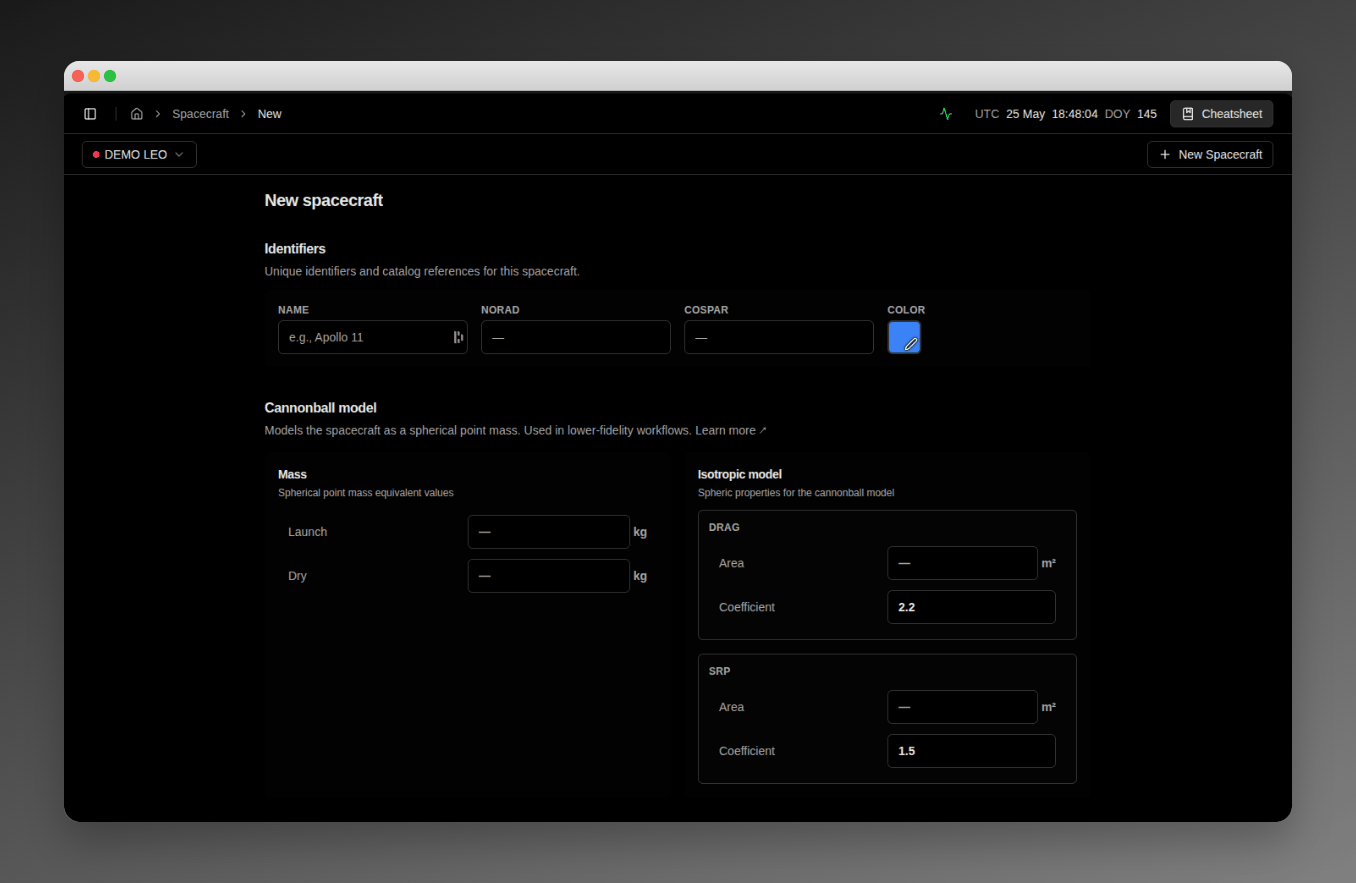
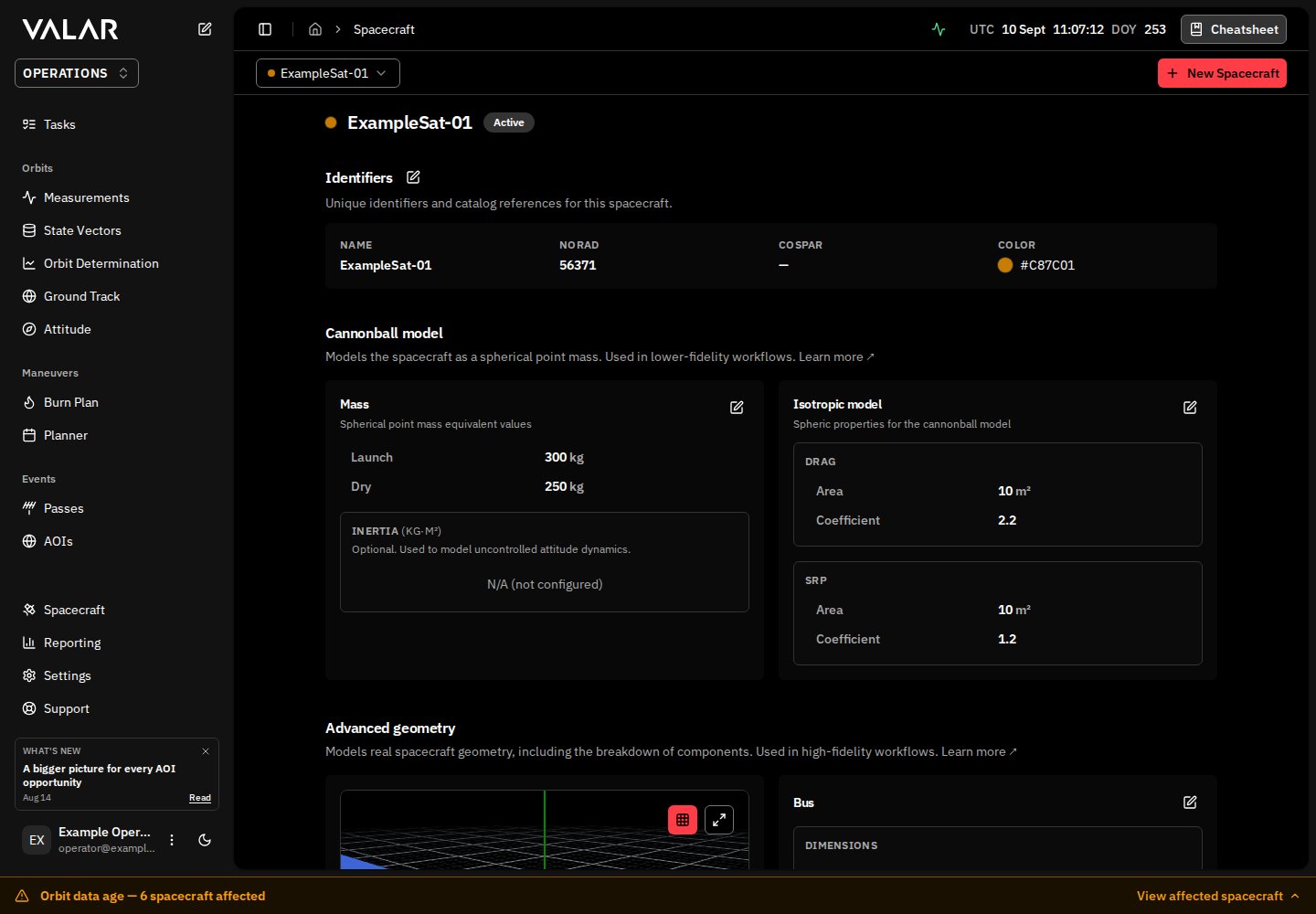
Identifiers
Search by name, NORAD or COSPAR and select your spacecraft from the catalogue. VALAR fills the NORAD and COSPAR identifiers from the same entry; you do not type or edit them separately. If your spacecraft has no catalogue assignment, choose This spacecraft is not yet catalogued instead.
A blank or whitespace-only Name shows
"Name is required." inline and blocks the submit. You must also select a catalogue entry or make the explicit not-yet-catalogued choice.
Catalogue selection identifies the spacecraft; it does not guarantee that a public orbit is available. VALAR can use public GP mean elements from Space-Track or CelesTrak even without TLE text. Keep the full numeric NORAD ID when searching: Alpha-5 is only an encoding inside exported TLE files.
Cannonball Model
The cannonball model is the default fidelity tier — bulk mass plus single drag and SRP area coefficients. The platform’s default propagation and conjunction stack uses these values, so the page requires all the values below except Dry Mass:
Validation: submitting with a blank required field surfaces that field’s inline message — for example,
Launch mass is required — and the page scrolls the first field with an error into view. A non-positive Launch Mass is rejected with Launch mass must be at least 0.001 kg, and a Dry Mass larger than the Launch Mass with Launch mass must be greater than or equal to dry mass. The page stays open and nothing is created until every required field is filled. See Validation Feedback for the full surface.
Drag area and SRP area are always operator-typed. The platform does not derive either from box or panel dimensions, even when those are configured. The two values let you tune drag without perturbing SRP and vice versa.
Advanced Geometry
The Advanced geometry section is required on the creation page: the bus dimensions for the selected body shape, plus the two surface-optics coefficients, all carry an asterisk and must be filled before Create Spacecraft succeeds. The Shape selector defaults to Box, so a box spacecraft needs its X, Y, and Z dimensions; there are no pre-filled values for the surface optics — enter Absorption and Specular reflection explicitly. You can refine everything in this section later from the Bus card and the Panels tab on the detail page.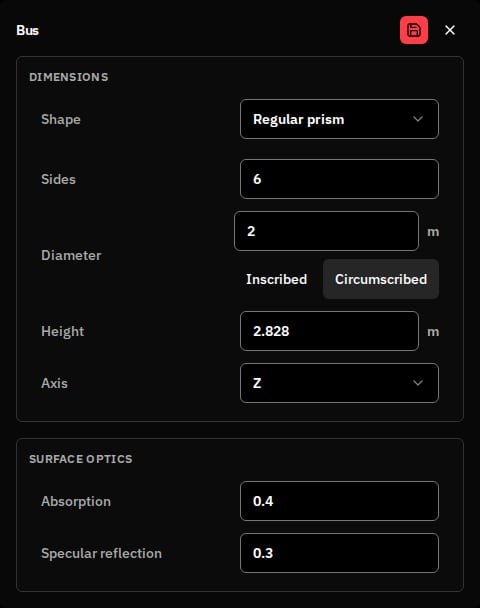
Bus shape
The Bus card opens with a Shape selector — choose Box or Regular prism. You define the whole bus from this single card during creation, with no extra navigation step. Switching the Shape clears the dimension inputs entered for the previous shape. A Box bus shows three dimension fields labelled X, Y, and Z — the bus’s body-frame axes, in metres — and no prism fields. A CubeSat might be0.1 m per side, while larger satellites can run several metres. A Regular prism bus replaces them with the polygon-prism inputs:
In read mode the diameter is shown with its measure, for example
1.0 m (Inscribed).
The 3D viewer beside the card renders the bus in its true shape — the configured polygon prism for a regular-prism spacecraft, or a box for a box spacecraft.
When no attitude profile is configured, the Bus card shows the inline note “faceted forces apply once an attitude profile is configured” for both box and regular-prism shapes — the faceted radiation model engages once you add an attitude profile.
Panels
The Panels tab beside the Bus card lists the spacecraft’s independent solar / radiator panels. Panels are optional at creation — an empty tab shows a No panels configured prompt with an enabled Add panel button, and you can also add panels later from the detail page. Each panel is configured on its own card:
A spacecraft holds up to 8 panels — at the cap the Add panel button is disabled with a Maximum 8 panels tooltip. Each card shows a Facing readout of the panel’s live outward normal, and the 3D viewer draws the panel as you configure it.
Validation Feedback
On the creation page, inputs show inline error feedback below them — the same surface every detail-page card uses after creation. The creation page surfaces the Error state: a blank required field, an out-of-range value (for example, prism sides outside3–12), or an optics pair that violates energy conservation (Absorption + Specular reflection must not exceed 1.0). The other states below appear on the detail-page cards, where each field is continuously re-validated as you edit:
Blocked submit — clicking Create Spacecraft with any required field blank or invalid refuses the submit: each offending field shows its inline message — for example,
Absorption coefficient (α) is required or Box X dimension is required — and the page scrolls the first field with an error into view, so the cause is never stranded below the fold.
Creating the Spacecraft
Click Create Spacecraft at the bottom of the page to submit. On success the platform:- Shows a confirmation toast.
- Navigates to the new spacecraft’s detail page so you can complete the remaining configuration.
Completing the Configuration
Several fields live on the detail page rather than on the creation page. Visit each card after creation:Inertia tensor — Mass card
The Mass card in the Cannonball model section hosts the inertia tensor — three principal moments (Ixx, Iyy, Izz) displayed as a 3×3 matrix with the moments on the diagonal and zeros off-diagonal. Set all three moments together (or leave all three blank). Validation rejects partial or non-positive entries:
Surface optics — Bus card
The Bus card you filled during creation carries the two surface-optics fields — Absorption (α) and Specular reflection (ρs) — and the detail-page Bus card lets you refine them at any time. They feed the faceted radiation model once the spacecraft also has an attitude profile configured.Panels — Panels tab
The Panels tab of the Advanced geometry section hosts the spacecraft’s independent panels — the same Add panel cards described in the creation walkthrough above. Add, edit, or delete panels at any time after creation; each card saves individually and the 3D viewer re-renders the panel geometry live.Thrusters — Thrusters tab
The Thrusters tab in the Advanced geometry section lists every thruster mounted on the spacecraft. Click Add thruster to open the thruster dialog and configure each one: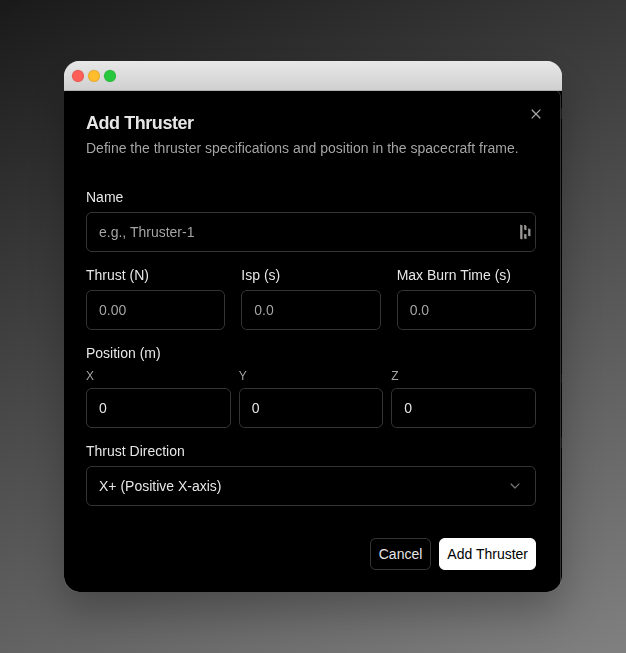
Deleting a thruster prompts a confirmation before applying.
Payloads — Payloads tab
The Payloads tab in the Advanced geometry section lists the on-board sensors mounted on the spacecraft — each one a body-frame boresight axis plus a field of view. Payloads are added inline (not in a dialog): click Add payload, fill the card in place, and Save it. To add one:- Name the payload (for example,
Imager-1). A name is required. - Set the Position (m) — the X, Y, Z attachment coordinates on the spacecraft body, in metres; any component may be negative.
- Pick the Boresight — the body-frame axis the payload points along, one of
X+,X-,Y+,Y-,Z+,Z-. - Choose the FOV shape, then fill the half-angle fields that appear for it (every angle is measured from the boresight to the edge of the field of view):
- Conical — one half-angle from
0°to90°(90°is a full hemisphere). - Rectangular or Elliptical — a half-width and a half-height, each above
0°and below90°. - Polygon — at least
3sides and a radius half-angle above0°and below90°, measured from the boresight to a vertex.
- Conical — one half-angle from
Editing After Creation
The detail page uses per-card editing — each card has its own Edit, Save, and Cancel controls. Entering edit mode on one card leaves every other card in read mode. While a save is in flight the card’s button showsSaving... and its inputs are disabled until the save completes. Cancel discards your draft and restores the last-saved values.
The Identifiers section is the one exception: it edits all four identifier fields under a single section-level Edit control.
For a full walk-through of each section and its fields, see Spacecraft Management.
What Makes a “Complete” Spacecraft?
The creation page requires the identifiers, the cannonball model values, and the Advanced geometry required fields — the bus dimensions for the selected body shape plus Absorption and Specular reflection — and a complete spacecraft has:- Full identification: Name, NORAD ID, COSPAR ID — establishes the spacecraft’s official identity.
- Cannonball model: Launch and dry mass, drag and SRP areas, drag and reflectivity coefficients — enables default propagation and conjunction analysis.
- Inertia tensor: Three principal moments — required for attitude propagation and any analysis sensitive to rotational dynamics.
- Advanced geometry: Bus dimensions, surface optics, independent panels — enables the faceted radiation model.
- Orbital data: State vectors or TLEs — tells the platform where the spacecraft is and where it’s going.
- Propulsion: Defined thrusters with positions and performance characteristics — enables maneuver planning.
- Payloads (optional): On-board sensors with a boresight axis and field of view — describes what the spacecraft observes. A spacecraft with no payloads is still complete.
Common Questions
Q: I don’t know the drag coefficient. A: Use2.2. It works for most satellites.
Q: Should I register a spacecraft before launch? A: Yes. Register the spacecraft as soon as you have a name and the cannonball model values; leave NORAD and COSPAR IDs blank until they are assigned after launch.
Q: What if I make a mistake? A: Every section on the detail page is editable. Click Edit on the relevant card and save your correction.
Q: Do I need to understand orbital mechanics? A: No. The platform handles the calculations — you describe physical properties.
Q: Can I create multiple spacecraft? A: Yes. There’s no limit. Create entries for an entire constellation or manage multiple missions simultaneously.
Spacecraft Management
Detail-page sections, per-card editing, and the Danger Zone.
Import Measurements
Import orbital data for your spacecraft.
Quick Start Guide
Continue your onboarding journey.
Application Overview
Navigate the VALAR interface.