
For the complete documentation index, see llms.txt.The Maneuvers page manages stored burn records for your spacecraft. Each record has an editable name, optional purpose, a required reference frame (attitude mode), and one or more burn segments. You can create records manually or import them from OCM files, then read, edit, export, or delete them. Stored records do not certify execution, even when their epochs are in the past. Mission-forecast history therefore shows execution counts and consumed propellant as unavailable when only these generic records exist; forecast estimates and dated state-vector inventory remain separate. Route:
/maneuvers/burn-plan
Find a record
Use the spacecraft and time-range filters to find maneuvers. Grouping by spacecraft keeps records together; the ungrouped view shows a flat list. Select a row to open its details. Checkboxes select records for bulk export or deletion. Rows show the maneuver name, identity/display identifier, spacecraft, timing, and available derived values. A conflict indicator marks overlapping records. A record outside the selected time range may still conflict with a visible one.Create a record
- Click Create maneuver in the toolbar.
- Choose the spacecraft. The selected spacecraft is fixed once the record is created.
- Enter a name. On creation, this becomes both the stable identity and initial display name.
- Enter a reference frame and, optionally, a purpose.
- Add at least one burn segment and supply its epoch, duration, thrust vector, ISP, and reference frame. Use Add segment or remove a segment as needed.
- Click Create maneuver to save. If validation fails, correct the indicated fields and retry.
TNW, RTN, QSW, and RSW_ROTATING; no frame is inferred. Acceleration,
delta-V, and delta mass are read-only projections in the detail view and can be unavailable.
A duplicate identity for the same spacecraft is rejected. Creation never updates a record
that already exists. Creating a stored maneuver does not send a command to the spacecraft.
Read complete details
Select a record to see its current name, stable Identity, Display ID, Spacecraft, Purpose, Attitude mode, and full burn-segment composition. The details panel retrieves the complete record, so edits start from the stored segments rather than a list summary.
Create, edit, and import controls require write permission. Deletion requires delete permission;
reading and exporting require read permission. Contact your administrator if an action is missing.
Edit a record
- Open the record and click Edit.
- Change its name, purpose, attitude mode, or burn segments.
- Review the complete segment list, including any added or removed segments.
- Click Save changes.
MAN_ID still refer to the original identity. Start and end times
derive from the segment epochs and durations. To change timing, edit those segment fields
directly and review the resulting burn definition.
Resolve conflicts
New and edited records must not overlap another record on the same spacecraft. The check uses the entire enclosing interval from the maneuver’s start to end, including gaps between segments. One record can end exactly when the next begins. Records for different spacecraft are independent. If saving fails, read the error and inspect the conflicting identities. Choose which record to edit or delete, then try again. VALAR does not automatically change other records to make room. Unsaved editor values remain available when a save fails.Inspect overlapping records
List indicators and record details identify overlaps. Use the Open links in details to inspect conflicting records, including records outside the list’s current time window. You can read, export, and delete these records. Every save must make the edited record non-overlapping, even when changing only its name or metadata. Resolve the conflict through an explicit segment edit or delete. Computation results retain their captured maneuver information; new computations use the current records.Delete records
Click Delete in a record’s details and confirm. To delete several records, select their checkboxes and use the bulk Delete action. Check the reported outcome for each action. Deletion removes live maneuver data and cannot be undone.Import and export
- Import adds records from
.ocmor.txtCCSDS OCM files. Each file is atomic; duplicate identities and overlaps are rejected. See Importing Maneuvers. - Export in a record’s details downloads that record; toolbar export selects a spacecraft and date range. The bulk toolbar exports checked records. See Exporting Maneuvers.
- Programmatic clients use the Maneuver API for OCM import, OCM export and deletion. To correct a record, explicitly delete it and import the corrected OCM; these are separate operations, so a failed import leaves the record deleted.
Timeline View
A horizontal Gantt-style visualization of every burn for the selected spacecraft, with orbital events overlaid as bands and markers to give thruster timing the right context. Route:/maneuvers/burn-plan/timeline
The timeline is anchored to a UTC time axis along the top. Each spacecraft row holds the stored burns within the current window, drawn as Gantt-style segments. Orbital events are overlaid above the burn rows as either shaded bands (entry-to-exit duration) or instantaneous markers (single-epoch events).
Zoom Toggle
Two zoom levels control how densely time is packed onto the horizontal axis.
A Now button to the right of the zoom toggle scrolls the timeline to the current UTC instant.
Orbital Events
Four orbital event types overlay onto the timeline. Each renders either as a shaded band (covering an entry-to-exit interval) or as an instantaneous marker (a single-epoch crossing).Display Popover
Click Display in the topbar’s right-aligned controls (accessibility name Display settings) to open the Orbital events popover. Each toggle controls visibility for one event type on the timeline; flipping a toggle is reflected immediately on the visible bands and markers.Schedule Export Dialog
Click Export in the timeline topbar’s right-aligned controls to open the Export Schedule dialog. The dialog generates a Spacecraft Schedule File (.ssf) listing every selected event over a chosen window. The same dialog is also accessible from the passes timeline at /passes/timeline.
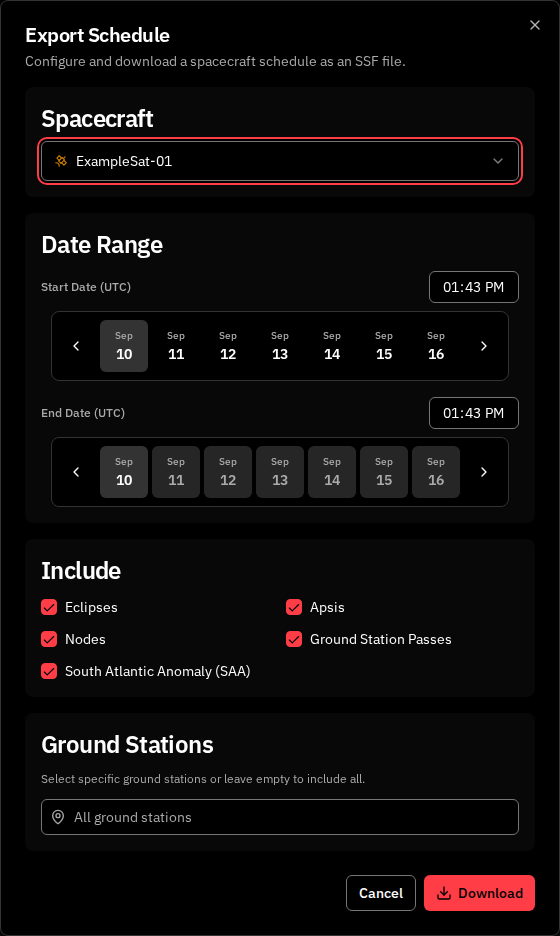
Spacecraft
A single-select dropdown listing every spacecraft in your tenant. The dialog defaults to the spacecraft already selected on the timeline.Date Range
Include
Five checkboxes determine what the exported.ssf file contains. All five are checked by default. With every checkbox unchecked the Download button is disabled and the dialog displays the validation message Select at least one event type.
Ground Stations
The Ground Stations card appears only when Ground Station Passes is checked. Use it to restrict the exported passes to specific ground stations.- Click the trigger button to open the picker.
- Check the stations to include; leave the selection empty to include all configured stations.
- The trigger label reads All ground stations when no stations are selected, or N selected when one or more are picked.
Footer
When you export a spacecraft that is running on the fallback (see Orbit age), the generated
.ssf includes that spacecraft’s fallback orbital events and carries an in-file COMMENT Orbital events derived from public TLE - indicative timing note, so a downstream reader treats their exact timing as indicative. When no fresh orbit is available and the fallback cannot rescue the craft, the file retains the COMMENT Orbital events unavailable - no fresh state vector note it carries today.
Related pages
- Maneuver Planner — separate plan evaluation and approval workflows
- Importing Maneuvers — add records from OCM files
- Exporting Maneuvers — share stored records as OCM
- Maneuver API — authentication, OCM import/export, deletion, and correction examples