
For the complete documentation index, see llms.txt.Generate OEM (Orbit Ephemeris Message) files from state vectors. OEM files contain predicted satellite positions over a specified time range, useful for mission planning, conjunction analysis, or sharing with external systems. Access: Click Generate Ephemerides on the State Vectors page top-right corner.
Modal Overview
The Generate Ephemerides modal guides you through four steps: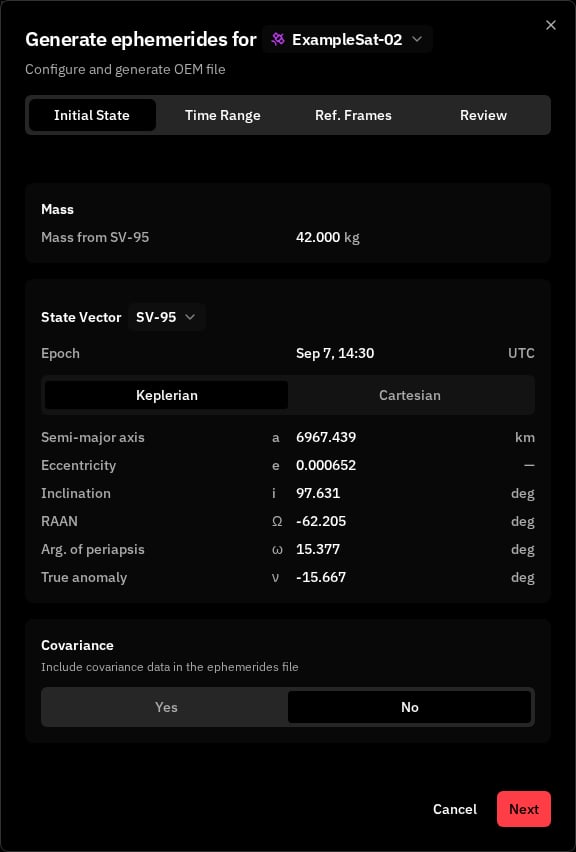
Step 1: State Vector Selection
Select Spacecraft
Choose a spacecraft from the dropdown. The list shows spacecraft names with colored satellite icons.Select State Vector
After selecting a spacecraft, choose a state vector from the dropdown. Each option shows the state vector ID and epoch date/time. Empty State: If no state vectors are available for the selected spacecraft in the last 30 days, you can:- Click Import State Vector to open the import dialog
- Click Run Orbit Determination to configure OD
Include Covariance Data
Toggle whether to include covariance matrix in the OEM file:Step 2: Time Range Configuration
Time Step
Use the slider to set the interval between data points (1–60 minutes).- Smaller step = more data points, larger file
- Larger step = fewer data points, smaller file
Start Date & Time
Select the start date from the 7-day calendar (use arrows to navigate weeks) and enter the start time in 24-hour UTC format (e.g., “08:30”). Default: 00:00 UTCEnd Date & Time
Select the end date and enter the end time. Default: 23:59 UTCDates are limited to ±30 days from the state vector epoch. Total duration cannot exceed 30 days.
Step 3: Reference Frames
Time System
Ephemerides Reference Frame
Covariance Reference Frame
Only available when covariance is enabled in Step 1.Step 4: Review & Generate
Review your configuration before generating: State Vector Card- Spacecraft name
- State Vector ID
- Epoch date and time
- Start and end date/time (UTC)
- Time step in minutes
- Calculated number of data points
- Time system
- Ephemerides frame
- Covariance frame (if enabled)
Generate OEM
Click Generate OEM to create and download the file. Loading states:- “Sending request to server…”
- “Downloading file…”
- Toast notification: “OEM generated successfully”
- File downloads automatically
- Modal closes
Navigation
- Step tabs: Click any step name to jump directly to it
- Next: Validates current step and proceeds
- Back: Returns to previous step (hidden on Step 1)
- Cancel: Closes modal without generating
Error Handling
Output
Format: OEM (Orbit Ephemeris Message), CCSDS standard text format Filename:oem_{stateVectorId}_{timestamp}.txt
Constraints
Related Pages
- State Vectors: Manage orbit solutions and state vectors
- OEM Format: OEM file format specification