
For the complete documentation index, see llms.txt.The Conjunction Classification page lets you monitor close approach events between your spacecraft and other space objects. View conjunction data, assess collision risk levels, and manage alerts from different originators. Route:
/conjunctions/current or /conjunctions/historical
Page Layout
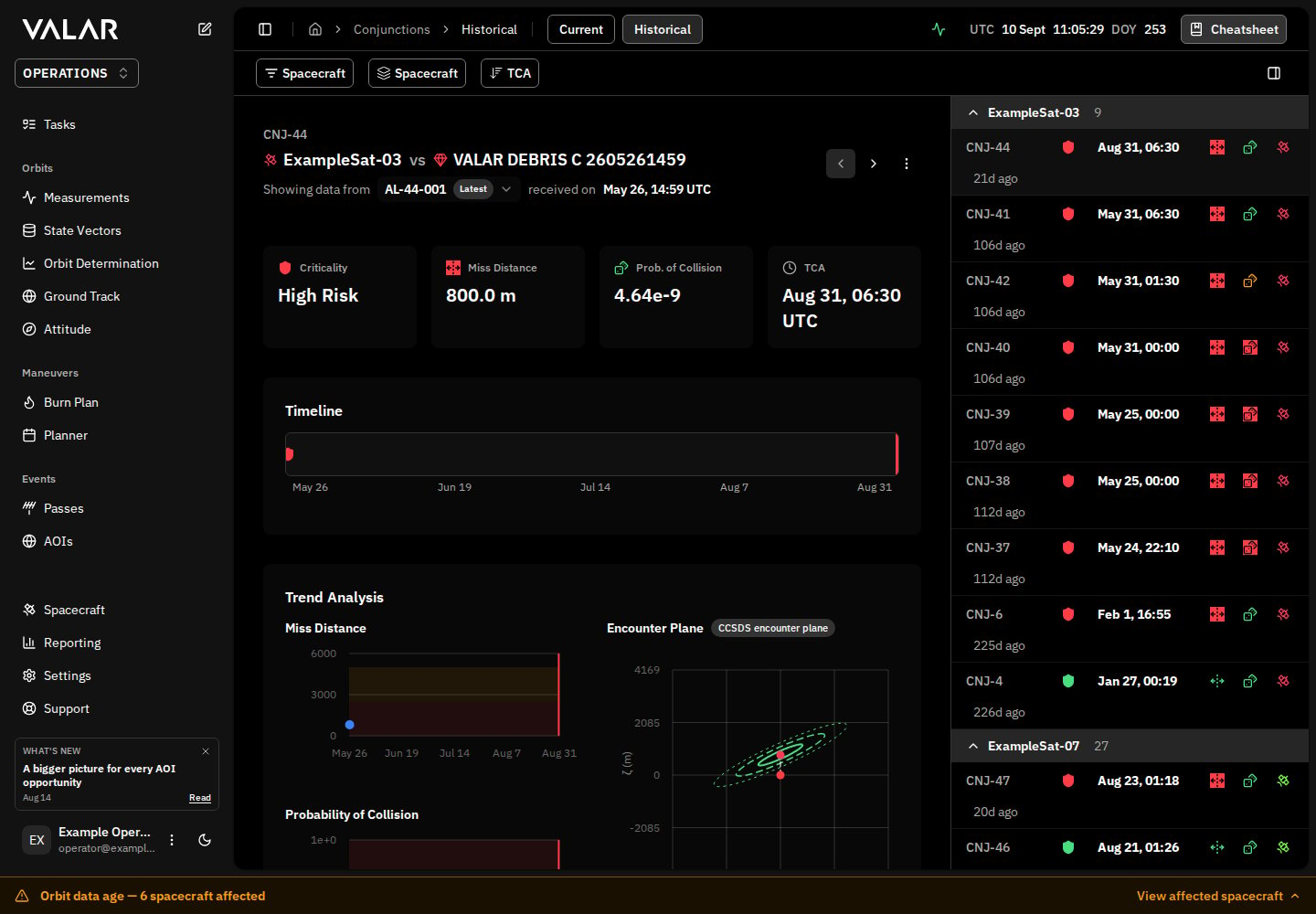
The page displays a details panel on the left and a scrollable conjunction list on the right. Two tabs at the top switch between views:- Current — Active conjunctions with upcoming TCA (Time of Closest Approach)
- Historical — Past conjunction events for review
Filtering and Sorting
Spacecraft Filter
Use the spacecraft dropdown in the toolbar to show conjunctions for specific spacecraft only. Select one or more spacecraft, then click Apply. When no spacecraft are selected, all conjunctions are shown.Grouping
Group conjunctions by:- Spacecraft — Groups by your primary spacecraft
- Criticality — Groups by risk level (High, Medium, Low)
- None — Flat list with no grouping
Sorting
Sort in Ascending (earliest TCA first) or Descending (latest TCA first) order.Conjunction List
Each row in the list displays:- Code — Conjunction identifier
- Risk Shield — Color-coded icon indicating criticality (red, yellow, or green)
- TCA — Date and time of closest approach (hover for full UTC timestamp)
- Miss Distance — Color-coded icon (hover for value in meters)
- PoC — Color-coded icon (hover for Probability of Collision value)
- Spacecraft — Colored satellite icon matching your spacecraft (hover for name)
- Last Updated — Relative time since the conjunction was last updated (hover for full timestamp)
Risk Levels
Conjunctions are classified into three risk levels based on your configured thresholds (see Settings):
The classification workflow and risk thresholds apply equally to conjunctions from all providers (SpaceTrack and EU SST). Alerts from any source are processed and classified using the same criteria.
Details Panel
Selecting a conjunction opens its details on the left. The panel includes:Summary
Key parameters at a glance:- Criticality — Risk level (High, Medium, Low) with color-coded shield
- Miss Distance — Predicted closest approach in meters, with radial, along-track, and cross-track breakdown on hover
- PoC — Probability of Collision in scientific notation
- TCA — Time of Closest Approach with countdown timer
Trend Analysis
When multiple alerts exist for a conjunction, a chart shows how miss distance or PoC has evolved over time. Each data point is color-coded by its originator (e.g., CSpOC, ESA, Valar).Encounter Plane (B-Plane)
For conjunctions with B-plane data, an interactive visualization shows the relative geometry at closest approach:- Primary object at the center with its covariance ellipse
- Secondary object position relative to the primary
- Uncertainty boundaries at 1σ, 2σ, and 3σ levels
CCSDS encounter plane — the frame the B-plane projection is computed in. Hover the badge for the full frame name; click Learn more to open the reference frame catalog.
State Vectors
Expandable sections display orbital state data for both objects, including position and velocity in Cartesian coordinates, position uncertainty in the RTN frame, and the reference frame used.Import Alerts
Import alerts from CDM files:- Click Import in the toolbar
- Select the target spacecraft
- Drag and drop files or click to browse
- Supported formats:
.cdm,.xml,.txt
Export Alerts
Export a conjunction’s alerts as CDM files:- Select a conjunction from the list
- Click the More menu (⋮) in the details panel header
- Select Export Alerts
Delete Conjunction
- Select the conjunction
- Click the More menu (⋮) in the details panel header
- Select Delete and confirm
Settings
Configure how conjunctions are classified via Settings → Integrations → STM.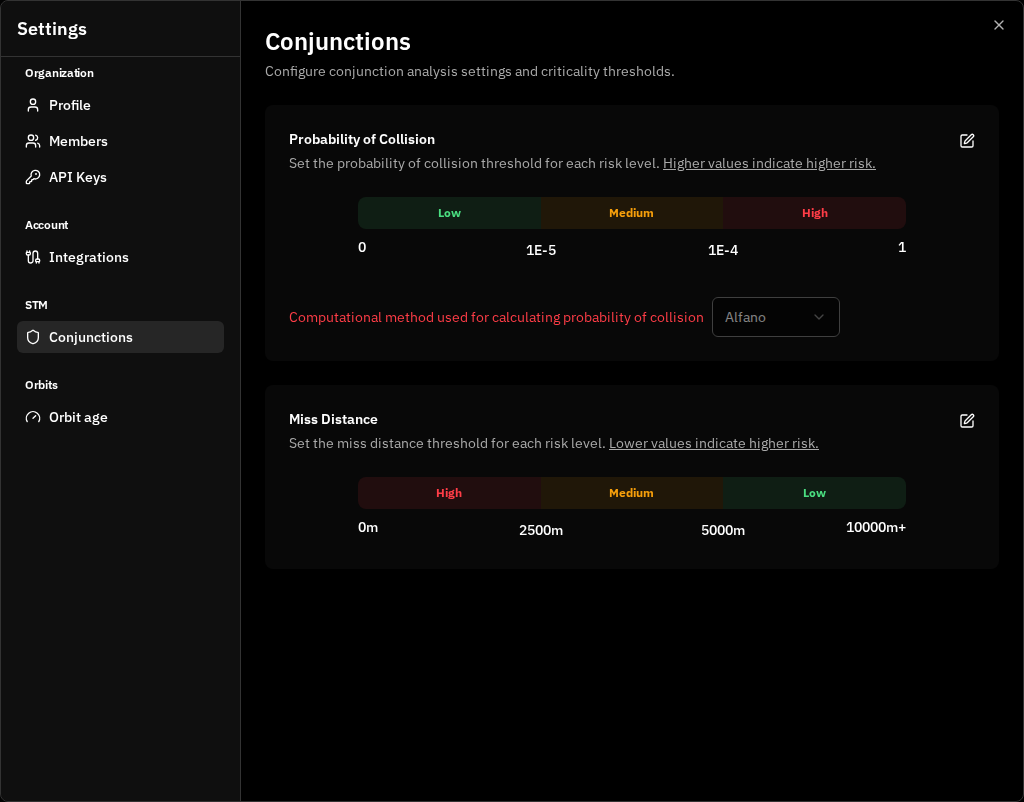
PoC Thresholds
Set the Probability of Collision values that define each risk level:
Conjunctions below the Medium threshold are classified as Low risk.
Miss Distance Thresholds
Set the miss distance values that define each risk level. Lower distances indicate higher risk:
Conjunctions above the Medium threshold are classified as Low risk.
PoC Computation Method
Select the algorithm used to calculate Probability of Collision:Editing Thresholds
- Click the Edit icon next to a threshold section
- Enter new values (scientific notation for PoC, meters for miss distance)
- Click Save to apply
Settings changes apply to all users in your organization.
Related Pages
- Conjunction Computation — Compute conjunctions using your own state vectors
- Fetch Alerts — Download alerts from external space surveillance providers
- CDM Format — Conjunction Data Message file format reference