
For the complete documentation index, see llms.txt.An off-nadir opportunity is an overflight opportunity a payload reaches only by slewing away from nadir — straight down — rather than testing access with the payload pointed only directly overhead. Switch it on for an area of interest to see every opportunity the payload’s declared off-nadir pointing limits allow, each carrying a geometric assessment of its own. Route: The Include off-nadir opportunities switch is in the Edit AOI dialog, opened via the pencil icon in the identity hero on the AOI Overview page (the reading it adds appears in the events surface on both AOI Overview and Overflight Events).
Turning It On
The Include off-nadir opportunities switch is set per area of interest, under Status & validity in the Edit AOI dialog. Off by default. Turning it on recomputes that area of interest’s overflight forecast, adding every opportunity the payload can be pointed at — not only those directly overhead. With the switch off, the events surface is exactly what it is everywhere else in the product: no off-nadir reading, no Access control, and nothing to opt back out of. Once it’s on, Filtering by Access narrows the list to All, Nadir, or Off-nadir only — choosing Nadir reproduces the list exactly as it stood before you switched this on.The Assessment
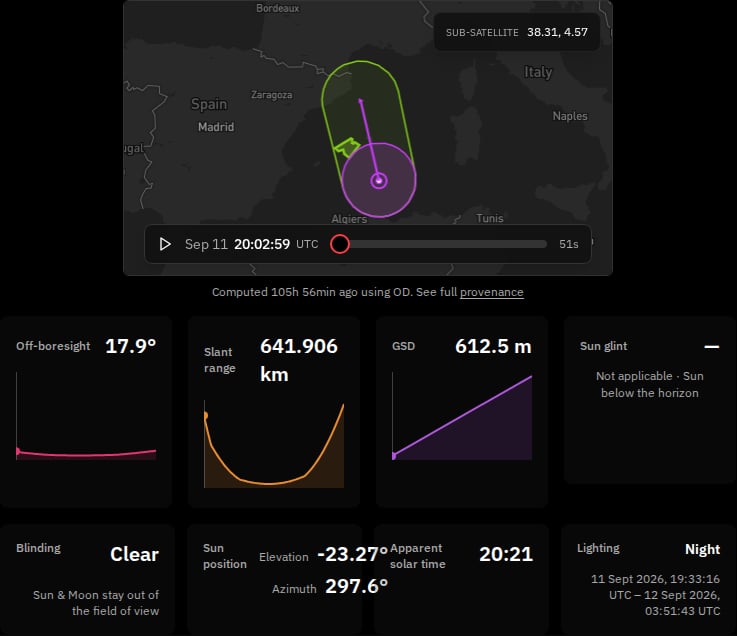
The assessment reports validity and provenance only. It never reports how good the opportunity is for imaging, and it is never a verdict on whether the spacecraft can be tasked to point there — see the disclaimer above.
Neither the caveated nor the not assessable glyph carries any colour or emphasis, and neither uses a warning or error style — deliberately so. A red or amber treatment would read as “cleared to task” or “do not task,” a judgement this reading never makes.
Vocabulary
States You Might See
Alongside the assessment, an off-nadir opportunity can land in one of several states. Each names what to chase — never a generic failure:
A GSD reading that falls outside its validated domain at this look angle is a related but separate state, documented under Availability states on the Overflight Events page.
Related Pages
- Overflight events — the full opportunity list, the per-event detail panel, and the Off-nadir group’s field-by-field reading.
- Areas of Interest overview — the page hosting the Edit AOI dialog where the switch lives.
- State vectors — refresh an orbit that is too old to place the bound.