
For the complete documentation index, see llms.txt.SMA (Semi-Major Axis) Maintenance is a station-keeping algorithm that computes a sequence of maneuvers to keep a spacecraft’s semi-major axis within a defined tolerance band. It corrects for natural orbital decay caused by atmospheric drag, gravitational perturbations, and other forces. This page documents the SMA-specific configuration. For the shared wizard steps (Overview, Initial State, Time Range, Review) and general Planner functionality, see the Planner overview.
Step 4: SMA Parameters
Configure the target semi-major axis and tolerance band for the maintenance algorithm.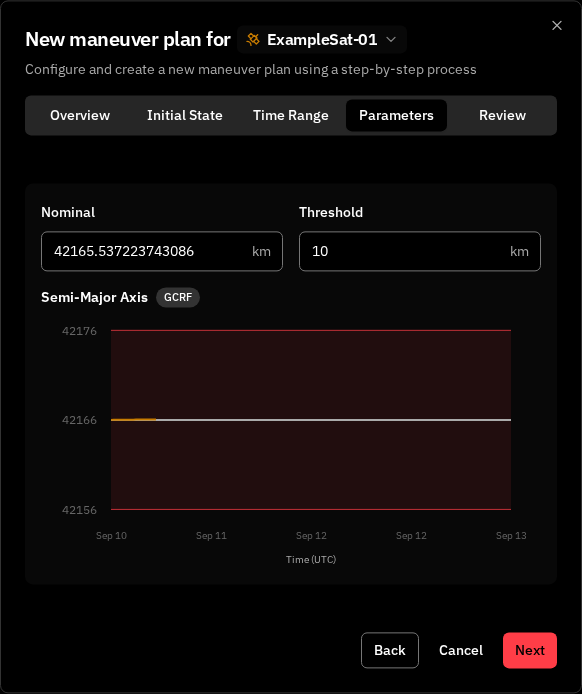
The optimizer will compute maneuvers to keep the semi-major axis within Nominal ± Threshold km.
SMA Plot
Below the input fields, a real-time plot shows the spacecraft’s semi-major axis over the configured time range. The plot displays:- Spacecraft SMA — the osculating semi-major axis line
- Nominal line — solid gray reference at the target value
- Threshold lines — dashed red lines at upper and lower bounds
- Tolerance zone — shaded area between the threshold lines
GCRF). Hover the badge for the full frame name; click Learn more to open the reference frame catalog. The badge also appears on the Inclination and Keplerian-element charts elsewhere in the SMA Maintenance planner views — they all share the same propagation frame.
Auto-Population
When a spacecraft is selected, the Nominal SMA field is automatically populated with the spacecraft’s current semi-major axis value (extracted from the latest Keplerian elements). You can override this value manually if needed.Analysis Tab
When viewing an SMA Maintenance plan in the details panel, the Analysis tab displays a chart showing how the computed maneuvers maintain the semi-major axis within the tolerance band (visible in the Planner page screenshot). The chart shows:- Osculating SMA — the spacecraft’s semi-major axis over the plan time range, including the effects of each computed maneuver
- Nominal reference — solid line at the target SMA value
- Threshold bounds — upper and lower bounds with shaded tolerance zone
Key Concepts
Tolerance Band
The range [Nominal SMA - Threshold, Nominal SMA + Threshold] defines the acceptable operating window. When the spacecraft’s SMA drifts toward a threshold boundary, the optimizer schedules a corrective maneuver to push it back toward the nominal value.Semi-Major Axis
The semi-major axis defines the size of an orbit — it is half the longest diameter of the orbital ellipse. For a circular orbit, it equals the orbital radius. For more details, see Core Concepts.Related Pages
- Planner — Planner overview, shared wizard steps, and plan details
- Burn Plan — View and manage individual spacecraft maneuvers
- Core Concepts — Foundational orbital mechanics concepts