
For the complete documentation index, see llms.txt.State Vector Comparison lets you inspect two state vectors side-by-side across their orbital elements — both osculating and DSST mean — and cross-check a single state vector’s mean elements against the public TLE reference propagated with SGP4. Operators use this view to verify that orbit determination has converged, investigate divergence between theories, and spot-check their solutions against an independent SGP4 reference. Route:
/state-vectors/data
Compare Button
The Compare button lives in the state vectors page toolbar, next to Generate Ephemerides and Import. The button is enabled whenever the current view contains at least one state vector. When the list is empty, the button is disabled and a tooltip reads No state vectors to compare. Clicking Compare opens the comparison modal with two tabs: Osculating Elements and Mean Elements. The Osculating Elements tab compares two state vectors side-by-side, so you’ll select two state vectors from the modal’s dropdowns to populate the view. The Mean Elements tab pairs a single state vector against the public TLE reference, so one selection is enough there.Osculating Elements Tab
The Osculating Elements tab compares two state vectors side-by-side using their osculating Keplerian elements. The modal header contains two spacecraft dropdowns — Spacecraft A and Spacecraft B — separated by the label vs.Selecting State Vectors
Once a spacecraft is picked on either side, a state vector (SV) selector appears in the column header for that side. Choose an SV for Spacecraft A on the left and an SV for Spacecraft B on the right. Selecting the same SV in both slots is prevented — if you pick an SV in one side that is already selected on the other, the other slot is cleared automatically.Epoch Alignment
When the two selected SVs have different epochs, SV-B is propagated to SV-A’s epoch so both columns represent the same instant. The right-column epoch row shows the original SV-B label followed by a note that it was propagated:Elements Table
The Δ column shows the signed element-level difference between SV-A and SV-B for each row. A directional arrow flags which side is greater at a glance — up arrow when SV-A is larger, down arrow when SV-A is smaller — and the numeric magnitude is shown next to it.
Mean Elements Tab
The Mean Elements tab compares a single state vector’s DSST mean elements against the public TLE reference for the same spacecraft. Because only one SV is compared, the Spacecraft B selector is hidden on this tab and only the Spacecraft A / SV-A selector is shown.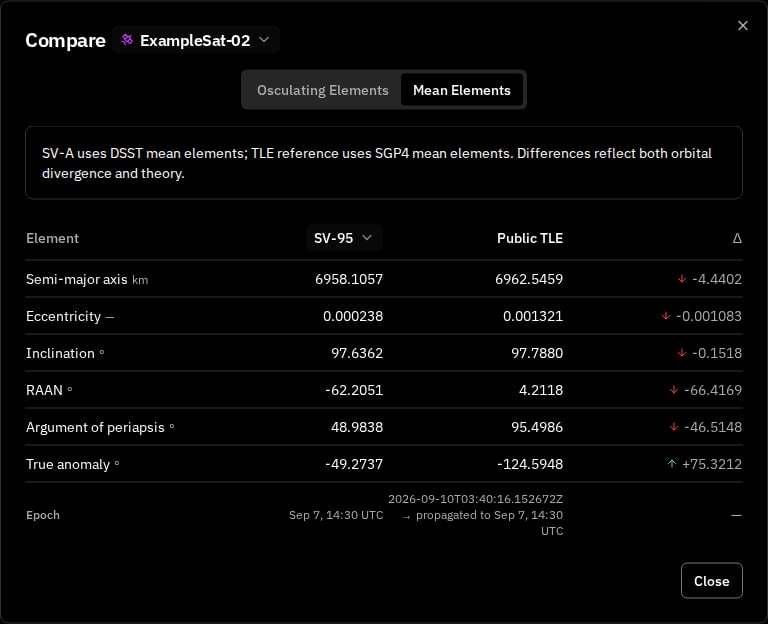
SV-A uses DSST mean elements; TLE reference uses SGP4 mean elements. Differences reflect both orbital divergence and theory.
Reference Data
The TLE is fetched for the spacecraft’s configured NORAD ID and propagated with SGP4 to SV-A’s epoch so the two columns share a common instant. The epoch row shows both the TLE epoch and the propagation target:Elements Table
The tab’s table uses three columns — SV-A (DSST), Public TLE (SGP4), and Δ (SV-A − TLE) — for the same six Keplerian elements listed in the Osculating Elements table, with the same precision (eccentricity to 6 decimals, other elements to 4).Details Panel — Mean Tab
Mean elements are also available directly in the state-vectors details panel on the right-hand side, without opening the comparison modal. The Coordinates section now has three tabs: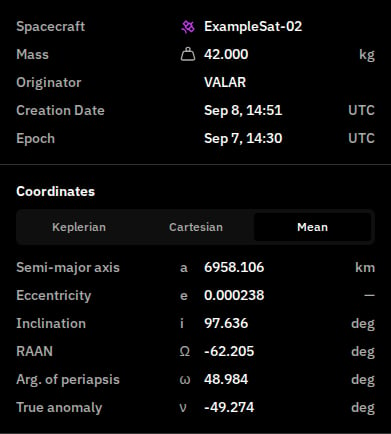
When the TLE column isn’t available
The Mean Elements tab depends on a public TLE for the spacecraft. When that reference is missing, the platform surfaces the reason in-place so you can act on it.Spacecraft has no NORAD ID
If the spacecraft selected as Spacecraft A does not have a NORAD ID configured, the TLE column is replaced with an informational notice:Configure a NORAD ID in spacecraft settings to enable the public TLE reference.
Space-Track temporarily unavailable
When the upstream Space-Track service is unreachable or returns an error, the TLE column surfaces a transient warning: This is a system-wide condition, not tied to any specific state vector — retrying a few moments later is usually enough.DSST conversion failure
DSST mean elements are derived per-state-vector. When the conversion fails for a particular SV, its mean-element cell is replaced with: This message appears in both places that render mean elements:- In the details panel Mean tab — the whole cell is replaced.
- In the Mean Elements comparison tab — the SV-A column’s first row is replaced.
Related API endpoints
UseGET /operations/state-vectors/{id} to read a state vector programmatically — the response includes a meanElements field, which is null when DSST conversion failed for that state vector. See the API Reference tab at the top of the docs for the full schema and authentication details.
Related Pages
- State Vectors: List, import, and manage state vectors
- Spacecraft Management: Configure a spacecraft’s NORAD ID
- TLE Format: TLE file format specification