
For the complete documentation index, see llms.txt.The Planner allows you to create and manage orbital maintenance plans for your spacecraft. Using optimization algorithms, the Planner computes a sequence of maneuvers to keep a spacecraft within defined orbital parameters over a given time window. Route:
/maneuvers/planner
Flight-plan forecasts (internal rollout)
In Maneuvers → Flight plan, saved phases have an automatic forecast. New suitable orbital data or changes to saved phase and spacecraft inputs trigger an update. The starting orbit follows the existing source-selection and orbit-age rules, including public fallback. Its original epoch remains visible. Each phase separates Recorded so far from the Forecast · remaining phase. The forecast shows expected completion, drift from the intended date, predicted consumption and exit orbit. Expand Trajectory & assumptions to inspect orbital parameters and epochs. Solid history and dashed predictions meet at the source-state boundary when compatible recorded mean-element data exists. You do not need to enter propellant inventory. Without a dated estimate, remaining fuel is unavailable and the nominal forecast assumes planned maneuvers can execute; it does not verify fuel sufficiency. Physical spacecraft inputs such as total mass and propulsion are still needed. Only explicitly recorded executions contribute to recorded progress; past or approved proposals are not proof of execution. The last completed forecast stays visible during updates, with outdated or failure status when applicable. History and starting-state override provides optional investigation runs. Forecasting does not approve burns or change saved phase dates.Supported Algorithms
Page Layout
The Planner page has two main sections: a details panel on the left and a plan list on the right.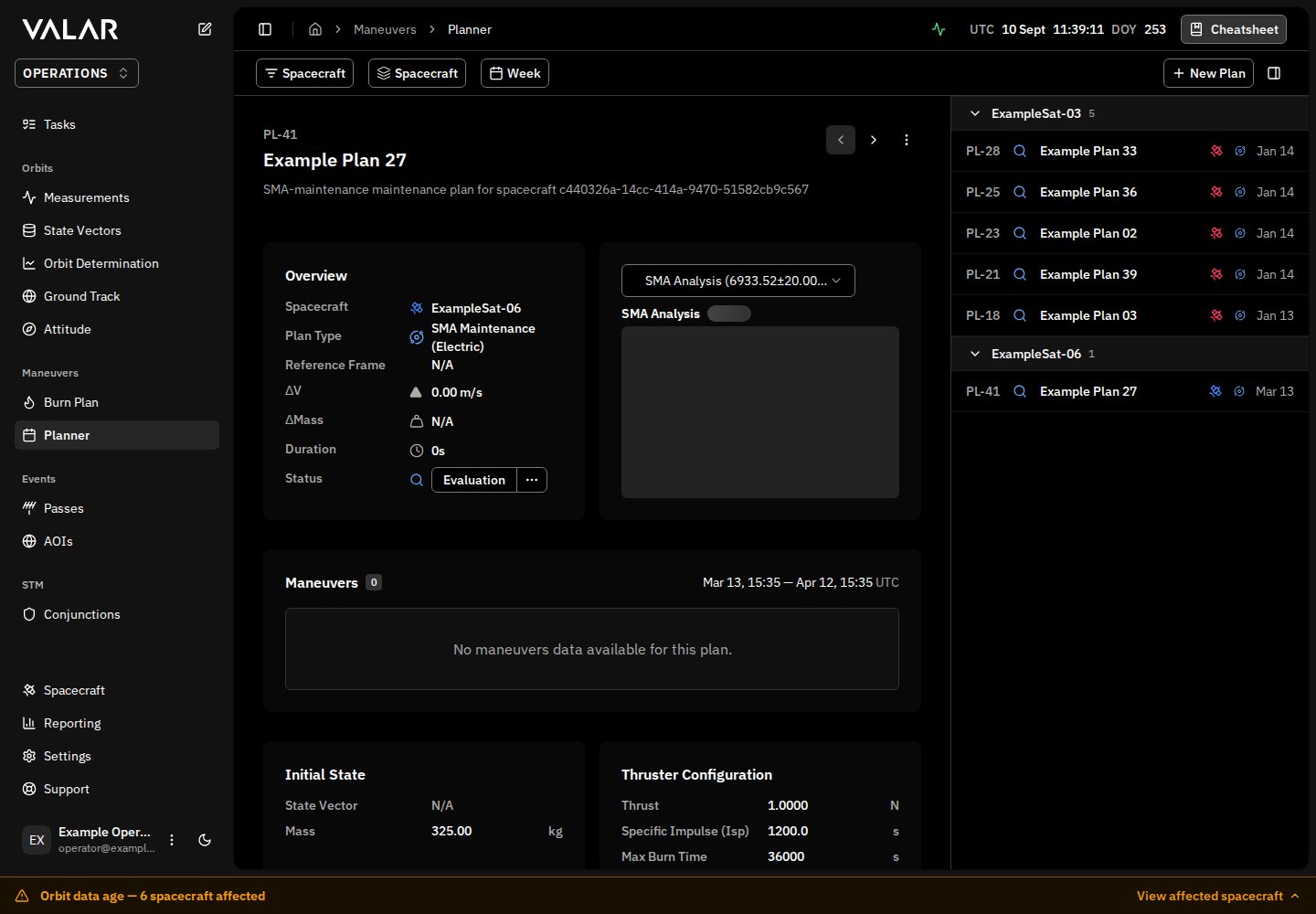
Toolbar
The top bar contains:- Spacecraft Filter — multi-select dropdown to filter plans by spacecraft
- Group By — group plans by Spacecraft, Status, Plan Type, or None
- Time Range — bidirectional time filter (past and future plans)
- New Plan — opens the plan creation wizard
- Toggle Panel — show/hide the plan list
Plan List
The right panel lists all plans matching the current filters. Each row shows the plan reference (PL-<number>), status icon, operator-entered name, spacecraft, plan type icon, and creation date. Ground-track control and orbit-raise evaluations reserve the same kind of reference before approval; the reference stays the same in the details panel and after approval. Older records without a reserved reference may show Reference pending instead of a truncated internal ID. Hover any element for a tooltip with details.
Plans can be grouped by spacecraft, status, or plan type. Each group header shows the count and supports pagination (5 items per page) and collapse/expand.
Status icons:
Click a plan row to load its details in the left panel.
Plan Creation Wizard
Missing Required Inputs
Before computing a plan, supply a complete initial state and its epoch, a finite positive mass from the selected source, and the selected spacecraft’s actual propulsion inputs. A TLE supplies an orbit, not a wet mass. The planner does not replace missing thrust, Isp, mass, or force-model data with representative values. If validation names a missing input:- Check the selected state and mass source. For propellant budgets, also configure dry mass and verify that wet mass is not below dry mass.
- Complete the selected thruster’s positive thrust and Isp, and the area/coefficient inputs consumed by enabled forces.
- For attitude-aware electric raising, complete the actual body/panel geometry and optics in Spacecraft; a drag cross-section alone cannot define faceted geometry.
- Retry the comparison or plan calculation. If approval reports an incompatible older snapshot, generate a new comparison with complete inputs rather than reusing the old approval evidence.
Step 1: Overview
Configure the plan metadata and select the optimization algorithm.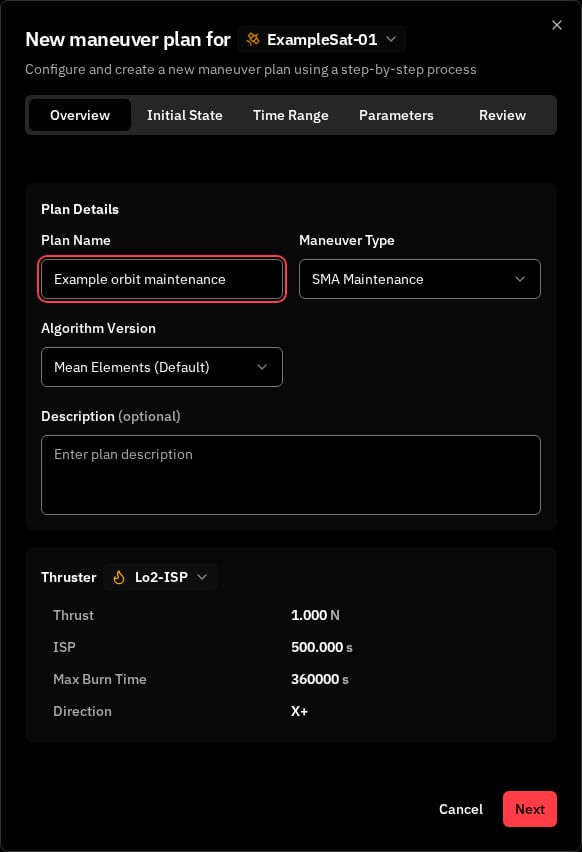
Step 2: Initial State
Displays the spacecraft’s state that will be used as the starting point for the optimization, which defaults to latest computed state vector. Users can select a different state vector if desired using the ID dropdown, or initialize the process with the latest public TLE.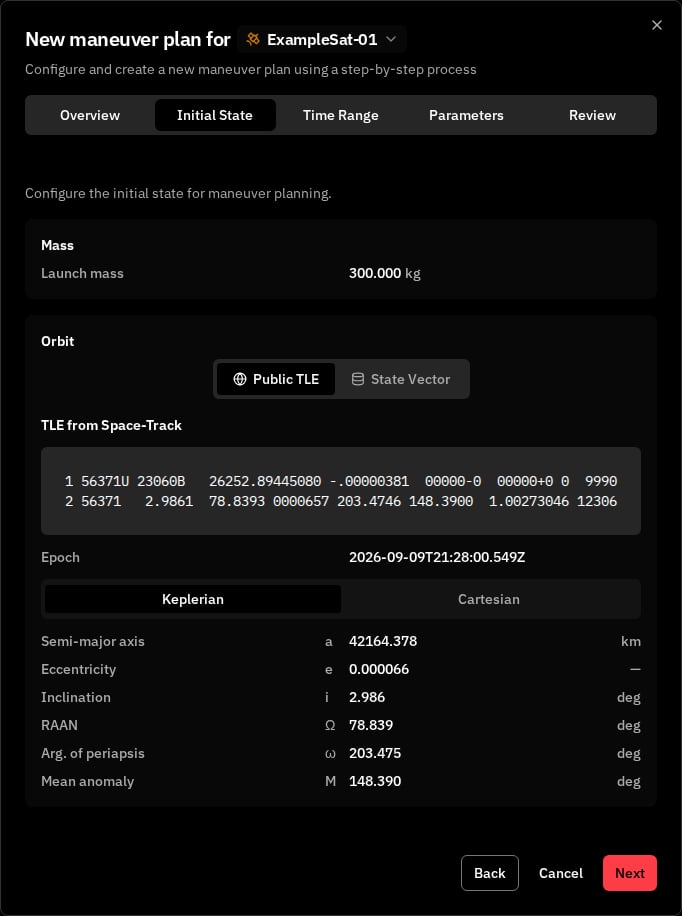
Step 3: Time Range
Define the time window over which the optimizer should plan maneuvers.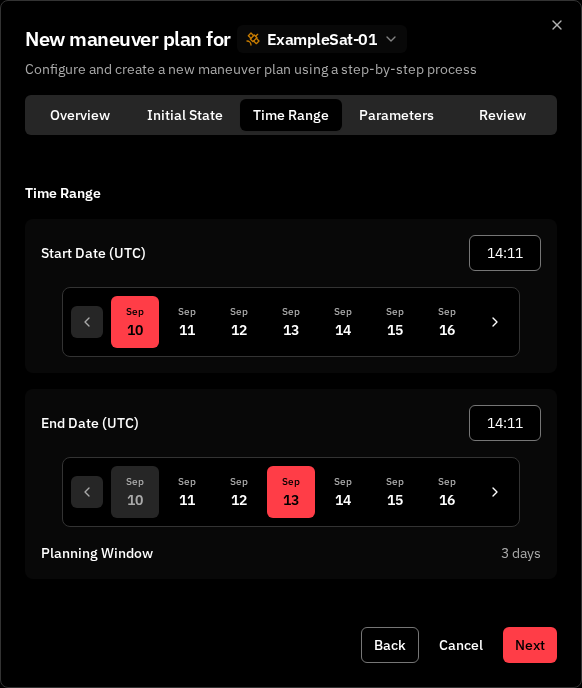
Step 4: Algorithm Parameters
This step varies by algorithm type. See the algorithm-specific documentation:- SMA Maintenance — Step 4
- Orbit Raise — Step 4
- Inclination Change — Mean target, fuel, reserve, availability and finite-burn verification
Step 5: Review
Review the full plan configuration before submission.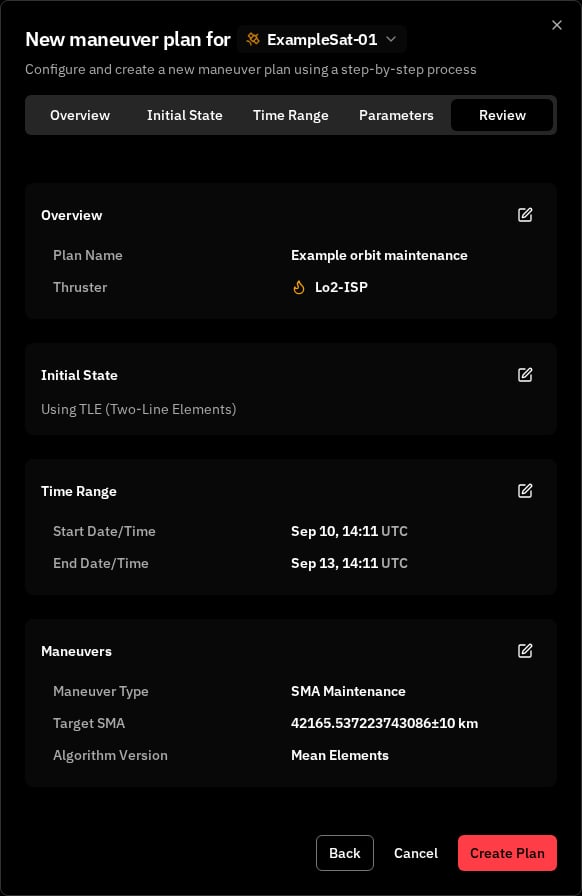
When the Orbit Is Stale
Maneuver optimization needs a fresh orbit to plan from. A spacecraft’s orbit age is measured from its latest state vector — the position and velocity at an epoch you provide through orbit determination, an OPM import, or manual entry. When that age passes the workspace’s configured stale level, the orbit is stale. Because a maneuver is a higher-consequence action than a plot, a stale orbit does not silently block it and does not silently proceed — it asks you to consciously acknowledge the risk before the action completes.Acknowledging a stale orbit on create and approve
The acknowledgment is a deliberate confirmation step, shown separately at the two points where a maneuver acts on the orbit — creating a plan and approving it for execution.
Both
N values are whole days — the spacecraft’s actual orbit age and your configured stale level.
Approval re-checks orbit freshness at the moment you approve, against the spacecraft’s latest orbit at that time — not against the orbit the plan was created on. A plan created while the orbit was fresh can still raise the approve-time confirmation if the orbit has since aged past the stale level; conversely, refreshing the orbit before approval clears it. To avoid the prompt entirely, provide a newer state vector for the spacecraft, or raise the stale level in Settings → Orbits → Orbit age. See Orbit age for the workspace-wide policy.
When a spacecraft has no usable orbit
A stale orbit can still be planned from once you acknowledge it. A spacecraft that has no usable orbit at all is different: there is nothing to plan from, so there is nothing to proceed on. Creating or approving a plan for such a spacecraft replaces the action with an in-place message — Can’t compute —{spacecraft} has no usable orbit — explaining that There is no usable orbit data for this spacecraft, so this product can’t be computed. Add tracking data to continue, with an Add orbit data button that takes you to the spacecraft page to add tracking data. This is never shown as a raw error; the remedy is to add orbit data, then create the plan.
Plan Details
Select a plan from the list to view its details in the left panel (visible in the page screenshot above).Header
The header shows the plan name, plan type icon, and a more menu with actions:Plan Information
Status Actions
Plans in Evaluation status can be approved or rejected using the action buttons in the header:- Evaluation → Approved (plan is ready for execution)
- Evaluation → Rejected (plan is discarded)
Tabs
Analysis — Algorithm-specific visualization showing how the computed maneuvers maintain the target orbital parameter. See SMA Maintenance Analysis for details. Burns — Lists each individual maneuver in the plan:
Activity — Timeline of plan events (creation, approval, rejection) with user attribution and timestamps.
Related Pages
- SMA Maintenance — SMA maintenance algorithm details
- Burn Plan — View and manage individual spacecraft maneuvers
- Orbit age — The workspace-wide stale level behind the create- and approve-time acknowledgment
- Core Concepts — Foundational orbital mechanics concepts