
For the complete documentation index, see llms.txt.Orbit age is how long it has been since a spacecraft’s orbit was last updated. VALAR governs it with one workspace-wide policy that has two graded levels: the degraded level, where a spacecraft falls back to a lower-accuracy public-catalog orbit and the platform signals it, and the stale level, where the orbit is too old to trust and VALAR warns you on the products that depend on it. Both levels are measured from the same point — each spacecraft’s latest state vector — and you set them together in one place. Both levels surface in one signal: the orbit-data-age footer that sits at the bottom of every page, tagging each affected spacecraft as Degraded or Blocked. Route: Settings → Orbits → Orbit age (the orbit-data-age footer appears across every page of the operations workspace).
Orbit age
A spacecraft’s orbit age is the time elapsed since its latest state vector — the position and velocity at an epoch you provide through orbit determination, an OPM import, or manual entry. It is now minus that latest state-vector epoch, expressed in whole days (all times UTC). Orbit age is a single, workspace-wide measure: the same definition applies to every spacecraft in the operations workspace, so an “old” orbit means one consistent thing across your fleet. As a spacecraft’s orbit ages, it crosses two thresholds in turn — first the degraded level, then the stale level — and each one changes how VALAR treats that spacecraft:
The two levels are ordered: the degraded level must be at or below the stale level, so a spacecraft falls back to a public orbit before it is ever flagged stale. You configure both — together with the block switch — in the Orbit age settings below.
Degraded level
The degraded level is the orbit age at which a spacecraft stops using its own now-old precise orbit and falls back to a public TLE — a Two-Line Element set the platform fetches itself from the public catalog, located by the spacecraft’s NORAD catalog ID. The spacecraft keeps planning and plotting, but on a lower-accuracy orbit, and the orbit-data-age footer names it with a Degraded tag, alongside any spacecraft tagged Blocked at the stale level. You never upload or paste a TLE; the platform retrieves it for you. The degraded level is on by default — a spacecraft that loses a fresh precise orbit automatically falls back to a public TLE, unless your workspace has deliberately turned degraded mode off (in which case such a spacecraft is governed only by the stale level). A spacecraft enters the degraded level automatically when either condition applies:
This is the lower-impact of the two levels: it keeps a product working, with a clear signal, rather than gating it behind a stale-orbit warning. What falls back to the public TLE — and which spacecraft the fallback cannot rescue — is detailed under How each product behaves.
What “Lower Accuracy” Means
A public TLE is a general-catalog orbit located by NORAD catalog ID, and it is less precise than an operator-provided state vector — so every result a spacecraft produces while it is at the degraded level is an approximation rather than a precise prediction. The platform never hides this: the orbit-data-age footer names every spacecraft currently running on a public TLE with a Degraded tag, and both the footer and the settings page describe that orbit as lower accuracy. Treat results for a degraded spacecraft as indicative, and restore a precise state vector when you need full accuracy.Stale level
The stale level is the orbit age at which VALAR considers a spacecraft’s orbit too old to trust and warns you on the products that depend on it. The verdict is judged per spacecraft: a stale spacecraft is flagged while every fresher spacecraft in the same view still computes normally. The stale level has a default of14 days.
Enforcement is controlled by the Block orbit-dependent products on stale orbits switch in the Orbit age settings, on by default. When it is on, a spacecraft whose orbit age is past the stale level has its orbit-dependent products gated or warned as described below; turning it off lets every product compute from an old orbit without the warning — the stale level still defines “stale”, it is just no longer enforced.
The Stale-Orbit Warning
When a spacecraft’s orbit is stale but still usable, VALAR does not refuse the product — it warns you, and lets you proceed. How the warning appears depends on the product:- On the interactive products — the ground-station passes timeline, the Keplerian-elements plot, and the ground-track map — the result is held behind a stale-orbit panel with a Compute anyway button. The chart, timeline, or map is withheld until you press Compute anyway, which computes and renders the result on the stale orbit. Proceeding is a conscious choice, not a silent default.
- On a background recompute — AOI overflight — the events still compute, and the same stale-orbit panel appears inline, above the result as a warning rather than a gate. Triggering the recompute is itself the conscious act, so no separate button is needed.
- On a file export — the attitude AEM export and the schedule export — there is no panel: the file downloads with an in-file
COMMENTline noting the orbit’s reduced confidence, so a reader of the file outside VALAR is not misled about its precision. Requesting the export is itself the conscious act. - The one exception is the state-vector OEM export: VALAR refuses outright rather than warning, because an orbit-data export must never embed a stale orbit. Provide fresher tracking data to continue — this export never proceeds on acknowledgment.
- A degraded (not stale) orbit on an interactive product is warned the same inline way, not gated — you keep the result, with the warning shown above it.
Both
N values are whole days — the spacecraft’s actual orbit age and your configured stale level. The Next action line reflects which orbits the platform holds for the spacecraft:
The remedy names the two ways to clear the warning: provide fresher tracking data (a new state vector) for the spacecraft, or raise the stale level in Settings. When the orbit in use came from the public-TLE fallback rather than your own tracking data, the panel adds the line the public-TLE fallback is also stale, so you know that refreshing your own data is what clears it.
When There Is No Usable Orbit
Warning-and-proceeding only applies when there is an orbit to proceed on. When a spacecraft has no usable orbit at all, the product cannot be computed no matter what you acknowledge — so in place of a stale-orbit warning, the result is replaced by a can’t-compute panel:
The panel names the spacecraft — or reads This spacecraft when it has no name — and carries an Add orbit data action that opens the spacecraft page so you can supply an orbit. Because there is nothing to compute, Compute anyway is not offered here: acknowledging staleness never unlocks a spacecraft that has no usable orbit. A numerically-invalid or decayed orbit gets the same panel with its own message, so a physically impossible orbit is always explained plainly rather than surfacing a raw error.
This verdict is consistent everywhere the spacecraft appears: the same classification that drives the panel tags the spacecraft Blocked in the orbit-data-age footer and Stale on its cheatsheet, and it governs maneuver planning too — creating a plan for a spacecraft with no usable orbit returns the same can’t-compute response immediately, rather than accepting the request and producing nothing.
The Orbit-Data-Age Footer
Both levels of the orbit-age policy — the degraded level and the stale level — surface in one signal: the orbit-data-age footer. Whenever any spacecraft in the workspace is affected at either level, a persistent footer sits at the bottom of every page of the operations workspace, spanning the full width beneath the sidebar and content. When no spacecraft is affected, no footer is shown. A spacecraft with no state vector at all — in a workspace where degraded mode is off, so it has no public-TLE fallback to stand in — now appears in this footer too, tagged Blocked, the same treatment as a stale orbit. It has no usable orbit of any kind; previously such a spacecraft was absent from the footer.The Collapsed Strip
By default the footer is a single collapsed strip reading Orbit data age — N spacecraft affected, whereN is the count of affected spacecraft. For a single spacecraft it reads 1 spacecraft affected.
The strip carries a blocked-severity cue: when one or more affected spacecraft are at the Blocked (stale) level, the strip switches to a higher-severity amber palette and shows an N blocked count, so “some are blocked” reads at a visibly higher severity than “all merely degraded”. When every affected spacecraft is only Degraded, the strip uses the softer degraded-yellow palette and shows no blocked count.

The Drawer
Select View affected spacecraft to open the Orbit age warnings drawer, described as Spacecraft affected by orbit data age — degraded or blocked — a grid showing one card per affected spacecraft. Each card carries:
A spacecraft that qualifies at both levels appears once, at its most severe level — Blocked; blocked spacecraft are ordered ahead of degraded ones, so a single spacecraft never reads as both “degraded” and “blocked”.
When an age is unavailable, the card shows — in place of the number, with a tooltip explaining why:
The footer is the workspace-wide orbit-data-age signal. A complementary per-spacecraft status also appears on each spacecraft’s cheatsheet, described next; there is still no orbit-age status on the spacecraft page or in the spacecraft selector.
Orbit Age on the Cheatsheet
Every spacecraft’s cheatsheet surfaces that spacecraft’s own live orbit-age status, so the orbit-age signal sits right beside its orbit data, not only in the workspace-wide footer. The cheatsheet applies the same orbit-age policy as the footer — the degraded level and the stale level — to the single spacecraft you are viewing, read fresh each time you open it, and pairs that status with both of the orbits the platform holds for the spacecraft. It is the per-spacecraft view of the same signal the orbit-data-age footer carries across the workspace.
The Header Status Chip
A colour-coded status chip sits in the cheatsheet header, beside the spacecraft selector at the top of the panel, showing the spacecraft’s live orbit-age status:
Click or tap the Orbit age button to read the reason for the status. You can also focus the button with
Tab and activate it with Enter or Space. Press Esc to close the details while keeping the cheatsheet open. If the status cannot be retrieved, the header shows Status unavailable; that is distinct from a Stale orbit.
Own and Public TLE Tabs
The cheatsheet’s Two-line element (TLE) section shows the available orbital references on two tabs:
Each tab shows its source’s two TLE lines, age, and epoch in UTC. The in-use indicator identifies the orbit source used by the spacecraft’s products; browsing another tab does not change it. The in-use source is selected by default, or Own computed when no source is known. Once you choose a tab, it stays selected until you switch tabs or spacecraft.
Click Copy to copy exactly the two lines in the displayed tab. Copied confirms success; Retry copy and an explanation appear if the clipboard is unavailable. On narrow screens, scroll the TLE horizontally to read its unwrapped lines.
When a source has no TLE, its tab reads No own TLE available or No public TLE available. When neither source is available, the section shows No TLE available. Loading and retrieval failures are shown within the affected section so you can continue reading the other spacecraft data.
Proactive orbit-age alerts
The orbit-data-age footer and each spacecraft’s cheatsheet show orbit-age status when you look at them. VALAR also notifies you the moment a spacecraft’s status changes, so an orbit that ages into Degraded or Stale — or recovers — reaches you even when you are working on something else. The notification arrives in your in-app notification inbox; it is the proactive companion to the footer, which remains the live snapshot you pull up.What raises a notification
A notification is raised whenever a spacecraft’s orbit-age status changes from one level to another, in either direction:
Each notification names the spacecraft and the reason its status changed — the same plain-language reason the footer and cheatsheet show — so you can triage it without leaving the inbox. The notification is informational: it is a signal, not a link, so there is no click-through — you act in your own time through the products and the footer. Delivery is in-app only — there is no email or Slack notification, and no new page.
What does not raise a notification
VALAR notifies you on a change, never on a standing condition, so your inbox is not flooded:- A spacecraft that stays at the same status raises no repeat notification — you are told once, when it changes, not again while it remains there.
- The first time VALAR records a spacecraft’s status — a newly onboarded spacecraft, for instance — it notes that starting status silently and notifies you only when the status later changes.
- An identical change repeated on the same day (UTC) — a spacecraft that goes Nominal → Stale, recovers, then goes Nominal → Stale again the same day — raises one notification for that change that day. A different change, or the same change on a later day, always raises a new notification.
How each product behaves
Orbit age governs every orbit-dependent product together, though not every product responds to the stale level the same way. At the degraded level, the products that support the public-TLE fallback keep working on the fetched orbit. At the stale level, most orbit-dependent products show the stale-orbit warning above — a conscious-proceed gate on the interactive products and an inline warning on a background recompute — while a spacecraft with no usable orbit gets the can’t-compute panel instead. A few products are exceptions: orbital events and attitude aren’t gated by this policy at all, and conjunction/collision-avoidance maneuvers refuse outright rather than offering a warning. The table below states exactly how each product responds. A gated or warned spacecraft is named in the one orbit-data-age footer — tagged Degraded at the degraded level, Blocked at the stale level — so a single signal covers both. The warning governs the result of an affected product; the footer is the workspace-wide signal that lists every affected spacecraft.
Ground-station pass prediction (
/passes/timeline) has no settings of its own — it follows this one workspace orbit-age policy, at both levels. Maneuver optimization’s stale-orbit acknowledgment and its can’t-compute response are documented in full on the Planner page. The subsections below detail how each product behaves on the degraded-level public-TLE fallback.
Ground-Station Passes on the Fallback
Ground-station pass prediction is the first planning function that runs on the fallback. While a spacecraft is at the degraded level, the Passes timeline computes its visibility windows from the public TLE the platform fetched for it, instead of skipping the spacecraft as it would without a fresh precise orbit. The fallback passes render exactly like passes computed from a precise state vector — the same timeline bars, and the same hover details (spacecraft, ground station, AOS, LOS, and duration). No individual pass is marked as degraded. Pass prediction follows the workspace degraded level in both directions: a spacecraft whose orbit age is past the degraded level computes its passes on the public TLE, while a spacecraft within the degraded level computes on its precise state vector and is not sent to the fallback. Passes computed from the fallback book exactly like precise-orbit passes — a booked fallback pass appears in your booked-passes list and its details panel, indistinguishable from any other pass. With degraded mode enabled, the skipped-spacecraft notice lists only the spacecraft the fallback could not rescue:
Degraded operation on the timeline is signalled solely by the unified orbit-data-age footer above, which tags the spacecraft Degraded; an individual fallback pass carries no separate marker. While degraded mode is off, nothing falls back to a public TLE: a spacecraft with no state vector is skipped with the usual “no state vector available” reason, and one whose orbit age is past the stale level shows the stale-orbit warning in place of its passes — and the footer tags that spacecraft Blocked.
AOI Overflight on the Fallback
Area-of-interest overflight planning also runs on the fallback. While a spacecraft is at the degraded level, VALAR computes its overflight events from the public TLE the platform fetched for it, instead of skipping the spacecraft as it would without a fresh precise orbit. A spacecraft located by a NORAD catalog ID alone — with no operator state vector — becomes overflight-plannable for its configured payloads. Fallback-computed overflight events render exactly like events computed from a precise state vector — the same per-payload rows, the same entry, exit, and peak times, and the same off-boresight and blinding detail — with no per-event marker that the orbit was a public TLE. An overflight recompute follows the workspace degraded level in both directions: a spacecraft whose orbit age is past the degraded level computes its overflights on the public TLE, while a spacecraft within the degraded level computes on its precise state vector and is not sent to the fallback. The fallback can’t rescue a degraded spacecraft in two cases — when no public TLE can be retrieved for it, or when it has neither a state vector nor a NORAD ID. In either case the spacecraft contributes no overflight events; unlike the Passes timeline, AOI overflight shows no per-spacecraft notice on the page. The reasons are the same two above for ground-station passes:
Degraded operation for AOI overflight is signalled solely by the unified orbit-data-age footer, which tags the spacecraft Degraded; no individual overflight event carries a separate marker. While degraded mode is off, nothing falls back to a public TLE: a spacecraft with no state vector contributes no events, and one whose orbit age is past the stale level shows the stale-orbit warning in the forecast — and the footer tags that spacecraft Blocked.
Orbit Plots & Ground Track on the Fallback
Orbit plotting is the everyday visualization that runs on the fallback. While a spacecraft is at the degraded level, both orbit-plot surfaces propagate it from the public TLE the platform fetched and plot the result, instead of skipping it as they would without a fresh precise orbit. The Ground Track page computes its ground track, 2D/3D globe position, and latitude/longitude plots from that public TLE; the Keplerian Elements page computes its six orbital-element time-series from the same fallback. A spacecraft located by a NORAD catalog ID alone — with no operator state vector — becomes plottable on both surfaces, and the fallback-propagated results render exactly like results computed from a precise state vector, with no per-result marker that the orbit was a public TLE. Both plot surfaces follow the workspace degraded level in both directions: a spacecraft whose orbit age is past the degraded level plots on the public TLE, while a spacecraft within the degraded level plots on its precise state vector and is not sent to the fallback. No per-track, per-position, or per-series source marker distinguishes a fallback plot from a precise one. Degraded operation on both surfaces is conveyed solely by the unified orbit-data-age footer, which tags the spacecraft Degraded (or Blocked once past the stale level); an individual plot carries no separate indicator, deliberately. With degraded mode enabled, the skipped-spacecraft warning lists only the spacecraft the fallback could not rescue. The reasons are the same two above for ground-station passes:
While degraded mode is off, nothing falls back to a public TLE: a spacecraft with no state vector cannot plot, and a spacecraft whose orbit age is past the stale level shows the stale-orbit warning in place of its plots.
Orbital Events on the Fallback
Orbital-event computation also runs on the fallback. While a spacecraft is at the degraded level, the Burn Plan timeline computes its eclipse, apsis, node, and South Atlantic Anomaly (SAA) crossings from the public TLE the platform fetched for it, instead of skipping the spacecraft as it would without a fresh precise orbit. The fallback events render exactly like events computed from a precise state vector — the same eclipse and SAA bands, the same apsis and node markers, and the same per-event-type toggles in the Display popover — with no per-event marker that the orbit was a public TLE. Because a public TLE is lower accuracy, treat the exact entry and exit timing of a degraded spacecraft’s events as indicative. Orbital-event computation follows the workspace degraded level in both directions: a spacecraft whose orbit age is past the degraded level computes its orbital events on the public TLE, while a spacecraft within the degraded level computes on its precise state vector and is not sent to the fallback. A degraded spacecraft’s fallback events flow into the exported schedule alongside precise-orbit events. When the events came from a public TLE, the exported.ssf file carries an in-file COMMENT line — Orbital events derived from public TLE - indicative timing — so a downstream reader of the file is not misled about their precision. Separately, whenever the spacecraft’s orbit-age verdict is not nominal — a public-TLE fallback in use, or a stale precise orbit — the file also carries the line Orbit age is non-nominal - schedule timing may be degraded. A degraded (public-TLE) export normally carries both lines together; a stale precise orbit that never fell back to a public TLE carries only the second. A spacecraft on a fresh precise orbit carries neither line. See the Schedule Export Dialog for the export controls.
The fallback can’t rescue a degraded spacecraft in two cases — when no public TLE can be retrieved for it, or when it has neither a state vector nor a NORAD ID. In either case the spacecraft contributes no orbital events, and the skipped-spacecraft notice names the reason. The reasons are the same two above for ground-station passes:
Degraded operation for orbital events is signalled solely by the unified orbit-data-age footer, which tags the spacecraft Degraded (or Blocked once past the stale level); no individual event carries a separate marker. While degraded mode is off, orbital-event computation is unchanged — a spacecraft with no fresh precise orbit is skipped exactly as it is today, and nothing falls back to a public TLE.
Attitude Profiles & Export on the Fallback
Attitude profiles also run on the fallback. While a spacecraft is at the degraded level, the attitude pages — the pointing-mode configuration and the quaternion-profile charts — compute its orientation over time from the public TLE the platform fetched for it, instead of showing the No state vector available block that asks you to define a precise orbit first. The pointing profile and the quaternion-component charts render exactly as they do for a spacecraft with a precise state vector, with no per-result marker that the orbit was a public TLE. Every pointing mode runs on the public TLE; none is excluded. How much the lower-accuracy orbit matters depends on the mode family:
The orbit-relative modes are the only ones a public TLE perturbs, and only slightly — treat their pointing as indicative rather than precise, exactly as for any other degraded result. See What “Lower Accuracy” Means for the general caveat; there is no separate per-mode accuracy read-out on the page.
The Export action is enabled for a degraded spacecraft — it is no longer disabled with a No state vector available reason — so you can still hand off an attitude product for a spacecraft running on the public TLE. The exported AEM file is generated from the fallback orbit, with the same window, step size, representation, reference-frame, and Euler-sequence options as a precise-orbit export. When the attitude was computed from a public TLE, the downloaded AEM file carries an in-file
COMMENT line — Attitude derived from public TLE - lower accuracy — so a downstream reader of the file is not misled about its precision once it leaves the platform. The same line also appears when the attitude was computed from a stale precise orbit rather than a fresh one — it signals reduced confidence in the orbit generally, not specifically that a public TLE was used. For a spacecraft with a fresh precise orbit the exported file is unchanged and carries no such comment line.
Because the attitude pages compute for the single spacecraft you are viewing, a spacecraft the fallback can’t rescue is not dropped from a list — instead the page reports the reason inline, on both the profile and the export:
Degraded operation for attitude is signalled solely by the unified orbit-data-age footer, which lists every affected spacecraft — tagging each Degraded or Blocked — so degraded attitude is never silent; no individual profile or chart carries a separate marker. While degraded mode is off, the attitude pages are unchanged — a spacecraft with no fresh precise orbit shows the No state vector available block, and nothing falls back to a public TLE.
Configuring orbit age
Open Settings → Orbits → Orbit age. One section sets both levels together, along with the block switch; the policy applies to every spacecraft in the operations workspace.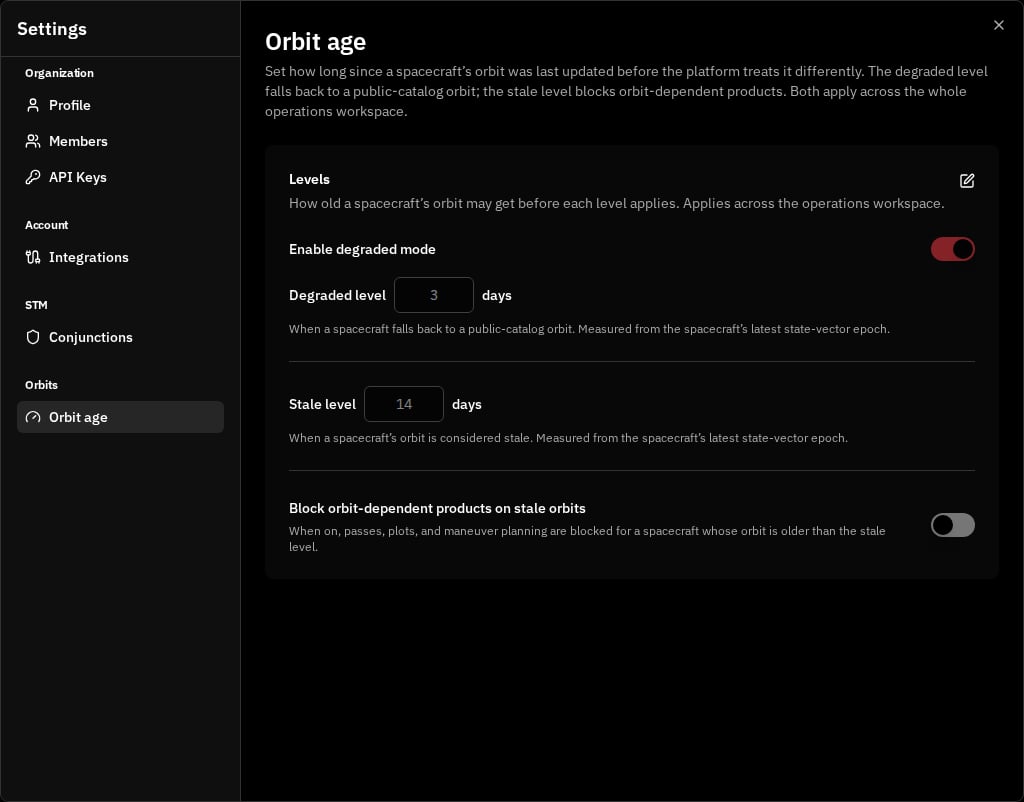
To change the levels, click the edit (pencil) control, enter the day counts, and click Save. A confirmation reads Orbit-age policy saved. Because the degraded level must sit at or below the stale level, saving a degraded level above the stale level is rejected inline with Degraded level must be at or below the stale level.
Validation Messages
When you save, each level checks your entry and shows one of these messages inline if it cannot be accepted:Turning degraded mode off
If you turn Enable degraded mode off while spacecraft are currently degraded, VALAR asks you to confirm before the change takes effect. The confirmation is titled Turn off degraded mode? with the body:N spacecraft will return to requiring a precise orbit and their planning functions will be blocked until a fresh state vector is provided. Continue?Click Continue to disable degraded mode, or Cancel to keep it on. When no spacecraft are currently degraded, the switch turns off without a confirmation.
Related Pages
- State Vectors: Provide and manage the precise orbital data whose epoch orbit age is measured against, and which the public-TLE fallback stands in for.
- Spacecraft Management: Set a spacecraft’s NORAD catalog ID so it can use the public-TLE fallback at the degraded level.
- Ground Track: The ground-track map that runs on the fallback at the degraded level and shows the stale-orbit warning past the stale level.
- Keplerian Elements: The orbital-element time-series that run on the fallback at the degraded level and show the stale-orbit warning past the stale level.
- Overflight Events: AOI overflight runs on the fallback at the degraded level and warns inline past the stale level.
- Burn Plan Timeline: Review and export the orbital events that run on the fallback at the degraded level.
- Attitude Profiles: Configure pointing modes and export the AEM attitude file that runs on the fallback at the degraded level.
- Planner: Maneuver optimization asks you to acknowledge a stale orbit, and can’t compute for a spacecraft with no usable orbit.
- CAM Optimization: Optimize collision-avoidance maneuvers, refused outright on a stale orbit until you provide fresher tracking data.